


Nowadays, we are seeing more websites created with artificial intelligence than ever before.
A person can open an AI website builder, type a short prompt, choose a style, and generate a complete website within minutes. The result may include a homepage, navigation menu, call-to-action buttons, product cards, icons, illustrations, contact forms, responsive layouts, and even ready-made website copy.
For business owners, this is useful. AI reduces the time and cost required to create a website. A small company can now launch a basic online presence without hiring a designer, developer, copywriter, and content team immediately.
But not everyone is comfortable with AI-created websites.
Many people still prefer websites created by human designers and developers because human design carries emotion. A human can understand the story behind a business, the personality of the founder, the concerns of customers, the culture of a region, and the small details that make a brand feel real.
AI can create a polished design.
Humans create meaning.
That is why an AI website detector can be useful. It helps you examine a public website, identify observable signals associated with AI website builders and AI-assisted work, and provide a score that indicates how strongly the site resembles AI-generated or AI-assisted output.
What Is an AI Website Detector?
An AI website detector is a tool that analyses a live website and estimates whether it was created using an AI website builder, AI-generated code, AI-assisted content, or a highly automated design system.
The tool does not simply look at whether a website appears modern.
It checks several technical and visual signals, including:
-
Website builder or development platform
-
Hosting and server headers
-
HTML structure
-
CSS and code patterns
-
Framework and script fingerprints
-
Typography choices
-
Image and asset sources
-
Metadata quality
-
Accessibility details
-
Content structure
-
Writing style
-
Placeholder elements
-
Business trust signals
-
Possible AI-generated design patterns
AI Website Detector says it can identify fingerprints from more than 80 AI builders and analyze technical evidence such as scripts, HTML structure, CDN and asset domains, HTTP response headers, meta tags, and cookies.
This is important because an AI detector should not make a decision based only on appearance. A website may use a modern design system without being AI-generated. It may also look human-designed while containing AI-generated code or content.
The tool attempts to bring together multiple signals instead of relying on one visual clue.
How to Use the Free AI Website Detector
Using the detector is simple.
Open the tool and paste the public URL of the website you want to check. Then click the button to run the scan.
The tool fetches the live page and analyses the information it can access. After the scan, it provides a score, a plain-language verdict, a confidence figure, and an evidence report explaining which signals influenced the result.
The score is presented on a scale from 0 to 100:
-
A low score suggests the website appears more human-built.
-
A middle-range score indicates mixed or inconclusive evidence.
-
A higher score suggests stronger signs of AI-generated or AI-assisted construction.
The tool’s public page says visitors can scan multiple websites without an account, while creating a free account can unlock a higher daily scan limit, scan history, and saved results.
This makes it useful for researchers, digital marketers, designers, developers, agencies, students, and business owners who want to compare websites.
What the Detector Actually Checks
The detector groups its analysis into different categories.
Build platform and hosting
The tool checks whether the site appears to have been created using an AI website builder such as Durable, 10Web, B12, Lovable, Mixo, Bolt, v0, Butternut, Wix AI, or related platforms.
It also looks at hosting headers, content delivery networks, scripts, cookies, and other technical elements that may identify the platform.
This does not automatically mean the website is poor. A business may use an AI builder to create a good starting point and then have a human developer improve it.
The technical detection only tells you what kind of tools or fingerprints may be present.
HTML and code structure
AI-generated websites may use repeated code patterns, standard component structures, common classes, or boilerplate sections.
The detector can examine how the page is built, how components are arranged, and whether the markup resembles known AI-generated templates.
This is useful for agencies reviewing a website before taking over maintenance. A site may look attractive on the front end but contain a large amount of difficult-to-edit code behind the scenes.
For example, an AI-generated page may place an entire design inside a single HTML block. It may work visually, but future updates can become difficult. A WordPress client may not be able to edit individual sections easily. A simple text change may require a developer.
Typography
Typography is one of the most interesting signals.
Many AI-generated websites use a small group of popular fonts and predictable combinations. Monospace fonts such as JetBrains Mono, IBM Plex Mono, Space Mono, and Geist Mono are increasingly used in AI, software, startup, and developer-focused website designs.
A monospace font is not proof that a website was created by AI. Designers use these fonts deliberately for technical brands, code-related products, cybersecurity websites, and futuristic visual identities.
But when monospace type is used as general body text, combined with a familiar AI-style layout, generic gradients, rounded cards, and stock illustrations, it may contribute to the overall score.
The tool’s explanation makes an important distinction: monospace typography used appropriately for code or technical labels is neutral, while a deliberately selected font, self-hosted typeface, and carefully developed brand system may suggest human design decisions.
Images and visual assets
AI-created websites often use generic illustrations, synthetic people, artificial product mockups, and stock-style images.
The detector looks at image sources, asset patterns, placeholder names, and visual clues that may suggest automated generation.
Real brand photography can make a website feel more personal. A local restaurant using photographs of its actual food, staff, interior, and customers often feels more trustworthy than a website using perfect AI-generated images of an imaginary restaurant.
This is not an argument against AI images in every situation. AI visuals can be useful for prototypes, concept work, fictional projects, internal presentations, and creative campaigns.
But for a business website, real images often communicate evidence that AI cannot invent.
Writing style
The detector also studies content patterns.
AI-written website content may contain familiar phrases, repetitive sentence structures, generic marketing language, excessive em dashes, predictable three-part lists, broad claims, and low vocabulary variation.
Examples include phrases such as:
-
“Empowering businesses to unlock their full potential.”
-
“Seamless solutions for a fast-changing world.”
-
“Transform your digital presence today.”
-
“Innovative, scalable, and results-driven.”
These phrases are not always written by AI. Human marketers use them too. That is why writing style should be treated as one signal among many rather than conclusive proof.
A website with real customer stories, named team members, location-specific details, first-person experience, original data, and specific service information usually feels more authentic because it contains information that is difficult to generate from a generic prompt.
Understanding the AI Score
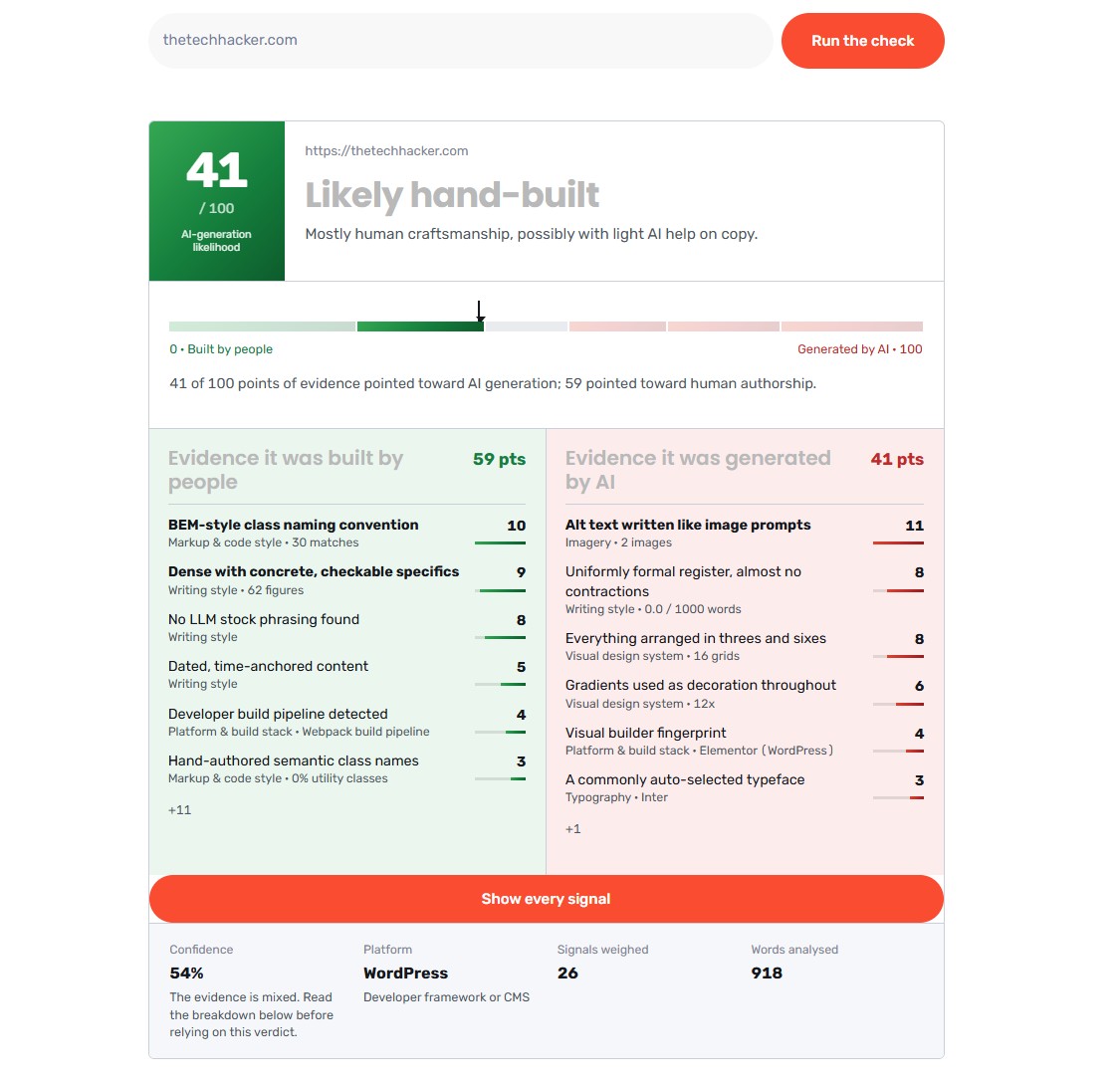

The score is not a legal verdict or a perfect identification result.
It is a probability estimate based on observable evidence.
A low score does not prove that humans created every part of the site. A high score does not prove that AI created every line of code or every sentence.
The detector’s guidance describes the range broadly:
-
Below 25: The site generally reads as hand-built.
-
25 to 41: The site is likely human-built.
-
42 to 51: The result is inconclusive.
-
52 to 64: The site appears human-built with AI-assisted sections or copy.
-
65 to 79: The site is likely AI-generated or heavily AI-assisted.
-
Above 80: The evidence is considered strong.
This range is helpful because it avoids treating every website as simply “human” or “AI.”
A website may be built by a human using AI tools. A designer may use an AI-generated image but manually build the website. A developer may use an AI coding assistant while creating a custom architecture. A business may use an AI builder for the first version and later rebuild the site in WordPress.
The score should therefore be read as an indication, not a final judgement.
What AI Detection Cannot Do
The scanner works only with publicly reachable websites.
It cannot inspect password-protected pages, private websites, internal staging environments, local development sites, or pages that block access. It reads server-rendered HTML rather than executing every JavaScript interaction, so highly dynamic single-page applications may provide fewer signals and produce a lower confidence result.
This limitation matters.
A low-confidence result does not necessarily mean the site is human-created. It may simply mean that the scanner could not access enough information.
Similarly, an AI-assisted website can be carefully edited and made to look entirely human. A template-heavy agency site may also look AI-generated because it uses common design patterns.
This is why the result includes confidence and evidence rather than only a single number.
Is an AI-Created Website Bad?
Not necessarily.
AI can help a new business launch faster. It can help a founder create a landing page, test a business idea, publish a temporary campaign page, or produce a prototype before investing in a full development project.
The problem is not the use of AI.
The problem is publishing the first output without review.
An AI-generated website may have:
-
Generic copy
-
Missing business details
-
Fake testimonials
-
Incorrect claims
-
Weak accessibility
-
Poor mobile spacing
-
Slow or unnecessary scripts
-
Broken links
-
Placeholder contact information
-
Inaccurate images
-
Confusing navigation
-
Weak conversion paths
Google’s official guidance does not automatically penalize content simply because AI was used. The focus is on accuracy, quality, relevance, originality, and usefulness to people. Google also recommends paying attention to titles, meta descriptions, structured data, and image alt text.
So the question should not be, “Was AI used?”
The better question is, “Does this website serve users well?”
How to Make an AI Website Feel Human
If the detector gives your website a high score, that does not mean you must rebuild everything.
Start by reviewing the evidence report.
Replace generic section headings with language specific to the business. Remove vague claims. Add real customer stories, original photos, first-person observations, dates, locations, names, service details, and verifiable contact information.
Choose typography deliberately. Do not use a monospace font simply because it is trending in AI-generated designs. Use it only when it supports the brand.
Replace placeholder images with real photography where possible. Write meaningful alt text. Fix dead links. Complete metadata. Add proper titles and descriptions. Make sure contact forms work. Review mobile layouts manually.
The goal is not to hide AI usage.
The goal is to add human thought.
A humanised website has a clear point of view. It understands its audience. It answers real questions. It includes details that could only come from the company itself.
That is what makes a website trustworthy.
Final Verdict
The free AI website detector is useful for understanding how a public website may have been created.
It analyses technical, visual, structural, and language-related signals, then provides a score and evidence report instead of asking users to trust a mysterious label.
For digital marketers, it can help compare competitors. For agencies, it can help audit incoming projects. For designers, it can reveal repeated patterns. For business owners, it can show whether their website looks too generic or overly dependent on automated templates.
But the score should not become a weapon against AI.
AI is now part of modern website creation. The important issue is whether the final website has been thoughtfully edited, technically maintained, factually checked, and designed for real people.
A website can be created with AI and still feel human.
A website can also be created entirely by humans and still feel generic.
The difference is not only who built it.
The difference is whether someone understood the people who will use it.