


Are you sick of slow timelines and frustrating export times? Here are the top professional video editors for Windows that will provide you with professional speed and artificial intelligence to maximize the quality of your footage.
Why Should I Upgrade Now?
Professional video editors are demanding innovations from their software. These video editors need 4K or 8K support, GPU acceleration, AI effects, and stability. Windows users have an edge over Mac users by utilizing native optimizations and leveraging hardware acceleration.
Choose the right video editor based on your workflow (professional Hollywood production, quick one-minute social cut, or hybrid graphic animations).
Here is the bottom line on the 5 video editing software programs that are currently dominating the professional industry.
1. Adobe Premiere Pro
Premiere Pro is the best video editing system for agencies and production companies. No software currently provides the editing features and capability that Premiere Pro does.
AI auto-reframing, text editing, and speech-to-text have saved professional video editors hours of work when compared to previous software.
Using dynamic linking with After Effects? Perfect. Hardware acceleration on multicam 8K is unrivaled.
Adobe Premiere Pro is a subscription-based service. It is best used by businesses that are part of the creative cloud.
2. DaVinci Resolve
Resolve stands out in editing by including everything—edit, color, VFX, Fairlight, and Fusion—on a single interface. The free version supports about 90% of professional use cases. Upgrading to the Studio version gives you access to noise reduction as well as provides access to additional tools.
Hollywood-quality color science as well as bin organization for managing your project beat out Premiere for film professionals.
The learning curve is high, but if you’ve got the horsepower (GPU) to get through it, you’ll be handsomely rewarded.
3. CyberLink PowerDirector
PowerDirector is surprisingly capable, considering its features, with object detection via AI, sky replacement, and motion tracking.
It has lightning-fast export capabilities, a stock library, and screen-recording capabilities make it an all-in-one tool for any content creator.
Onboarding into PowerDirector is much easier compared to DaVinci Resolve, while it’s still professional enough clients deliverables.
It remains as a great option for YouTubers and marketers who needs to produce content quickly.
4. VEGAS Pro
With its event-based editing system, VEGAS offer exceptional audio editing capabilities. It provides nested timelines, Bézier mask editing, and planar tracking, enabling advanced VFX editing while avoiding unnecessary complexity.
VEGAS users appreciate the non-destructive workflow of the program, while recent updates add more AI tools, such as stabilization.
Beyond that, VEGAS is a niche choice for people focused on audio production, as well as those who are hesitant to try DaVinci Resolve.
5. Corel VideoStudio Ultimate
One of the best features about Corel VideoStudio Ultimate is that it has an easy drag-and-drop interface to create, edit and share your videos, even if you’re not very good at video editing. Besides, you’ll be able to edit video footage from multiple cameras at the same time in any way that works for you!
Smart masks and face indexing technology helps you to quickly edit out talking heads, speeding up the process of getting your project finished.
Having the ability to work independently with a perpetual license makes this software very appealing to those who don’t want to pay monthly subscription fees.
It is a great option for freelancers to build up their business and gain experience as they move on to more advanced projects.
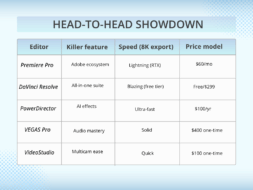

Select your tool:
Premiere Pro for agency lock-in and team collaboration.
Resolve for one-stop cinematic shops.
PowerDirector for solo hustlers.
VEGAS for sound wizards.
VideoStudio for freelance flexibility.
Conclusion
Selecting the right video editing software is crucial and should be based on project requirements, technical skills, and budget limitations. The five options listed are among the leading professional tools compatible with Windows in 2026.
Test free trials. Determine your GPU. Export a 4K trial clip. Done!