

Customize Android Home Screen and Themes using Buzz Launcher
If you want to make your Android screen stylish and customized try Buzz Launcher. It completely changes the look and feel of your Android phone. It comes with tons of Widgets, Downloadable themes, gesture controls and Layout options. It is a complete Home Screen replacement of your phone. Just download from Google Play store and…

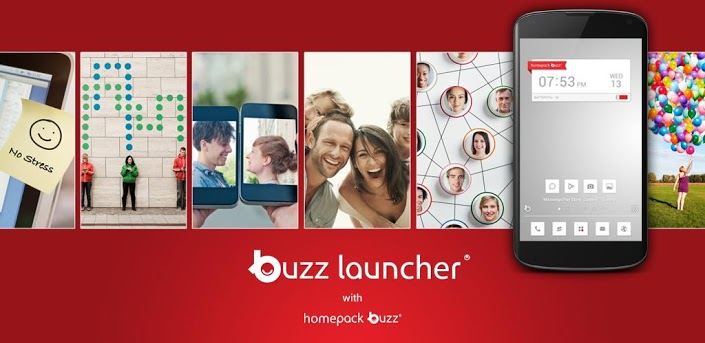
If you want to make your Android screen stylish and customized try Buzz Launcher. It completely changes the look and feel of your Android phone. It comes with tons of Widgets, Downloadable themes, gesture controls and Layout options. It is a complete Home Screen replacement of your phone.
Just download from Google Play store and install it. After installing it applies the default buzz launcher theme to your Android. If you want to install a new theme, hit the menu button on your device and select ‘Homepack Buzz’.All downloaded themes can be accessed at ‘My Page’. You can easily create your own Home screen with various decorating features such as Multi-wallpapers and My Icons. It also has a widget editor that lets you customize them before arranging them. Buzz Launcher is free, and it is in beta.
Want to enjoy the customization features that your Android phone offers? Then you need to learn how to customize your Android home screen using one of the best launchers available on the Google Play Store.
Buzz Launcher will completely change the look and feel of your Android phone. It comes with tons of Widgets, Downloadable themes, gesture controls and Layout options. It is a complete Home Screen replacement of your phone.
Just like other beautiful launchers like the Nova Launcher and the Windows 8 launcher for Android, the Buzz launcher keeps your Android home screen buzzing with life and activity.
It comes with a ton of features such as the following;
- Over 1000 widgets that work the magic right on your home screen
- Ability to make your own Android home screen
- You can also upload your already made Android home screen and share it with your friends and with the public
- The Buzz Launcher uses little memory so you certainly won’t worry about the app draining your battery or clogging your device memory.
After downloading the launcher from the Google Play Store, you are simply shown some of the best launchers you’ve ever seen on Android which you can easily download at that time for no cost at all.
The Buzz launcher comes with a feature known as the Homepack Buzz which gives a Buzz Launcher user unlimited access to different fantastic home screens.
Just download from Google Play store and install it. After installing it applies the default buzz launcher theme to your Android. If you want to install a new theme, hit the menu button on your device and select ‘Homepack Buzz’.All downloaded themes can be accessed at ‘My Page’. You can easily create your own Home screen with various decorating features such as Multi-wallpapers and My Icons. It also has a widget editor that lets you customize them before arranging them. Buzz Launcher is free.
More in App Reviews
APUS Android Launcher Review
The good thing about the Android ecosystem is that you can customize it however you want and to your heart’s content. One way of customizing your Android experience is to use custom skins and launchers which come with loads of features, usability, and awesome looks.
EverythingMe Android Launcher Review – Simplicity Is The Ultimate Sophistication
Many people these days started using smartphones to play games, make phone calls, check emails and even video calls. Android is world’s most popular mobile operating system with lots of capabilities. In a world of Android, everything is possible when it comes to customization. Ever feel boredom when checking your Android device home screen or…
Solo Launcher – Android App Review
There are tons of launcher apps available for Android at the Play Store. However, the users who have been an Android user for years already know what launcher should they use. But, they barely try out a new launcher (they think that their launcher app is the ultimate choice!). Well, I wouldn’t argue with them,…
The week in tech, minus the noise.
New reviews, fixes and the stories that matter — once a week, straight to your inbox.
We only use your email to send the newsletter. Unsubscribe any time. See our privacy policy.
Comments