

How to Fix Java4Shell (CVE-2026-114938): Check Your Java Version and Update
Oracle patched a serious Java flaw on November 17, 2026, and security researchers have nicknamed it Java4Shell. Tracked as CVE-2026-114938, it affects Java 17, 21, 25 and 27 and can be exploited over a network without a password. If you run Java on a server, a laptop or inside a container, the fix is simple:…

Image: Oracle
Oracle patched a serious Java flaw on November 17, 2026, and security researchers have nicknamed it Java4Shell. Tracked as CVE-2026-114938, it affects Java 17, 21, 25 and 27 and can be exploited over a network without a password. If you run Java on a server, a laptop or inside a container, the fix is simple: check which version you have and update it.
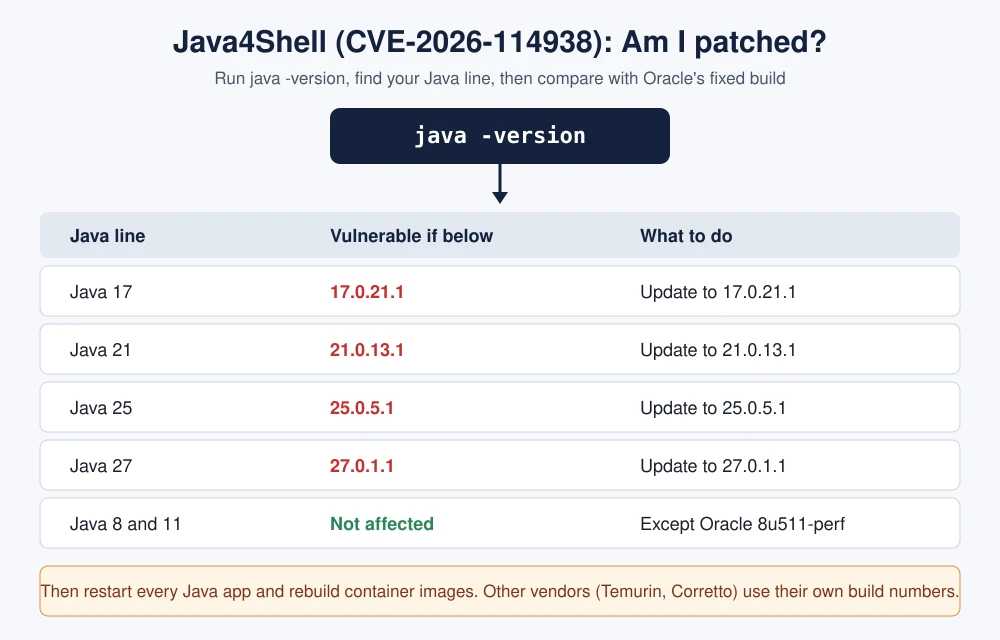
Quick answer: Open a terminal or Command Prompt and run java -version. If you are on Oracle Java 17 below 17.0.21.1, Java 21 below 21.0.13.1, Java 25 below 25.0.5.1 or Java 27 below 27.0.1.1, you are exposed. Install the fixed build from Oracle or your Java vendor, restart every Java app, and rebuild container images. Standard Java 8 and 11 are not affected by this bug.
What is Java4Shell (CVE-2026-114938)?
Oracle’s November 2026 Critical Security Patch Update lists CVE-2026-114938 as a flaw in the Compiler component of Oracle Java SE, Oracle GraalVM for JDK and Oracle GraalVM Enterprise Edition. Oracle gives it a CVSS 3.1 score of 8.1 (High) and says it can be exploited remotely without authentication, by supplying data to the affected APIs, for example through a web service. Oracle rates attack complexity as high. Oracle credits Albert Yang and Quang Luong of Calif.io with the report.
The OpenJDK vulnerability advisory for the same day lists the bug under hotspot/compiler and marks Java 17, 21, 25 and 27 as affected, not Java 8 or 11. That matters because almost every Java build, from Eclipse Temurin to Amazon Corretto, comes from OpenJDK code.
Security firms reported more detail. According to Aikido and Rapid7, the bug is a memory corruption flaw in the fast Base64 decoder that the JVM uses on x86-64 chips. Calif, the research firm that found it, reportedly showed remote code execution against default setups of Keycloak, Atlassian Jira and Confluence, JFrog Artifactory, Jenkins and PingFederate. Calif rates it 9.2 (Critical) under CVSS 4.0, higher than Oracle’s score.
Which Java versions are affected?
Oracle’s advisory names these affected builds: Java SE 17.0.21.0.3, 21.0.13.0.3, 25.0.5.0.3, 27.0.1.0.3 and the 8u511b33-perf build (Enterprise Performance Pack), plus GraalVM for JDK 17.0.21.0.3 and 21.0.13.0.3 and GraalVM Enterprise Edition 21.3.20.0.3. Older builds in those lines are affected too.
| Java line | Vulnerable | Oracle fixed build |
|---|---|---|
| Java 17 | Before 17.0.21.1 | 17.0.21.1 |
| Java 21 | Before 21.0.13.1 | 21.0.13.1 |
| Java 25 | Before 25.0.5.1 | 25.0.5.1 |
| Java 27 | Before 27.0.1.1 | 27.0.1.1 |
| Java 8 and 11 | Not affected (except Oracle 8u511-perf) | No action for this CVE |
| Java 18, 19, 20, 22, 23, 24, 26 | End of life, no fix | Move to 21, 25 or 27 |
Other vendors use their own numbering. Amazon Corretto’s fixed builds are reported as 17.0.21.1.2, 21.0.13.1.2, 25.0.5.1.2 and 27.0.1.1.4, and Eclipse Temurin’s as 17.0.21.1+2, 21.0.13.1+2, 25.0.5.1+2 and 27.0.1.1+4. Red Hat, Azul Zulu, Microsoft’s OpenJDK build and Linux distributions publish their own fixes, so check your vendor’s advisory.
Researchers also report that only x86-64 processors with AVX-512 VBMI (Intel Xeon from Ice Lake onward, AMD Zen 4 and newer) can trigger the bug. ARM64 machines, such as Apple Silicon Macs and AWS Graviton servers, are reportedly not affected. Patch anyway, since images and servers move between hardware.
Step 1: Check your Java version
Run the same command on every operating system:
java -version- Windows: Press Windows+R, type
cmd, press Enter, then runjava -version. To see every copy of Java on the PC, runwhere java. - Mac: Open Terminal and run
java -version. Run/usr/libexec/java_home -Vto list every installed JDK. - Linux: Run
java -version, thenupdate-alternatives --list java(Debian and Ubuntu) oralternatives --display java(RHEL and Fedora) to find other installs. - Docker: Run
docker run --rm your-image java -versionfor each image that ships Java.
The output looks like java version "21.0.13" 2026-10-20 LTS or openjdk version "17.0.21". Compare the number with the table above. A version that ends before the fixed build, such as 17.0.21 or 21.0.13, is still vulnerable.
Step 2: Find Java that hides inside apps
Many products ship their own Java runtime, so java -version will not show them. Look for these:
- Self-hosted Jira, Confluence, Jenkins, Keycloak, Artifactory and Elasticsearch servers.
- IDEs such as IntelliJ IDEA and Android Studio, which bundle a runtime.
- Container base images like
eclipse-temurin:17-jreoramazoncorretto:21. - Build agents and CI runners that install Java on the fly.
On Linux, sudo find / -type f -name java -perm -u+x 2>/dev/null lists every Java binary on the disk. Run each one with -version.
Step 3: Install the fixed Java build
- Oracle Java: Download the patched JDK from Oracle’s Java downloads page (it lists 21.0.13.1) and install it over the old one.
- Homebrew on Mac: Run
brew update && brew upgrade --cask temurin(or the cask you use) once your vendor’s fixed build is out. - Ubuntu and Debian: Run
sudo apt update && sudo apt upgradeafter your distribution publishes patched openjdk packages. - RHEL and Fedora: Run
sudo dnf upgrade 'java-*'after Red Hat’s fix lands. - Windows: Uninstall the old JDK in Settings, Apps, then install the fixed one. Our guide on how to update Java on Windows walks through it.
- Apps that bundle Java: Install the vendor’s update for that product (Atlassian, Jenkins, JetBrains and so on).
Step 4: Restart and rebuild
A running Java process keeps the old code in memory until it restarts. Restart every Java service after the update. For containers, rebuild images on a fixed base image and redeploy them, because pulling a new tag does nothing to containers that are already running. Run java -version again to confirm the new build.
If you can’t patch today
Security researchers report a temporary workaround: start affected JVMs with -XX:-UseBASE64Intrinsics, which turns off the vulnerable fast path, or with -XX:UseAVX=2 on x86-64 only, an option Red Hat reportedly recommends. Apps that decode a lot of Base64 may slow down, and neither flag replaces the patch. Put internet-facing services first, especially anything that accepts Base64 from users, such as login headers and file uploads.
Is Java4Shell being exploited?
As of November 18, there are no confirmed reports of attacks in the wild, and the flaw is not in CISA’s Known Exploited Vulnerabilities catalog, according to Aikido. Calif has reportedly held back its product-specific exploits to give people time to update. Attacks often follow soon after working exploit code spreads, so treat this as urgent. Supply-chain and web attacks have moved fast this month, as the Optimizely hack that hit 178 organizations showed. If you think a server was already breached, follow our data breach checklist.
FAQs
What is Java4Shell?
Java4Shell is the nickname for CVE-2026-114938, a Java flaw that Oracle patched on November 17, 2026. It affects Java 17, 21, 25 and 27 and can be exploited over a network without a password.
How do I know if my Java is vulnerable?
Run java -version. Oracle Java 17 below 17.0.21.1, 21 below 21.0.13.1, 25 below 25.0.5.1 and 27 below 27.0.1.1 are vulnerable. Other vendors use their own build numbers.
Are Java 8 and Java 11 affected?
No. The OpenJDK advisory does not list Java 8 or 11 for this CVE. The one exception Oracle lists is the Java SE 8u511b33-perf Enterprise Performance Pack build.
Do I need to restart after updating Java?
Yes. Running Java apps keep the old runtime until they restart, and containers need to be rebuilt on a fixed base image and redeployed.
Featured image: Oracle.
Disclosure: TheTechHacker has no paid relationship with Oracle or any company mentioned here.
More in How-to
How to fix NVIDIA control panel not showing In Windows 10
Nvidia control panel missing is the most common problem for Nvidia graphic card users. According to the sources, the Nvidia control panel missing error is caused due to the bad Windows 10 update. What is Nvidia Control Panel and why it is needed? Nvidia control panel lets you configure the Nvidia graphics card according to…

How To Fix Generic PnP Monitor Problem On Windows 10
Problems, failures and issues are not new to the Windows 10. Sorry to say, but many Windows users are complaining about the hardware connectivity issues right after unboxing the system. One of the most noticeable issue among the Windows 10 users is Generic PnP Monitor. The issue is coming after updating their older version of…
How to Find Google Chrome Version
To find the Google Chrome version, there are several methods available. Keeping the google chrome up to date is always important to get the latest changes and bug fixes from the developers. Google automatically updates in some cases. If the google chrome browser is not updating automatically, you need to do it yourself to get…
The week in tech, minus the noise.
New reviews, fixes and the stories that matter — once a week, straight to your inbox.
We only use your email to send the newsletter. Unsubscribe any time. See our privacy policy.
Comments