

Barry App: Take Full Screenshots of Webpages In iOS Devices
The process of taking screenshots of web pages in their entirety on an Android handset is quite simple, exactly like it is on a Galaxy J7. To what extent, however, do iOS devices also provide us with the same functionality? The fact of the matter is that iOS devices do not have native functionality for…

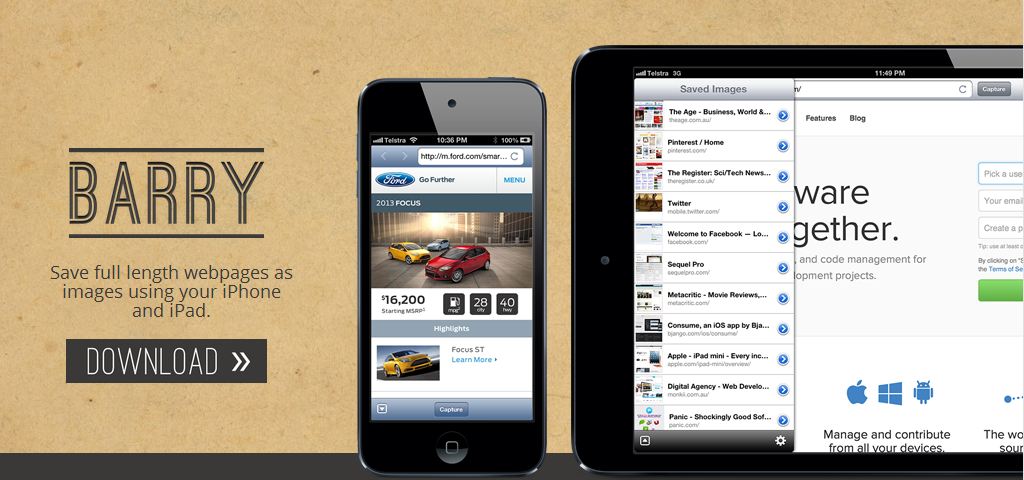
The process of taking screenshots of web pages in their entirety on an Android handset is quite simple, exactly like it is on a Galaxy J7. To what extent, however, do iOS devices also provide us with the same functionality?
The fact of the matter is that iOS devices do not have native functionality for taking complete screenshots of web pages. In the same way that we have a feature that is comparable with the new flagship devices in the Galaxy S series, we may see something with iOS 11. Through the use of the Barry app, which can be downloaded from the App Store, it is possible to capture complete screenshots of a web page on iOS devices.
Web pages should be captured in their entirety. When using the Barry App on iOS devices: There are instances when you wish to take a screenshot of a web page on your iOS device, but you are only able to grab a portion of the screenshot. This is because the length of the web page may exceed the size of the screen on your smartphone.

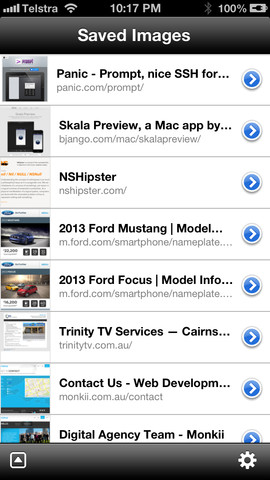
Barry finds a solution to this issue. An iOS app called Barry is specifically designed to capture a snapshot of the complete website. The user interface is not overly complicated and is satisfactory. Although it may have an antiquated appearance, it certainly performs the tasks that you would anticipate it to. We regret to inform you that there is no extension available for other browsers that would allow them to make use of this capability.
It is necessary for you to proceed with the process of capturing that full-length screenshot once you have opened the web page of your choice just in Barry’s built-in browser. Naturally, in order for the app to be able to save the screenshot directly to your camera roll, you will need to grant it permission to access your images (if it asks for permission to do so).
If you are using iOS 10.3 or a later version, there is a possibility that you can have compatibility difficulties due to the newly implemented 64-bit file system. It is a paid app, but as it only costs $1.99 USD, it will not put a significant dent in your financial resources.
Verdict
While this app may fool you with the User Interface, it is not something deceiving but rather which works. In a nutshell, it is one of the best apps to take full screenshots of web pages in iOS devices.
More in App Reviews
Fotor Photo Editor App Review
After the launch of smartphones, photography becomes everyone’s hobby. Parallelly Android and iOS platforms have tons of image editing, styling and sharing apps. If you take plenty of photos with your smartphone you need a powerful photo editor to your images. Fotor is one of the most robust App based photo editing tool out there…

Rocket VPN App Review: A Good VPN to Consider
VPN apps are very useful in this restricted internet where your security is also a question mark. They can break the barriers of restrictions by layering the internet connection with an extra security mask. If you are a regular internet user, you might come across numerous VPN apps on the play store. Some of them do…

Track My Mac App Review
Mac is a beautiful piece of art created by one of the best tech companies in this modern tech world, the Apple. From the great insights of Steve Jobs, the company had a glory path in providing quality products to the customers. If you are a lucky customer that owns a Macbook of your own,…
The week in tech, minus the noise.
New reviews, fixes and the stories that matter — once a week, straight to your inbox.
We only use your email to send the newsletter. Unsubscribe any time. See our privacy policy.
Comments