

Keywords Importance In WordPress Post
Blogging is this century’s fashion and a good income source. If you have talent and good knowledge in a particular niche you can earn money by blogging. As you know we share our knowledge by blogging in Thetechhacker platform. In this post, I want to discuss the importance of Keywords in a WordPress post or article. We…


Here is the importance of keywords in wordpress post and website SEO.
Blogging is this century’s fashion and a good income source. If you have talent and good knowledge in a particular niche you can earn money by blogging. As you know we share our knowledge by blogging in Thetechhacker platform. In this post, I want to discuss the importance of Keywords in a WordPress post or article.
We all know the importance of keywords in a WordPress post, it is very important for getting good results in search engine positions. Most of us think that WordPress is not SEO friendly, but it is not true. WordPress is an SEO friendly platform with tons of customization options including SEO Plugins.
WordPress SEO by Yoast is a great Keyword SEO Plugin for WordPress users. It has all the features needed by blog or site to achieve a good rank in Google search results.
How to use or insert Keywords in WordPress
Title Tag (keywords in title of a post)
For every post or article title comes in the first position. From your reader’s and Google perspective using title keyword is a worth mentioning. Using main keyword of your article in the title tag helps you gain good rank in Google search results and your audience can easily know what the page is all about.
Heading H1, H2, H3 tags keywords
Heading tags build the fine structure of your blog post. If you are writing a topic about installation of WordPress, mentioning the steps involved in the process as heading tags will help a lot to your visitors and search engines.
Ex: Title of your post: Guide to install WordPress on Windows”
- H1 Tag: WordPress on Windows (Pre-required files)
- H2 Tag: Installation Procedure of WordPress on Windows
- H2 Tag: WordPress installed on Windows What’s next?
Even you can take this post as a good example for keywords placement.
Keywords in post body content
After optimizing Title and Heading tags next most important task is optimizing body content. Use relevant keywords in the post with 3% to 5% density. Don’t use hidden keywords, irrelevant keywords and stopping words in the post.
Keywords in the URL
Good keywords rich permalink gives very good results in search engines. Change the permalink structure from the default: http://example.com/?p=123 to http://example.com/sample-post/
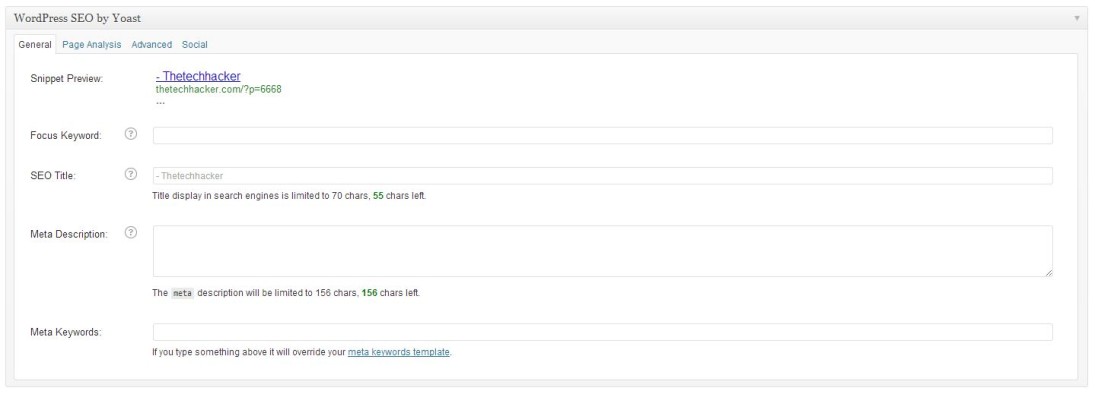
Meta Keywords and Tags
Adding Meta description to WordPress is very easy If you are using WordPress SEO by Yoast. You’ll find the Yoast SEO settings in bottom of the article. Here enter focus keyword, SEO title, and Meta description.
You might also like

WordPress Is Installed What Next
All major hosting providers offer WordPress, it is easy simple to use and most famous CMS in the world. We already posted a article about installing WordPress in Windows in simple steps. After lot of testing in private environment it is time to launch site to public. WordPress Is Installed Next: All major hosting services…

Important Safety and Security Tips for WordPress Bloggers
Setting up and running a WordPress blog for the very first time can be super exciting. Unfortunately, it is tempting to get so caught up in building your site and posting content that you forget that there is the potential for threats to your site’s security and your personal safety. For this reason, you should…
What Is Alexa Rank? Tips To Improve Alexa Ranking
If you are into blogging, you might be at the idea of learning Alexa ranking system. It is a web information company and subsidiary of amazon.com, it simply audits and metrics the rank of your site in the ocean of websites.
The week in tech, minus the noise.
New reviews, fixes and the stories that matter — once a week, straight to your inbox.
We only use your email to send the newsletter. Unsubscribe any time. See our privacy policy.
Comments