

Access Dropbox From Google Chrome Using EasyDrop Extension
Dropbox is one of the most popular cloud storage service available for almost all platforms. The ease of use, user interface, and free storage offering makes the Dropbox very popular across masses. It has multi-platform support; you can access Dropbox from Windows, Mac, Linux, Android, and iOS. One Google Chrome extension will let you access the dropbox from…


Access Dropbox From Google Chrome Using EasyDrop Extension tth
Dropbox is one of the most popular cloud storage service available for almost all platforms. The ease of use, user interface, and free storage offering makes the Dropbox very popular across masses. It has multi-platform support; you can access Dropbox from Windows, Mac, Linux, Android, and iOS. One Google Chrome extension will let you access the dropbox from Google Chrome browser. To access Dropbox, we usually install Dropbox official desktop client. If you are looking for another way to access Dropbox easily, install EasyDrop extension for Google Chrome.
How EasyDrop Extension Works?
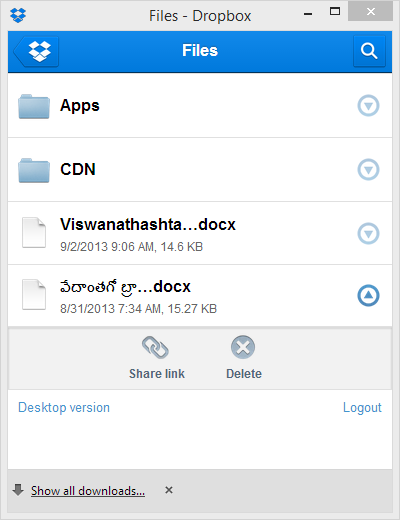
The extension can be installed from Chrome Web Store. After installation, it is accessible from the top right corner of the Google Chrome. After clicking on the icon, it opens the sign in box. After signing into the account, you can see your files. Clicking on the folder opens the file location page. Clicking on the file will download the file on your computer. Or clicking on the drop down option beside the file opens the share link and delete option.
As everyone knows Dropbox is the easiest way to store, sync, and, share files online. Now you can use this widget to access you Dropbox account in Chrome!
EasyDrop can easily open the most of the file types like images, documents, PDF file, and texts. It is one of the most useful extensions for Dropbox cloud users who also use Google Chrome for their browsing purposes. This combination will save your time to access Dropbox only from a particular platform. EasyDrop provides an easy way to check and download Dropbox files easily without any hassle. So, you don’t have to rush to the Dropbox website every time you need to check or download a file.
So, download the EasyDrop extension from the store and start accessing your cloud drive like a pro. You can considerably improve your productivity with this handy extension.
More in Internet

How To Save Internet Files Directly To Cloud With Ballloon Chrome Extension
Nowadays everyone using cloud services to store files. Typically when we want to save a file from the internet, first we download it to a computer and then upload it to cloud services like Google Drive or Dropbox. You can simplify this process by using Ballloon for Google Chrome extension. If it is a regular…

Access Cloud Accounts From Google Chrome Browser With These Extensions
The cloud is a favorite word among all of you. The influence of the cloud technology has changed the market in a very short span of time. Now, in this years, we can’t work better without the cloud storage or cloud technology. Being a cloud dependent, I can assure that the service offered by those storage…
Chrome URLs that you Should Know
Chrome URLs are the short URLs used to access different functions of the Google Chrome web browser. Typing them on the URL bar and pressing enter will bring specific functions such as Chrome settings, History, Downloads list, Installed Extensions, etc. You don’t have to navigate using your mouse to access these functions if you know…
The week in tech, minus the noise.
New reviews, fixes and the stories that matter — once a week, straight to your inbox.
We only use your email to send the newsletter. Unsubscribe any time. See our privacy policy.
Comments