

Privacy Drive Review – Protect Your Drives From Unauthorized Access
There are so many ways to protect your hard disk data from others. One simply use system lock, but what if someone steals your hard drive containing most important documents and other sensitive data? Here is a great solution to protect your sensitive data from a hard disk security breach, Privacy Drive is a standalone…


Privacy Drive Review
There are so many ways to protect your hard disk data from others. One simply use system lock, but what if someone steals your hard drive containing most important documents and other sensitive data?
Here is a great solution to protect your sensitive data from a hard disk security breach, Privacy Drive is a standalone solution to encrypt your important data from unauthorized access.
Privacy Drive is another great product from Cybertron Software Co. Its user-friendly interface, advanced encryption algorithms like AES-158, AES-256, Twofish-128, and Twofish-256 are Privacy Drive’s biggest assets to draw the attention.
The program is particularly created for creating and managing encrypted virtual disks, it is a powerful drive encryption tool that lets you easily encrypt your files and folders, and save them in virtual drives.
Privacy Drive Review

How it works?
To get started download the program from the official Cybertron website. After installation, the program starts with very easy to understand user interface with a popup containing create, open and mount options.
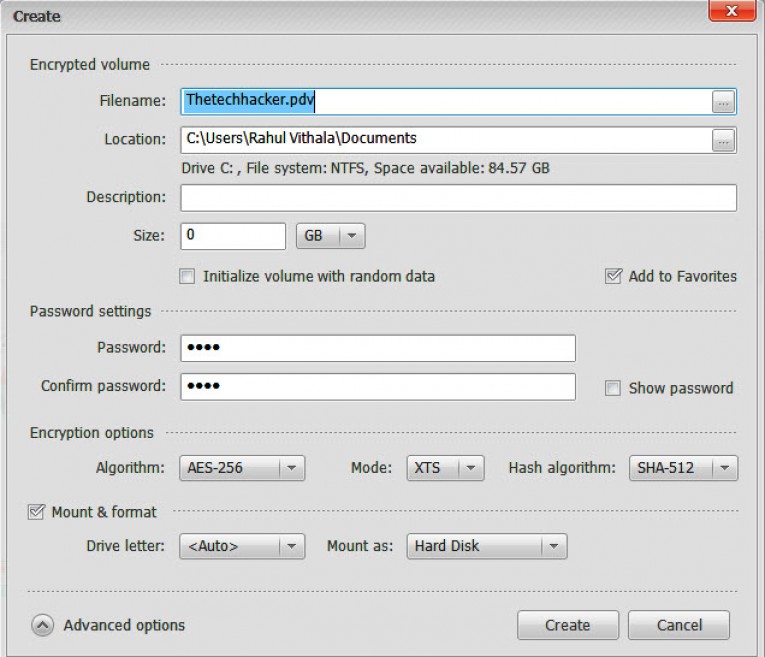
After first launch, you can go with ‘create’ option. Clicking on the create option will open a popup, from where you can specify new encrypted volume name, location, size and password details. Clicking on the advanced option will let you to chose advanced Encryption options and mount & format options. When all the settings are in place, click “Create” to begin the process.
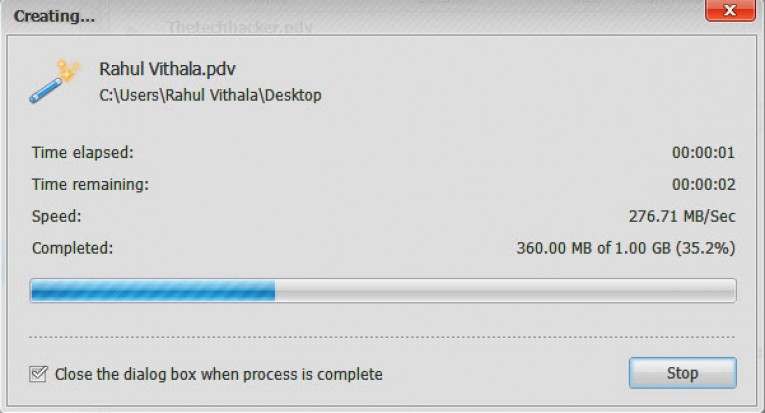
Privacy Drive can take several minutes to encrypt a volume, depending on its size and overall speed of storage medium. In our testing to create 1GB encrypted disk it took few seconds to create. Once a partition is encrypted, you can use Mount and Unmount button to use respectively. Once done, your disk image will appear on Privacy Drive main interface. You can mount, dismount using top menu tabs.

During testing, we created an encrypted drive Thetechhacker of 1GB, on the main user interface the details of the created drive is clearly given. You can create as many as encrypted drives using Privacy Drive, and also you can set individual passwords for each.
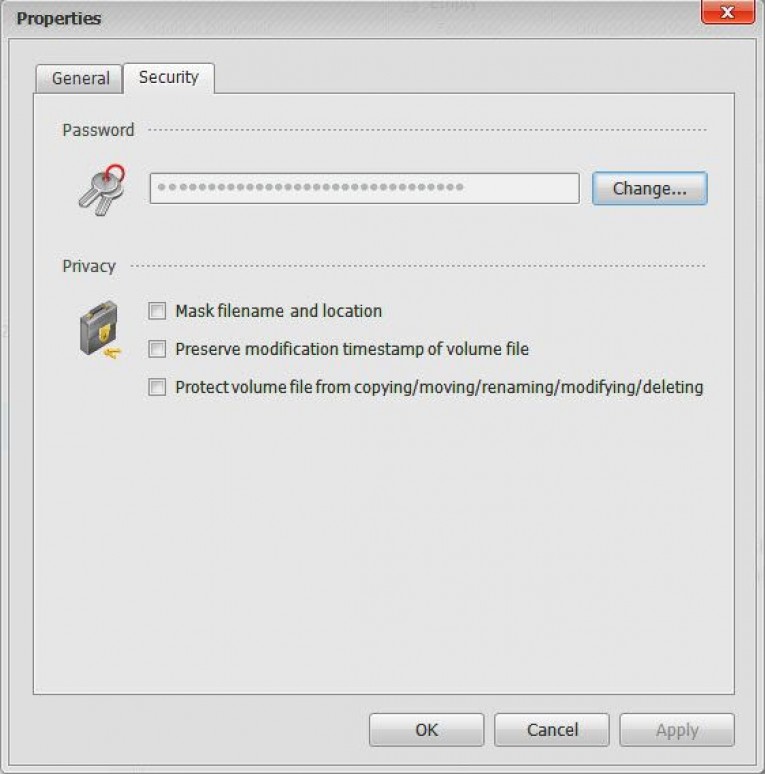
The program allows you to create multiple encrypted volumes to mount as virtual disks, you can use them just as other normal hard drives. Here is the best part comes, clicking on the Properties tab lets you change the password and also allows you to stop copying/moving/renaming/modifying/deleting and modification time stamp of the volume file. These actions will restrict the unauthorized access and the thief will not be able to access your data.
Must read: Privacy Eraser Free Review: Cleans And Protects Your Privacy
You can carry the created volumes wherever you go with you, or you can send the virtual drives in Email, upload or backup, move or copy them to external hard drives, USB drives, Firewire drives, CD/DVD and even in Cloud Servers.
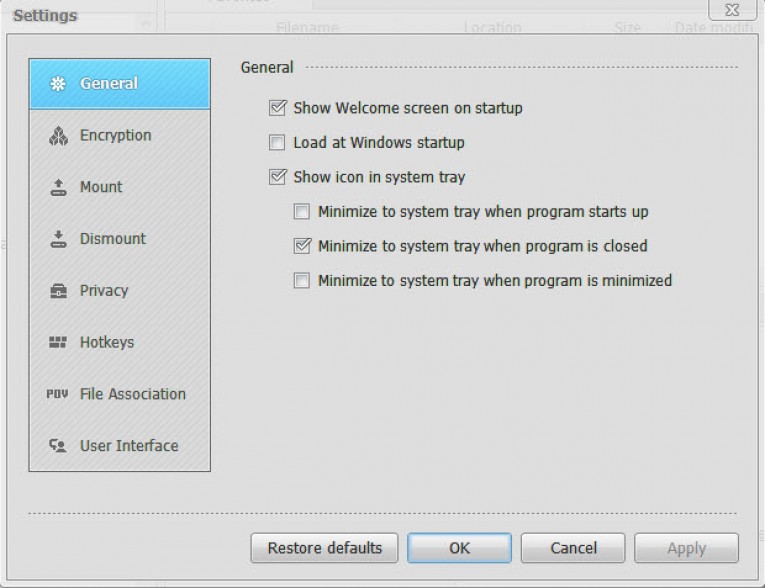
The application’s Settings window lets you configure a few additional settings under General, Encryption, Mount, Dismount, Privacy and Hotkeys tabs for advanced users.
Features
- Supports FAT16/FAT32/exFAT/NTFS file systems.
- AES 128-bit & 256-bit industry standard encryption algorithms
- Works on Microsoft Windows 8.1/8/7/Vista/XP/2012/2008 (32/64-bit)
- Lock, hide, encrypt and password protect all kind of pictures, videos, documents, files, and folders.
- Simple drag and drop to encrypt files & folders, just like using a normal hard drive.
Verdict
If you are a BitLocker user and looking for a good alternative with advanced features, Privacy Drive is definitely worthy of a try. Overall, Privacy Drive is an excellent program that provides robust data encryption facility to instantly create, protect and mount volumes.
More in Software Reviews

AweEraser Review: Don’t Leave Your Data Behind
The importance of data is beyond your imagination. In the wrong hands, it could do a lot of damage than you ever expected. They can use it for really bad things. Especially in the world we are living in, that depends on digital information for almost everything, the power someone posses with access to information…

Wondershare Data Recovery: The Best Flash Drive Data Recovery
Flash drive becomes an important accessory for a PC or Mac. It is a helpful tool in carrying files, e-documents, and any digitalized work. Many of us using Flash drive may have experienced the situation where we need to recover a deleted file.

Driver Genius Review
Drivers are some unneglectable things on every computer. If you have changed your OS or done a system reset by removing all your drivers, you might be facing some difficulties in some hardware which required a proper driver to operate. Especially the sound driver problem is a common one among the users. They won’t work until you…
The week in tech, minus the noise.
New reviews, fixes and the stories that matter — once a week, straight to your inbox.
We only use your email to send the newsletter. Unsubscribe any time. See our privacy policy.
Comments