

How To Restrict Author To Specific Category In WordPress
Maintaining a multi-author blog is not an easy task. It requires editorial and management skills to maintain and run work smoothly. If you have multiple authors and you want to restrict the author to a particular category you can restrict an author to a specific category using a plugin. How To Restrict Author To Specific…


Maintaining a multi-author blog is not an easy task. It requires editorial and management skills to maintain and run work smoothly. If you have multiple authors and you want to restrict the author to a particular category you can restrict an author to a specific category using a plugin.
How To Restrict Author To Specific Category In WordPress
For example author, Sarath is a very good writer for WordPress, if he knowingly or unknowingly writes an article about Social Media you can block him. This means you can restrict an author to a particular category only. To get started the first download and install Restrict Author Posting plugin on your WordPress website. After activating plugin now go to Users section in your WordPress dashboard and edit User profile you want to block.
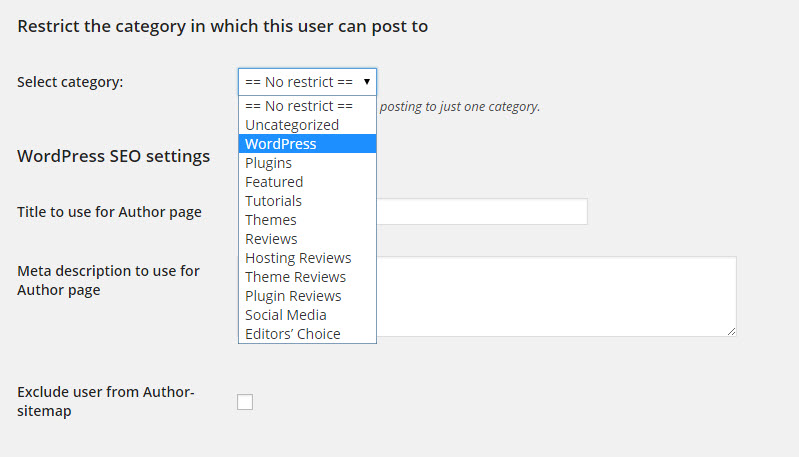
In the user profile of a person, you see select category option. Here scroll down to the middle of the page and you’ll see “Restrict the category in which this user can post to“. Here in the drop-down menu shows the available categories in your blog are seen, now select the category you want to restrict and update the user.

From now onwards the user can see only alotted category on his profile page. A small notification appears in his post page below permalink “You are allowing to post to category: WordPress”. And plugin also disables category box in his editing page. In the above example, Sarath is intended to write articles only for WordPress.
If you want to remove the restriction from an author account, then go to their user profile and scroll down to the Restrict Author Post to a category section. Now you need to select “No Restrict” to remove the category restriction on the user.
It is an open source software and available as free download in WordPress plugin store. Next time when you want to remove the restriction simply head over to the author profile page and select “No Restrict” option.
More in Web 101

Remote DBA Experts List The Must Know Skills For WordPress Developer
WordPress as we know it is one of the most efficient powerful and popular CMS frameworks being used in the industry at this very moment. It is used in the creation websites that are extremely flexible, complex and expandable in nature. Some believe that the availability of varied plugins and themes for WordPress makes it…
A Simple Way To Install WordPress On Windows
WordPress is a great platform for bloggers, business owners, and developers. it is a simple and easiest CMS in the World. It is good to test a plugin or theme, or any major development locally on a PC than on the real server. Some people want to try WordPress before really step into online, it…

Reasons To Leave A Poor WordPress Web Hosting Service
Are you a WordPress user with a poor web hosting service? When you search online for a good hosting provider you will get a number of results. After selecting your desired hosting service matching with your WordPress site traffic in some cases, you’ll feel hiccups. A poor web hosting can cause errors, site down issues…
The week in tech, minus the noise.
New reviews, fixes and the stories that matter — once a week, straight to your inbox.
We only use your email to send the newsletter. Unsubscribe any time. See our privacy policy.
Comments