

Sponsored Review: Battery Time Optimizer Android App
Here, we have found an App – Battery Time Optimizer. It is very simple to use, very effective in performance and also it gives information about the estimated Battery time save for every action we do with this app. This app got seriously good reviews in Google Play Store with 4.5 stars.
Battery Time Optimizer App Review
All the Smartphones users have one common problem – Battery Backup. Smartphones are heavy power consuming gadgets as well as it gives a great experience of connected with the whole world through its apps and fills your leisure time with a big list of games. New arrival Smartphones now started concentrating into the Battery performance while the old ones in most of our hands are a big worry in Battery back up.
Most of the damages to Battery, done by the background Apps, Internet connectivity through either WiFi or 3G/4G services, the brightness of the display etc. Every one of us would have used one or more Battery saver/ Optimizer apps to increase the performance of power management in our Android device/devices to reduce the excess damage. But, most of us push ourselves to get satisfy with one of the available apps.
Must Read:
- Systweak Android Cleaner App Review
- Yabb Text and Voice Messenger App Review
- QualityTime – My Digital Diet-Android App Review
Practically, finding a unique battery saver app for your device is not that easy task. You have to install and check the performance of these apps one by one.

Here, we have found an App – Battery Time Optimizer. It is very simple to use, very effective in performance and also it gives information about the estimated Battery time save for every action we do with this app. This app got seriously good reviews in Google Play Store with 4.5 stars.
Battery Time Optimizer Android App Review
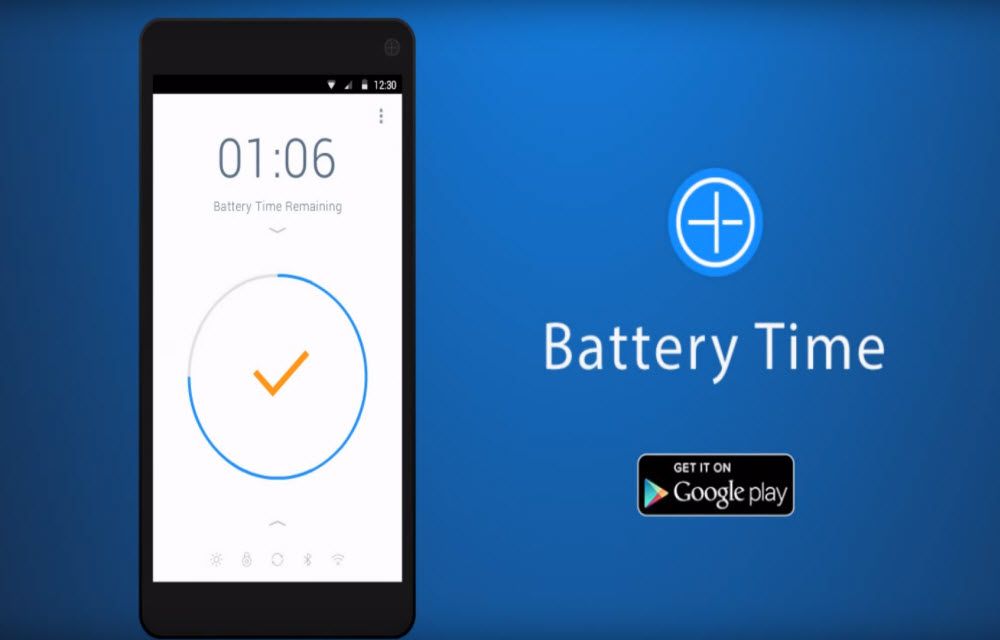
Install and launch this app. In default when opening, you will see the estimated time left with your battery charge in Android device. Below the estimated time left, extend Time option in a circle is seen.

Tapping the Circle will begin the process to save the Battery time. It closes the running apps, shutting down the Bluetooth and WiFi connections etc.
It also shows the extra time saved by each process, it does for saving the Battery time. You can also set the app to not to close the WiFi and Bluetooth in the process of saving battery time. You can also set the Screen Off time
After it adds extra battery time after series of process, you will see the final estimated battery left time. But, in some time the estimated battery time left is not as same as we seen in the Android Battery settings. This app shows more than the Android Settings. In any case, the battery time is extended using this app to give good extra time. You can test the time left in Android Battery settings before you use this app to confirm this.
Conclusion
Battery Time Optimizer App is a simple to use. Just a few settings and one single touch to finish the process. It enables us to do it as quicker as we can. As we mentioned so many Pros, it did have one Cons. The Terms of Service of this app includes anonymous traffic analysis and advertisement. Though it is a usual thing we see in all the apps, some people may not like this Ads. The usability of this simple and easy Battery saver app may wonder you with its quick functionality.

Battery Time Optimizer App
Excellent
- Features8
- Usability8.5
- User Interface8.5
- Value For Money9.5
What we like
- Features
What we don't
- None
No ratings yet — be the first.

You might also like

DU Battery Saver & Phone Charger Review
Coming to Android, the battery is one of the most attention-seeking components. The Google Play Store has various apps to optimize and improve the battery performance of an Android device with a no-brainer. These types of apps optimize the Android system to get the most of the juice from the battery. The device manufacturers are…
Virus Removal for Android Review
Virus Removal for Android is a Security Tool app developed by universalstudiosappsamazing. Even its name gives importance to the virus removal, the app doesn’t. Many users reported that the app is more concentrated on saving the battery life and cleaning purposes of the device. But yes, it also do help to stop small vulnerabilities affecting the Android…
Sponsored App Review – Write Now – Notepad
Everyone who uses Android Smartphone for their works in Office or Home needs a Note taking app. As I always need notes to remind my tasks, I use Note taking apps in my Laptop and Smartphone. In Android, most of the Note taking apps are just a piece of paper in the Touchscreen without many…
The week in tech, minus the noise.
New reviews, fixes and the stories that matter — once a week, straight to your inbox.
We only use your email to send the newsletter. Unsubscribe any time. See our privacy policy.
Comments