

Android
How to Fix Pixel Always-On Display and Lock Screen Problems After the November Update
Google’s November update has been rough on some Pixel owners. Camera failures and wireless charging grabbed the headlines, but a third group of complaints is about the screen you look at most: the always-on display and lock screen. Owners report the notification shade staying on screen after locking instead of the always-on display, a notification…
How to Fix Pixel Wireless Charging Not Working After the November Update
You put your Pixel on the charger, the charging icon lights up, and an hour later the battery is lower than when you started. Since Google’s November update arrived, some Pixel owners have been reporting exactly that: the phone says it’s charging wirelessly, but the percentage drops. Others see “Connected, not charging” on a pad…
How to Fix Pixel Camera Not Working After the November Update
If your Pixel’s camera opens to a black screen or a “Camera error” message since the November update, it’s not just you. Since November 13, Pixel 10 and Pixel 11 owners have reported the same thing, and for some of them it affects third-party camera apps too, not only Pixel Camera. Google hadn’t issued a…
How to Fix Wi-Fi and Mobile Data Dropping on Samsung Galaxy After One UI 9
Your Galaxy installs One UI 9 and for an hour or so nothing seems wrong, and then the Wi-Fi starts connecting and disconnecting by itself with a “Connection failed” message that only clears when you restart the phone. Some owners are dealing with something worse than that, where mobile data won’t load a single page…

Google and Samsung Unveil Android XR: A New Era for Smart Eyewear (2026)
Discover Google and Samsung’s Android XR platform. Launching in Fall 2026, these smart glasses feature Gemini AI.

How to Record Call on Android
There are many reasons you should have a call recorder on your phone. If you need to record a conversation for legal reasons, having a call recorder in your phone will make it easy. You might also need to remember something said during a phone call; a call recorder can help you do that. Or…

How to Scan QR Codes on Android
QR code is the new way to interact with the world of information, scan and gain access to information linked to that code such as a link to a website, etc. This obviates the need to remember and type it in a web browser. Its importance is not just providing comfort to the user, but…

How to Change Screen Saver on Android TV
Are you using an Android TV and want to change its screensaver? In this article, we are going to look at the steps required to use a different screen saver on your Android TV. No matter which version of the Android your TV is running, these steps will work for most of them. But it…

Textra SMS Review- Best SMS Replacement App for Android
If you are an Android user, you must know the level of customization it offers. By default, the device comes with usable pre-loaded apps including the SMS app. The stock SMS app comes with Android doesn’t come with fancy features. It is useful only for sending and receiving the messages and nothing else. SMS replacement…
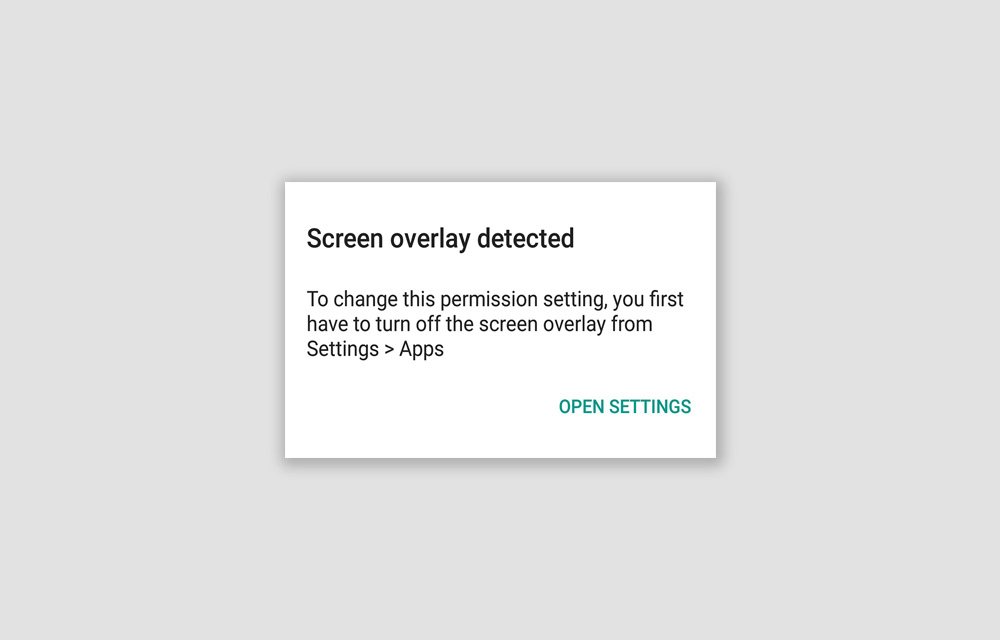
How to Fix the “Screen Overlay Detected” Error on Android Smartphones – Updated 2019
Screen Overlay Detected. An error that prevented you from using certain applications on your Android smartphone. The error will itself show you the solution, “You first have to turn off the screen overlay from Settings > Apps.” So, why don’t you just follow it and fix the issue? We are going to look at this…
Running Out Of Space On Android? Easy Tips To Regain More Space
Low internal storage is the most common problem for entry-level smartphones. Android-equipped devices coming in various forms like smartphones, phablets, and tablets. But the internal memory capacity is very limited when compared to laptops and desktops. As they equip with 16GB or below memory, it is not enough to carry the Android OS, apps and…
How to speed up Xiaomi Smartphone
Xiaomi has a great list of smartphones portfolio. The company regularly launches new devices with upgraded hardware specs and features. After prolonged use, every smartphone slows down at one point. It is relatively a common issue when we use the smartphone with many applications installed. If you are feeling your Xiaomi smartphone performance is poor,…