

Stack Airport Wi-Fi Networks and Their Passwords Inside your Phone with WiFox
Hanging out in the Airport in search of a Wifi network is a common thing for the travellers. Even after finding one, how to get its password? Trapped right? But wait! WiFox is an application for your Android or iOS devices that can store the username and password of thousands of major Wifi spots in hundreds…

stack-airport-wi-fi-networks-and-their-passwords-inside-your-phone-with-wifox
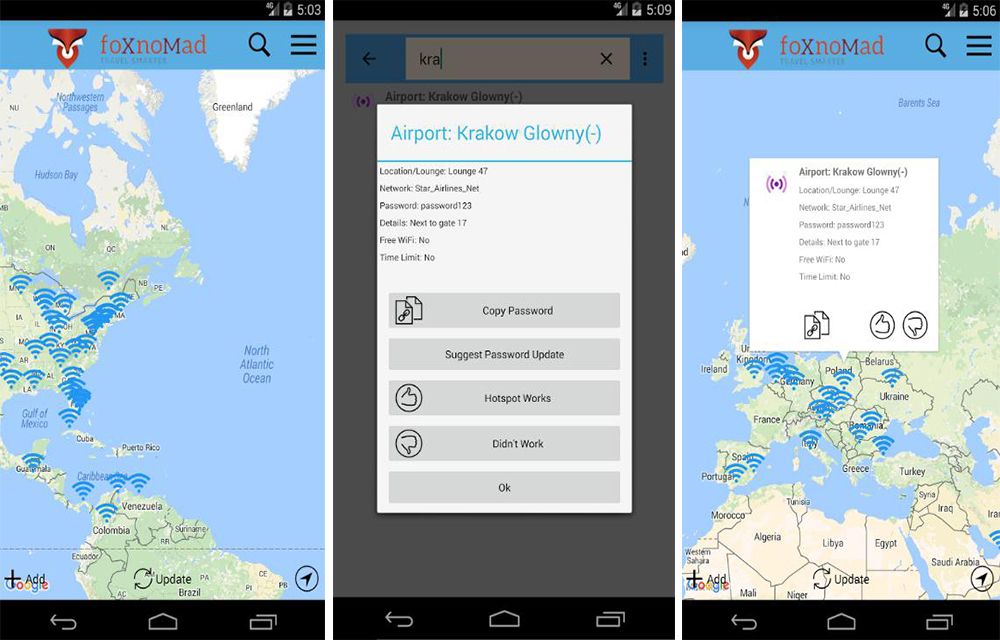
Hanging out in the Airport in search of a Wifi network is a common thing for the travellers. Even after finding one, how to get its password? Trapped right? But wait! WiFox is an application for your Android or iOS devices that can store the username and password of thousands of major Wifi spots in hundreds of airports all around the globe. So the next time, you don’t have to carry your notepad and search it for the access credentials of a specific hotspot in the airport.
There is a $2 charge for the application in app purchases to start using it. After testing it in a couple of Airport hotspots, we found that it does what it made for. The pricing also looks pleasing for the good service it offers in emergency situations. As you know, using the mobile data in airports is far difficult than pulling a rock in the mountain slope. Most of the times, there will be no coverage for the networks inside the platform. So, the “Free Airport Wifi hotspots” are the only way to get connected to the internet. As they are free, it further increases our joy in using it. 😉
Also Read: Top 5 Apps To Fix WiFi Connection Problems On Your Android
The hotspot data including the credentials are crowdsourced from various trusted users and sources all around the world. There are options to Upvote and Devote Wifi hotspots and their credentials to help other users who are using the WiFox app. For example, if you found a credential that is no longer working for the hotspot or a hotspot that is no longer working, you could devote it on the application. It helps the developers to either fix or replaces it somewhere else or completely remove it from the database if needed.
Also Read: How to Save Mobile and Wifi data on Android with Opera Max
Once you found out the correct password for the hotspot, you can even copy them to your settings. So that it will automatically get connected to it once you reach the coverage. If you are a frequent traveller to a specific location from the same airport, you will be lucky as damn. Anyhow, go and give a try to this nice application and one thing we can say is it worths the 2 dollars.


More in App Reviews

JioTV Live Sports Movies Shows Review
JioTV Live Sports Movies Shows is an Entertainment app developed by Reliance Jio Digital Services Pvt. Ltd. The app is exclusively available for the Jio users to enjoy Live TV shows right from their smartphone. If you are using any other mobile operators, this app is not for you. It features hundreds of TV channels and…

Network Master – Speed Test App Review
Network security is one of the most important things in this technology era. Everyone is connected to the internet and has been exposed to potential threats day by day. Especially while having some free data with Public hotspots or Airport Wife’s, the network security is at its dead end. So, before having some fun with…

Hexlock Android App Review – Best App Locking App
The security of an Android smartphone is something that should be taken very seriously. Android OS is easy to hack and vulnerable to threats. A simple swipe lock is not enough to secure your data from wrong hands.
The week in tech, minus the noise.
New reviews, fixes and the stories that matter — once a week, straight to your inbox.
We only use your email to send the newsletter. Unsubscribe any time. See our privacy policy.
Comments