

Tuneskit DRM Media Converter for Windows – DRM Removal Software Review
DRM (Digital Rights Management) is a technology used by certain media distributors to protect the content distribution beyond their control. Many people are against this technology as this is used to restrict the ownership of the purchased media content. For example, a video or TV Show purchased from iTunes can only be played on Apple…

DRM (Digital Rights Management) is a technology used by certain media distributors to protect the content distribution beyond their control. Many people are against this technology as this is used to restrict the ownership of the purchased media content. For example, a video or TV Show purchased from iTunes can only be played on Apple devices with iTunes. It restricts the legally purchased video to be played on other devices. It also forces the person to buy the same video content, separately for various devices and platforms. It helps the distributors to earn more while it costs the people to spend more than once if they want it to play the video on various devices.
The restriction of DRM technology paves the way to remove DRM video and convert using a software. Tuneskit DRM Media Converter for Windows is one such software tool for DRM removal for Windows.
What Tuneskit DRM Media Converter for Windows do?
Tuneskit DRM Media Converter for Windows directly converts the iTunes M4V videos to lossless MP4 and M4V video formats. This conversion enables the users to share and play the DRM videos on multiple non-apple devices. The non-apple devices include Android Smartphones and Windows PC and smartphones. We have analyzed and reviewed the tool and the results are below.
Features
- Tuneskit DRM Media Converter removes DRM protection from rented and purchased videos, movies and TV shows on iTunes.
- It removes iTunes DRM at 30x faster speed.
- It converts the DRM locked M4V video format to M4V or MP4 video formats. It is one of the fastest DRM M4V to MP4 converter.
- It keeps AAC tracks, Closed Captions, AD tracks, AC3 5.1 Dolby Surround sound, subtitles as exactly same as the original iTunes video.
- Free lifetime upgrades for paid users.
User Experience
Tuneskit DRM Media Converter has a simple user interface. Anyone can learn the iTunes DRM video conversion within few minutes. Here is our user experience with this conversion tool.
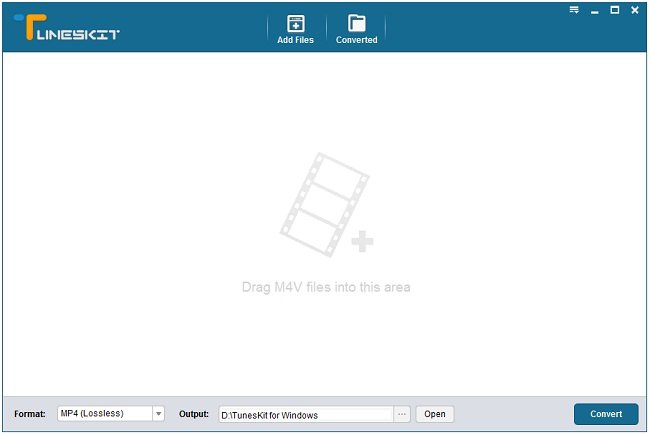
We launched the Tuneskit DRM Media Converter. We clicked the “Add files” button. It pops up a window, which shows the videos and movies from the iTunes. Another method given is to drag and drop the video files from iTunes media folder.
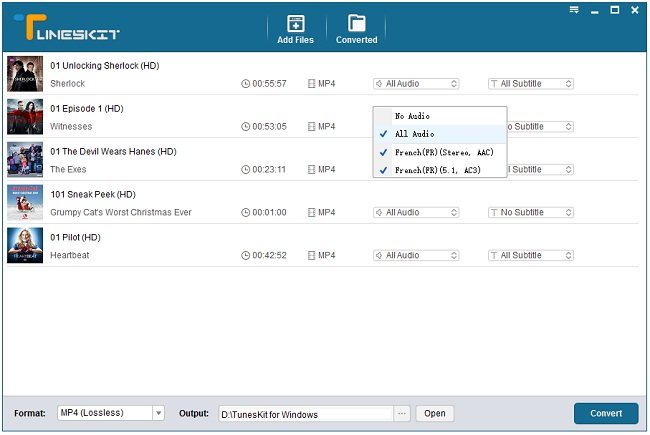
After the videos added to the tool, we have selected the desired output video format, subtitle, and audio tracks. Then, we have chosen the output file location. Then, we clicked the “Convert” button at the bottom right corner.
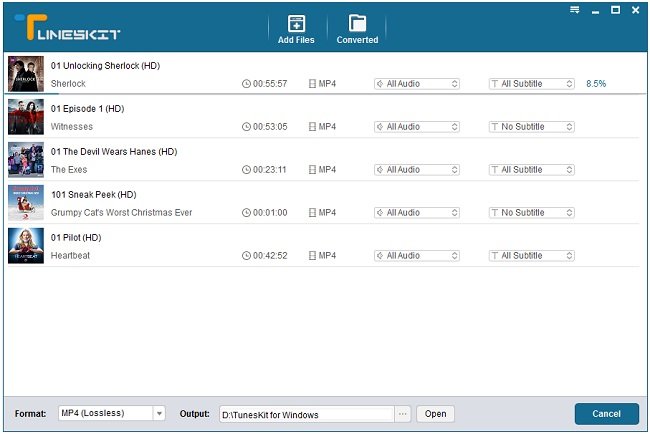
After few minutes, the selected videos converted and saved in the output location we have chosen. The converted videos played well on both Windows media player and VLC media player.
The entire process went smoothly for us. We experienced no issues or lag in the conversion process. We compared the original iTunes video and the converted video. We are unable to find any significant difference between the two videos.
System Requirements
Tuneskit DRM Media Converter for Windows can be installed in PC and Laptops with Windows XP, Vista, Windows 7, 8, 8.1, 10 (both 32bit and 64bit OS). It requires a minimum 1GHz processor, 512MB RAM, and 1024 x 768 pixels resolution. It supports iTunes version 12.6.2 or lower. It converts iTunes DRM protected M4V videos (both rental and purchased videos) to MP4 or M4V.
Support and Updates
The official support is available with Email and Facebook page. The users can contact the seller through them. Other than this, detailed tutorials in the text, as well as video, are available to help the new users. The FAQ is available with all the general queries asked earlier by other users. It almost answers all the basic queries for a new buyer.
The paid users are promised with lifetime update to this software. The refund option is available. It can be claimed if the user feels the software is not working properly. However, the decision is the seller. At first, Tuneskit support team will try to solve the issue raised by the user who is claiming the refund.
Price
Tuneskit DRM Media Converter for Windows is available for the price of $45. It includes lifetime license to this software with lifetime free update to the latest version. As of now, they have provided an update to support the latest iTunes version.
Verdict
Tuneskit DRM Media Converter for Windows did what it promised. It is worth and one of the best iTunes video DRM removal software. One thing is it comes at a cost. We have analyzed its features and user experience and we found it is worth. If you are looking for iTunes DRM removal tool, you can try the free trial version available for Tuneskit DRM Media Converter for windows and decide yourself, before you pay for it.
More in Software Reviews
AppleMacSoft DRM Converter 3 for Mac Review
Have you bought your favorite music file from the iTunes store? But not able to enjoy it in other devices? It seems like the DRM protection of the file makes conflicts. These kind of media files are always a barrier for the users. Having some of the most favorite music doesn’t seem to be good…
Leawo TunesCopy Ultimate Review – A Complete DRM Removal Tool
In a world of media and streaming services iTunes is a very popular name in the industry. iTunes has changed the music industry to the next level. You can stream and buy any song as soon as they available on the market. When you bought media via iTunes it is fully copyright protected. This content…
Noteburner M4V Converter Plus Review – User Friendly DRM Removal Program
Gone are those days when you’d demand a media converter that support the latest version of iTunes, capable of converting video to various friendly formats with full support. Most folks use free options for converting video files between different user-friendly formats. When it comes to the DRM removal in Windows platform, the number of free…
The week in tech, minus the noise.
New reviews, fixes and the stories that matter — once a week, straight to your inbox.
We only use your email to send the newsletter. Unsubscribe any time. See our privacy policy.
Comments