

How to Delete Your Google Purchase History
We are seeing personal data collection by many companies like Facebook which stirred the controversies including Cambridge analytica scandal. It is a huge factor for everyone who doesn’t want to share their likes, personal details, and other online activities. Now Google comes under the same rope by collecting the user purchase details history via their…

How to Delete Your Google Purchase History
We are seeing personal data collection by many companies like Facebook which stirred the controversies including Cambridge analytica scandal. It is a huge factor for everyone who doesn’t want to share their likes, personal details, and other online activities. Now Google comes under the same rope by collecting the user purchase details history via their Gmail accounts.
Yes, it is true.
Google has been tracking its account users purchase history and you can check the data in your Google account. Not only Google related purchases like you made from buying an app or game from Google Play Store. It is extended to purchases made in other services where you used the Gmail to signup in the account. Whatever the bills and receipts you get from other services to your email, Google will collect that data.
In my findings, Google collected all my purchases made by using various e-commerce sites where I used my personal Gmail to sign up the service.
According to Google, the user data collection is designed to help the people to keep track of their purchases and expenses. However, this move is not liked by many users and looking for a way to remove the Google Purchase history from their accounts.
If you are trying to opt out of this situation, there is no straightforward way to it. There is no bulk removal of the purchase history and you have to manually delete each entry one by one and there is no option to turn off this feature either.
How to delete your purchase history
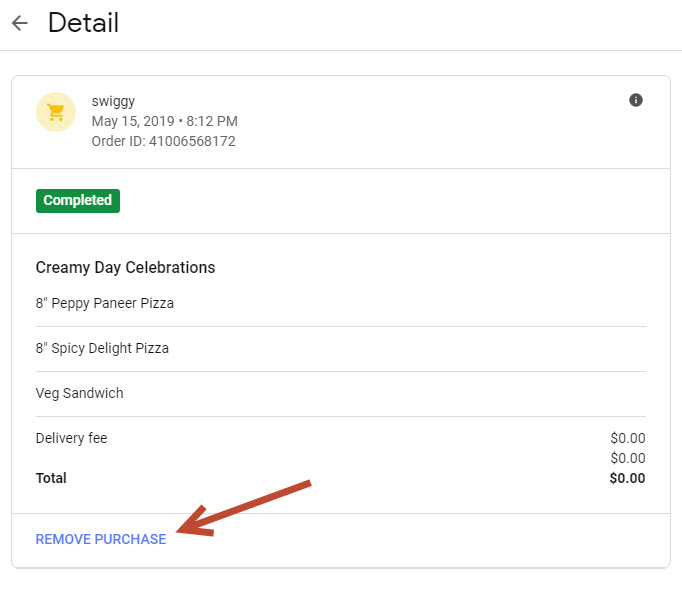
As we already said, there is no straightforward option that wipes the purchases. To remove the items, you have to go through each item and click on the cart icon placed beside the name. Once you click on the cart it opens a new page. Here you will see an option “REMOVE PURCHASE” at the end of the page.
What’s next?
Recently Google has faced criticism for the collection of user data and resulting Google CEO Sunder Pichai has made a clear statement that “privacy should not be a luxury good”. Google responded about the issue and says the information wasn’t used to serve ads, and that the data could be deleted. If you feel uncomfortable with the collected data you can delete this information at any time.
More in Internet

How to Speed Up Web Browsing – In 10 Best Ways
No matter how much Internet speed is improved these days, many people are struggling with slow browsing speeds. It is quite irritating if the web browsing speed is slow when you browse the Internet while traveling or during an important task. Feeling very slow web browsing? There are many reasons for a slow web browsing…
How to Browse in Private Browsing or Incognito Mode on Any Web Browser
Private Mode is developed in browsers for security purpose. Every browser comes with normal mode and as well as Private Mode or Incognito mode. This mode allows you to surf the Internet without saving your browsing data like history and cookies.
List of Google Chrome Commands to Access Features and Settings
Google Chrome is everyone’s favorite browser. Chrome is very easy to install, supports multiple platforms, cross-platform sync feature, bookmarks, passwords, guest mode support, and what not everything we can enjoy using Google Chrome. The level customization options offered by Google Chrome are many. The features range from appearance change to personalized search, additional security options…
The week in tech, minus the noise.
New reviews, fixes and the stories that matter — once a week, straight to your inbox.
We only use your email to send the newsletter. Unsubscribe any time. See our privacy policy.
Comments