
CRM stands for Customer Relationship Management, is a tool that is designed to help businesses to organize, track and manage customer relationships more effectively. It acts as a central location where customer data like contacts, interactions, purchase history, and preferences are stored which helps in personalized engagement and data driven decisions.
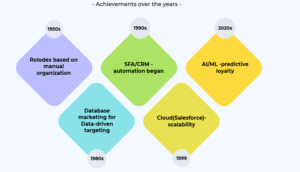
CRM timeline
CRM has evolved from paper tools to AI-driven platforms over 70+ years, mirroring tech developments from manual records to cloud intelligence. Here is the chronology:
Key features to look in a CRM feature:
CRMs empower both sales and marketing, but their value shines differently-sales gains pipeline speed and closure rates, while marketing sees lead quality and ROI lifts. Sales teams use CRMs for:
- Pipeline visibility and forecasting to prioritize high-value deals
- Automation of follow-ups, emails, and tasks.
- Lead scoring and contact history to personalize pitches
Marketers use CRMs for leveraging and measurement:
- Lead generation via forms, campaigns and segmentations.
- Behavior tracking across channels to boost engagement.
- ROI analytics on campaigns, showing attribution and conversion paths.
In 2026, 91% of US companies use them, yielding an average 8.71x ROI through better decisions and operations. Efficient CRMs help in revenue growth, operational efficiency, customer experience, retention, and data-driven decisions.
After a tiring day, you open your food delivery app, and it instantly suggests your go-to butter chicken with extra naan—exactly as you ordered last Tuesday, with the mango lassi filter you loved. No typing, no scrolling—tap, order, done. It’s the restaurant’s CRM magic at work, remembering your preferences to drive impulse buys and loyalty.
Behind the scenes, the eatery’s CRM tracks your past orders, filters (spicy level, dietary tags), and timing patterns, then pushes personalized recommendations via the app. Result? Your $25 order becomes their $35 upsell (hello, dessert add-on), repeat visits spike 40%, and they outpace competitors who treat you like a stranger. Without CRM, it’s blind menus and forgotten favorites—with it, every past bite fuels future revenue.
Here are the top 5 CRM software tools:
1.HubSpot CRM, developed by the American company founded in 2006 by Brian Halligan and Dharmesh Shah, stands out for its free core platform that requires no workflow changes post-setup. It’s ideal for US small to mid-size businesses which look for an intuitive entry into CRM with seamless marketing-sales alignment via integrated hubs.
Key Features:
- Customizable deals dashboard, email tracking, live chat, meeting scheduling, and prospect tracking.
- Gmail/Outlook integration, email templates, notifications, and pipeline management.
- Automated logging of deals/activities, activity stream with real-time alerts (email opens, link clicks).
- Stores up to 1M contacts/companies; records calls, assigns tasks, and auto-publishes to contact timelines.
- Ticketing, email marketing, real-time metrics (open/click rates), 200+ integrations (Salesforce, Shopify, Zapier), and reporting dashboards.
- Best for US startups, agencies, and B2B teams needing quick setup, inbound tools (forms, campaigns, sequences), and pipeline dashboards without IT complexity.
2. Salesforce CRM: Salesforce Starter Suite is Salesforce’s entry‑level CRM for SMBs. It offers account, contact, and opportunity management plus customizable reports, dashboards, and lead routing. It guides you clearly through setup while still giving you strong Salesforce‑level functionality, basic commerce, service, and marketing tools, and support for up to 66 users before needing a custom arrangement.
Salesforce as a whole remains a leading CRM choice in the US for mid‑market and enterprise organizations that need deep customization and scalability. Its platform lets companies design complex sales processes, automate workflows, and build personalized customer journeys. Einstein AI provides lead scoring, insights, and forecasting. You also get highly customizable objects, fields, and workflows suited to specific territories or compliance rules, plus a huge marketplace of integrations with tools like Slack, Google Workspace, and major accounting systems.
Best fit: organizations that want an end‑to‑end, highly configurable CRM and are ready to invest in admin or support resources to fully leverage the platform.
3. Zoho CRM: Zoho CRM is a feature‑rich yet affordable CRM aimed at small and growing businesses, especially in the US. It spans sales, marketing, and support, with capabilities that can rival larger platforms while keeping pricing within reach of SMBs.
What makes Zoho CRM stand out
- Strong core CRM: Manages leads, deals, contacts, accounts, omnichannel communication, detailed reporting, and collaboration tools.
- AI and customization: Zia (AI assistant) supports deal predictions, anomaly detection, and workflow suggestions; Canvas lets you redesign the interface with drag‑and‑
- Highly customizable: Admins and end users can tailor dashboards, views, and layouts to match their roles and workflows.
- Ecosystem fit: Integrates seamlessly with other Zoho apps, plus email, telephony, and social media, making it a natural choice if you already use Zoho’s suite.
- SMB‑friendly extras: Online catalog and inventory management, mobile apps for Android and iOS, and robust automation for routine tasks.
Pricing and ideal users
Zoho CRM offers a limited free plan for up to three users, with paid plans starting around $20 per user per month and going up to about $65 per user per month. It’s best for cost‑conscious businesses that want serious CRM functionality—automation, analytics, integrations, and mobile access—without paying enterprise‑level prices.
4. Microsoft Dynamics CRM: Microsoft Dynamics 365 excels for US mid-size and large companies already embedded in Microsoft 365, Teams, and Azure ecosystems. It unifies sales, customer service, marketing, and field service with seamless native integrations into Outlook, Teams, SharePoint, and Power BI analytics.
Key Strengths:
- Deep Microsoft integration: Works naturally with your existing Microsoft tools.
- Enterprise-grade security: Strong compliance and identity management for regulated industries.
- Modular scalability: Add Sales, Customer Service, Marketing, or Field Service modules as needed.
- Core capabilities: Sales pipelines, automated lead qualification, AI-assisted communication, sales forecasting, and reporting.
Best for: Microsoft-centric organizations wanting CRM, analytics, and collaboration under one familiar umbrella. Non-Microsoft shops should look elsewhere due to cost and lighter base features.
5. Pipedrive is a simple, pipeline‑driven CRM designed for sales teams who want visual deal tracking without complexity. It starts at $14.90/user/month, making it accessible for US SMBs focused on closing deals efficiently.
Key Strengths:
- Visual pipeline management: Drag‑and‑drop stages, deal progression tracking, and pipeline health insights to spot bottlenecks and forecast revenue.
- Sales‑focused tools: Contact management, email sync/templates, activity tracking, and automations for lead assignment/follow-ups.
- Easy adoption: Intuitive interface, customizable dashboards/reports, and integrations with email marketing/support tools. There is no steep learning curve or need for full‑time admin.
Best for: US SMBs and sales‑driven teams which are looking for a lightweight, visual CRM that prioritizes deal closure over bloated features.
How to choose the best CRM software?
Now that you got a glimpse of 5 best CRM platforms, it’s time to determine what should you look for in a customer relationship manager software platform. Please ensure that the software you select must cover the following features:
- Pipeline: The CRM software should provide pipelines that help you to monitor deals and more at every stage of your process.
- Task management: Any CRM software must allow users to track important tasks. It should provide calendars, boards-to-do lists so that you can keep track of everything you need to do.
- Automation: The chosen CRM software should automate workflows to improve efficiency and processes.
- Integration: As SMBs use may software platforms, chosen CRM must work well with the existing softwares.
- Value: SMBs should evaluate value vs. cost before committing to pricey CRM plans—research ensures your budget aligns with needed features. Free tiers help startups test essentials, but paid unlock full potential. Check budget, pick best value, and consult CRM pricing guides for clarity.
- Ease of use: Test CRM software hands-on before committing—ease of use often gets overlooked. Most offer free trials (1 week–1 month) or free plans; use them to navigate interfaces, test integrations, automation builders, Kanban boards, and pipelines. Confirm it feels intuitive and fits your workflow to ensure a smart team decision.
- Customer support: Test customer support during free trials—poor help leaves SMBs stranded. Use all channels (phone, email, live chat) to ask easy and tough questions. Estimate their software knowledge, friendliness, and respect for your time. If no impressed, move to another provider.
Conclusion
The right CRM turns customer chaos into predictable revenue—Salesforce for enterprise scale, HubSpot for inbound SMBs, Zoho for value, Dynamics for Microsoft shops, and Pipedrive for sales speed.
Start with free trials to test pipelines, integrations, and support firsthand. Your perfect fit depends on team size, budget, and workflow. Don’t let another customer slip away. Choose today, scale tomorrow.