Animation has big advantages for growing a YouTube channel. You can speed up how long it takes to explain your ideas and create more memorable intros. Plus, having good-quality animation will help keep your viewers watching longer.
The great thing about animation is there are tons of options available to you at very little cost. By 2026, there should be many low-cost software applications available for creators to produce high-quality animated content without breaking the bank. Below are five of the low-cost software available that will allow all creators to create high-quality, polished animation without breaking the bank.
Why animation is important on YouTube
In addition to being visually appealing, animation has the ability to transform basic concepts into rich visual storytelling. Animation can also help improve viewer retention and develop a consistent brand identity or style. Plus, using animation for how-to videos, explainers, and list videos will help viewers follow along as you present your content.
For creators, the real plus is the flexibility you gain by using animation for creating different types of content. You can use animation in channel intro videos, lower thirds, motion graphics, character based videos, and small social media clips, all which will assist with the growth of your channel.
Having low-cost tooling makes a difference for a large number of people. Without low-cost software available for creators to experiment with, many individuals will not be able to justify to themselves purchasing high-end software until after they become familiar with the low-end to gain the experience necessary to produce high-quality content.
What To Consider
When selecting an animation program for YouTube, you should evaluate: (1) Your skill level (2) The type of computer you use for video editing and (3) The type of content you intend to produce. Ideally, your YouTube animation application should be user-friendly, reasonably priced, and versatile enough for both simple and complex projects.
You should also evaluate: (1) The quality of the animations you are producing (2) Any available pre-made templates (3) Whether or not the application can create 2-D animations, 3D animations, explainer videos, Or motion graphics.
Here are some suggestions.
1.Blender:
Is one of the best low-cost programs available today. It is free and provides an extremely powerful 3D animation, modeling and VFX package. If you are looking for an application to create cinematic-like intros, animated stories, or advanced character design, then Blender would be perfect for you. There is a definite learning curve with Blender, but the value it will provide to you will continue to grow as you become more skilled with the product.
YouTube creators use Blender because it allows them to produce creative ways for viewers to engage with the channel. Examples include creative opening titles, animated product info, and creative branded 3D animated graphics.
In summary, if you want a robust program for creating high-quality animated graphics on a budget, Blender offers the best value.
2. OpenToonz:
It is a powerful free 2D animation software for those who prefer to create hand-drawn or frame-by-frame animations. Many people recommend using OpenToonz if you’re looking for studio-quality tools and don’t want to pay for a software license. Because of this, many creators recommend it for developing cartoon explainer videos, short films, or educational videos. OpenToonz is more advanced than the beginner animation software but will give users more control of the animation process. If your YouTube channel leans toward artistry or traditional animation, OpenToonz is one of the best low-cost ways to learn.
3. Adobe Express:
It is good for creating quick animated visual content for YouTube. With Adobe Express, you can create animated character content, quickly and easily create motion graphics and use animated media to produce content quickly, making it perfect for creators who need speed vs deep technical skill. Adobe Express is a great way to create content that can be used as a way to introduce your videos or create short explainer videos or use them as branded content. Adobe Express was designed to create quick content that can be produced quickly for individuals to achieve and create professional-looking content without spending hours developing there. If your goal is to create professional-looking content quickly, Adobe Express is a very affordable way to do that.
4.Powtoon
Powtoon is a popular online video production tool for creating animated videos, presentations, and educational materials. Some of the reasons creators love using Powtoon include the availability of predesigned templates that allow you to create animations without any prior experience in designing. Channels focused on education, marketing, and business can save significant amounts of time using Powtoon. Ease of use is the most significant benefits of using Powtoon. Creating animated scenes is extremely easy with this tool, making it an excellent option for those who value speed and consistency. You should consider putting Powtoon on your list of websites to remember if you need a low-priced solution to creating clear animated videos from ideas.
5. Animaker
Animaker is an affordable platform that allows you to create high-quality explainer videos, animated presentations, and YouTube channel introductions in a fraction of the time of conventional video creation. The drag-and-drop editing interface makes it easy for new and small channels to produce high-quality video projects quickly. If you are creating frequently published videos and require a simple animation workflow, Animaker is a great resource to include in your YouTube strategy.
Animaker is excellent for channel branding, short-form educational video content, and motion-based content created for social networking.
Which one should you choose
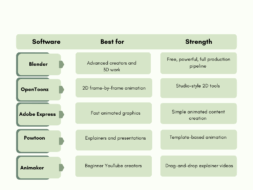
Here’s how to choose the right animation program for you. Use Blender if you want an ever-evolving 3D model and plan to move into advanced animation. Use OpenToonz if you prefer a traditional 2D workflow that feels familiar. Choose Adobe Express when quick motion branding matters most. Powtoon works well for simple animated explainer videos, and Animaker is the easiest way to create animated YouTube content regularly.
Final thoughts
In summary, low-cost animation software enables YouTube creators to achieve professional results without breaking the bank while still establishing their channels. Ultimately, the best animation software for you will be determined by which tool matches your channel’s format, how quickly you edit videos, and how eager you are to learn new things.
Once you have set up one of these five tools, you should have a strong basis for developing a recognizable visual identity and consistently posting new content within an affordable budget.
FAQs
1. What is the best low-cost animation software for YouTube beginners?
Blender, OpenToonz, Animaker, Powtoon, and Adobe Express are some of the best low-cost animation software options for YouTube beginners.
2. Is Blender good for YouTube animation?
Yes, Blender is one of the best free animation tools for YouTube creators because it supports 3D animation, modeling, and VFX.
3. Which animation software is easiest for beginners?
Adobe Express, Powtoon, and Animaker are easier to learn because they use templates and drag-and-drop editing.
4. What software should I use for 2D YouTube animation?
OpenToonz is a strong choice for 2D animation, especially for hand-drawn and frame-by-frame styles.
5. Can I make YouTube intros with low-cost animation tools?
Yes, tools like Adobe Express, Powtoon, and Animaker are great for YouTube intros, motion graphics, and simple branded animations.
6. Do I need expensive software to start animating on YouTube?
No, you can start with free or low-cost tools and still create professional-looking animation videos for your channel.
Leave a Reply