
As your business grows in the US, adding more customers means that your support inbox will become more chaotic and disorganized every time we add another customer to our list, as new channels become available. In the early days of running our business, we could have used out-of-the-box software like email or spreadsheets to manage customer inquiries; however, once we reach a critical mass of inquiries and support tickets for each individual customer as well as an increasingly large number of communication mediums (including email), we want to implement a properly engineered and robust customer support toolset so that we can deliver a consistent and timely level of service to our customers based on data and other relevant factors following various touch points throughout their entire experience with our company.
Therefore, this article provides a list of the top five customer support systems for the United States in 2026 and the associated criteria for selecting which one to use based on your current company status.
Why Scaling Companies Need Better Customer Support Platforms
As your organization grows, problems with CS no longer become “just another inbox issue,” but instead, start to impede your ability to scale your organization. The following issues may occur:
- Your response times and customer satisfaction ratings (CSATs) decline because of all of the manual processes that are applied to fulfill a CS ticket.
- There are numerous tickets that were not responded to in a timely fashion, because they were distributed over so many different channels (e.g., email, chat, phone, social media).
- New CS agents struggle to get started due to a lack of documented workflows and an undocumented knowledge base.
- Leadership/management has no clear insight into the operations of CS due to a lack of accurate reporting.
The right platform for your customer support will allow your company to:
- Centralize all customer support channels, including email, real-time chat, social media, phone, and in-app support.
- Automate repetitive processes that may otherwise be manual, such as ticket routing, tagging, and automated responses.
- Create a self-service help center so that customers can resolve simple issues on their own.
- Use SLA (service level agreement), team performance, and customer satisfaction measurements to inform your hiring and process-related decisions.
Why scaling businesses must have better customer support software
As a scaling U.S. company, when evaluating your tools look for the following:
Omni-channel support: Support via email, chat, social media, phone and in-app messaging all in one place.
Automation and artificial intelligence (AI): Automation that enables you to define rules and workflows for support, as well as AI assistants who can help triage tickets, summarize tickets, and suggest ways to respond to tickets.
Integrations: Provide tight integration with your CRM, product tools, invoicing or billing management tools, etc.
Collaboration features: Internal note-taking, mentions of team members in the ticket, collision detection to avoid duplicate responses to the same customer issue, clearly defined ownership of a ticket’s resolution.
Reporting and analytics: Metrics on number of tickets, response times, customer satisfaction (CSAT), and trending issues.
Value-based pricing: When you scale your team and add additional channels/agents to your support operation, costs should not exponentially increase.
Compliance and security: This is important for U.S. companies that handle sensitive information and/or operate in a regulated industry.
With those criteria in mind, let’s look at five strong platforms.
1. Zendesk – The Best Option for Fast-Growing Teams
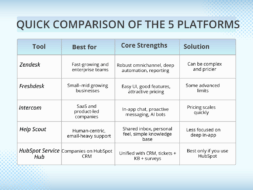
Zendesk is the best known and used customer service platform. In the fast-growing sector, it is used by both large enterprises. Zendesk provides a solution for teams that require the ability to customize based on size of team, location, processes etc.
Advantages
- Completely integrates customer interactions across multiple channels: email, live chat, social, voice and self-service.
- Able to automate route and prioritize tickets through triggers, macros, workflows.
- Extensive reporting and dashboard capabilities for both Management and Customer Support Management.
- A mature ecosystem of applications (CRM, ecommerce, messaging etc.) to support foundation.
Best for
- Growing companies in SaaS, ecommerce or marketplaces that require a robust infrastructure.
- Teams that have, or plan to have, a dedicated support operations team.
2. Freshdesk – Simplified Features and Usability
Freshdesk provides a modern helpdesk that has a balance of usability, features and pricing that will help small to mid-size US businesses grow.
Advantages
- Easy to learn how a support agent can use a helpdesk with a user friendly, clear and concise interface.
- Using all channels of communication, Freshdesk provides an omnichannel experience (email, chat, phone, social media) with the ability to create a knowledge base and community forum.
- Able to automate the assignment of tickets to agents, create SLA’ s, use canned responses for initial ticket responses.
- Pricing is competitive with older enterprise solutions offering similar features at a lower cost.
Best for
- Small to mid size US companies who are outgrowing their existing shared email inboxes.
- Teams that want help without the complexity involved in using an enterprise level tool.
3.Intercom – Best for SaaS and In‑App Customer Experiences :
It is the best customer experience platform for software as a service (SaaS) and product-led businesses because it has been designed specifically to support companies whose in-app experience is highly valued and there’s a proactive communication strategy between product, marketing, and customer support.
The key strengths of Intercom are:
- You can communicate via live chat with customers using Intercom’s in-app messaging feature that provides beautifully designed messaging windows for both live and guided support flows.
- You use a combination of outbound messaging as well as behavioral messaging to help onboard, educate, and retain customers.
- Use bots and automation with AI enhancement to help answer frequently asked questions before they reach your human agents.
- Within your inbox are all contextual details about product usage history relating to each customer so your agents can provide better service because they have data on what the customer has done within the application.
Intercom is ideal for US-based SaaS and technology companies providing services to customers within an internet or mobile product. Companies whose teams require support, engagement, and marketing automation in one application should consider using Intercom.
4. Help Scout – Best for Human‑Centric, Email‑Heavy Support
It is best suited for organizations providing email-based customer service with a focus on human interaction. Help Scout uses a shared inbox model but has integrated advanced features into the shared inbox model to enable customer service teams to maintain their organizational structure while providing a personal touch to every customer.
Key strengths of Help Scout include:
- Customers will feel that the Help Scout application is an email communication application while customer service agents will use a shared-inbox structure to manage correspondence with customers.
- Help Scout provides tools such as collision detection, tags, assigned agents, and internal notes to keep customer service agents aligned.
- A Help Scout self-help knowledge base allows customers to complete their own service tickets by using the Help Scout knowledge base as a reference.
- Friendly user interface with quick start guide provide customer service agents with the basic setup requirements to begin providing customer support.
- Intercom is built for modern SaaS and product‑led companies that care deeply about in‑app experiences, proactive messaging, and tight alignment between product, marketing, and support.
Ideal for
- US SaaS and technology companies that serve customers inside a web or mobile product.
- Teams that want support, engagement, and light marketing automation in one tool.
5. HubSpot Service Hub – Best if You Already Use HubSpot:
HubSpot’s Service Hub is its customer support and success hub built to integrate with the other products in the HubSpot ecosystem – CRM, marketing and sales. It is especially designed for a company that uses HubSpot to handle its go-to-market efforts.
The key features of this product include:
- A shared inbox for all customer conversations (email, chat, etc.)
- Ticketing pipelines that include automation and SLAs
- A knowledge base, customer portal, surveys/feedback tools
- Integrated naturally with HubSpot CRM to provide the support team with a complete contact and deal history
Ideal for: This product is best suited for US companies who currently use HubSpot for CRM, marketing, and/or sales; and companies that want a unified “front office” system across marketing, sales and support.
How to Choose the Right Customer Support Software for Your Company
To help narrow down your choices, consider the following questions:
1. How do you receive most of your tickets?
Email heavy (Use Help Scout, Freshdesk)
In-app and website based ticketing typically (Use Intercom or Zendesk)
Multiple ticketing sources (Use Zendesk or Freshdesk)
2. What are your current technology dependencies?
If you currently use HubSpot CRM (Use HubSpot Service Hub)
If you have a significant Microsoft (or other) tech stack (Use Zendesk)
3. How complex are your workflow(s)?
Simple queues with SLAs (Use Freshdesk, Help Scout)
Complex employer routes with multiple brands or languages (Use Zendesk or comp).
4. How much are you budgeting, and what are your growth plans?
A tight budget and small but growing, utilize Freshdesk or Help Scout; a willingness to pay for advanced features and scaling, use Zendesk, Intercom, or HubSpot.
Implementation Tips for a Smooth Transition
A practical approach is to short-list 2-3 tools based on the methods of your operations, the support solutions in your stack, and your budget. Test 14-30 days with 2-3 tools, with a small selection of agents. Connect your main channels to both tools and create an account with a subset of customers/tickets from those channels to test. Analyze your results for first response time, resolution time, and CSAT performance, as well as agent feedback.
Implement your support platform carefully and plan thoughtfully—a slow rollout reduces risk:
Begin with one team/group to implement a project, as well as a region, product line, or channel on a pilot program. You should have established core workflows; create routing rules, establish SLAs, and build at least basic forms of automation before you start implementing chat-bots.
Invest in creating and/or migrating FAQ articles to provide your customers with an immediate ability for self-service to reduce volume of simple inquiries.
Help your agents be successful — conduct short internal training sessions and have quick reference guides or tiny films available on your support site.
Track data on volume, first response time, resolution time, and CSAT performance before, and after, you implement your new support platform.