

Facebook Is Testing Face ID And Touch ID Support On Messenger For iOS
We have been seeing that software support is crucial and it does not matter that you have the latest hardware for your phone, laptop or something else

We have been seeing that software support is crucial and it does not matter that you have the latest hardware for your phone, laptop or something else when the software cannot take advantage of the same.
Similarly, we have seen that Apple gives a lot of security mechanisms for their phones such as Touch ID in the past and the Face ID mechanisms on the latest devices. However, this security means nothing when the apps can’t take advantage of the same for locking and unlocking the devices. It is said that Apple’s Face ID technology is the safest face unlock method in the market right now.
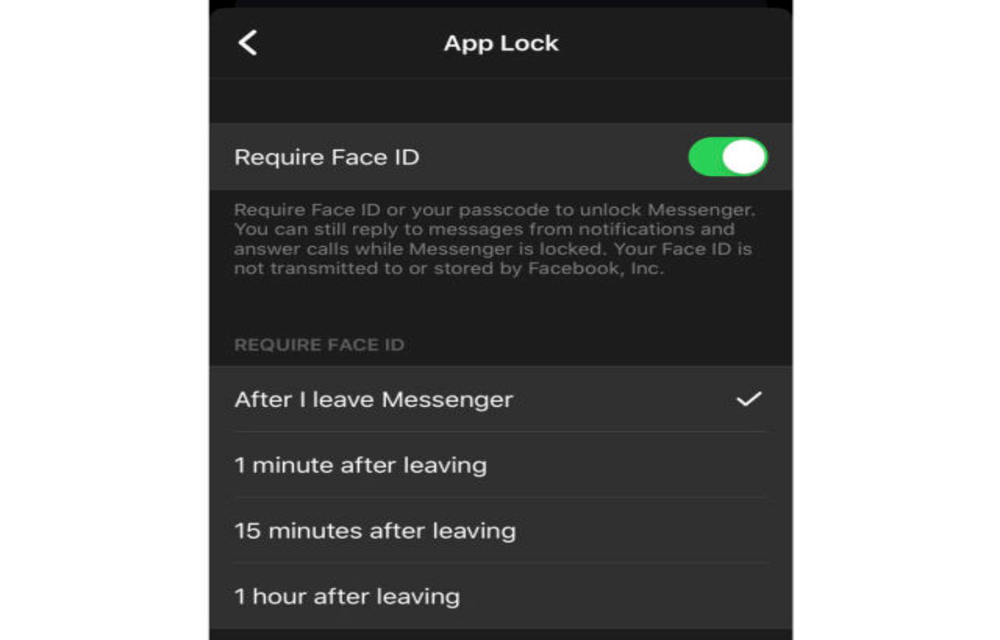
So in order to let people unlock their apps even with Face ID so that no one else can enter their favourite apps, Facebook is now testing Face ID support on Messenger for iOS. This will help the users who use Messenger to unlock their apps using their Face ID and no one else can unlock the app and see their messages.
As per the statement from Facebook, the company said that “We want to give people more choices and controls to protect their private messages, and recently, we began testing a feature that lets you unlock the Messenger app using your device’s settings. It’s an added layer of privacy to prevent someone else from accessing your messages”.
As we mentioned earlier, this feature is currently in beta testing and we don’t know when it will become available for everyone. Facebook has also not shared any timeline as to when it plans to implement the feature for all. The testing screenshot of Face ID for Messenger shows that you can set the app to require Face ID either immediately after leaving the app or after an interval of 1 minute, 15 minutes or an hour of closing the app.
More in News
How to Fix Apps Crashing While Multitasking After iOS 26 Update
The latest iPhones are powerful enough to handle heavy multitasking without breaking a sweat. So when your device starts crashing, freezing, or stalling while switching apps after the iOS 26 update, it feels especially frustrating. This issue can stem from several sources: a bug in the iOS build, misconfigured background refresh settings, insufficient storage, or…
How to Fix iPhone 18 Pro and Pro Max Speaker Crackling and Popping
Hearing crackles, pops or ticks from your iPhone 18 Pro or Pro Max earpiece? Here’s how to tell software from hardware, which settings to check, and when to take it to Apple.
How to Fix iPhone Proximity Sensor Not Working Properly After iOS 26
After the iOS 26 update, a growing number of iPhone users are reporting issues with the proximity sensor. In some cases, the screen does not turn off during voice calls. In others, features like Always On Display behave oddly in low-light conditions. If your iPhone’s proximity sensor feels “broken” or inconsistent after updating, you are…
The week in tech, minus the noise.
New reviews, fixes and the stories that matter — once a week, straight to your inbox.
We only use your email to send the newsletter. Unsubscribe any time. See our privacy policy.
Comments