

How to appear Offline on Facebook for unwanted People
Are feeling annoying while chatting on Facebook with specific people? Sometimes we don’t want to chat with people we don’t like or maybe some other reason for the ignorance. Do you want to stay anonymous for a reason on Facebook to specific people? This article will help you to hide your Facebook availability to offline for…


How to appear Offline on Facebook for unwanted People (guide)
Are feeling annoying while chatting on Facebook with specific people? Sometimes we don’t want to chat with people we don’t like or maybe some other reason for the ignorance. Do you want to stay anonymous for a reason on Facebook to specific people? This article will help you to hide your Facebook availability to offline for unwanted persons.
Facebook is a very user-friendly platform for communication. It allows us to make status updates, photos, our feelings and much more. Literally, there is an infinite number of opportunities are available with this social network. Social networks are becoming an important part of lives, they provide a smarter way to project ourselves in front of the world. Privacy is important for everyone.
Also, many of us using Facebook Messenger for instant messaging. It is one of the best features of Facebook for communication friends on Facebook. Now you must be aware that when you log in to Facebook, it shows your status available for everyone on Facebook. Anybody on the friend’s list can chat with you. To avoid this and maintain your privacy just use this simple setting. You can permanently turn off chat or block the certain unwanted people.
How to appear offline on Facebook for unwanted people?
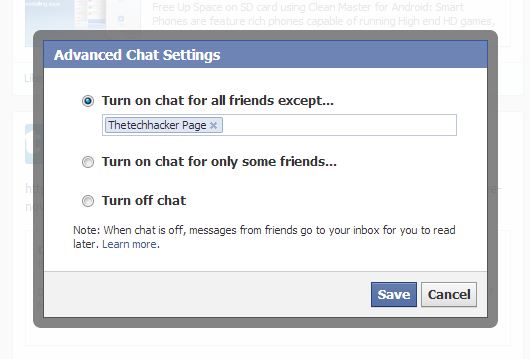
How to stay invisible from specific people on Facebook guide
- Open Facebook Chat
- Click on the gear icon on the Facebook chat page.
- Click on Advanced Chat Settings.
- You can turn on chat for all friends except some unwanted person. Type the name of the unwanted person.
- Or you can turn on chat for some people only. Enter names of your desired persons.
- Or you can turn off chat completely.
- Once you have added them to this list, they will no longer see when you log into Facebook Chat.
That’s all for now. Please do share your views and feedback in the comment box below.
More in How-to
Why Facebook is addictive? Best Ways To Avoid Facebook From Your Life
Facebook is a most popular social networking site in the world. Millions of people are using Facebook to share their photos, videos and even feelings to loved one’s, friends and public.
How To Block And Turn Off Facebook Apps Permanently
You have the option to permanently disable notifications received from Facebook apps if you are not using those apps. Applications and games developed by third parties provide users of Facebook with the opportunity to authorize their usage of their Facebook login credentials. There is a possibility that certain requests could be risky, and there are…
Best Google Reader Alternatives For Android And iOS
Best Google Reader Alternatives for Android and iOS: Google Reader is shutting down in July. People are searching for best alternative feed reader for the mobile platform.
The week in tech, minus the noise.
New reviews, fixes and the stories that matter — once a week, straight to your inbox.
We only use your email to send the newsletter. Unsubscribe any time. See our privacy policy.
1 comment
I’ll try.