

Edit Music Tags Quicky In Windows Explorer With AudioShell Add-on
These days, our hard disks contain several GB’s of music files. This means tons of audio file stored in a computer, by default most of the music files miss meta information. If you leave them, they will appear in audio players with missing album covers, song name, artist name and more. Improper music library takes…


These days, our hard disks contain several GB’s of music files. This means tons of audio file stored in a computer, by default most of the music files miss meta information.
If you leave them, they will appear in audio players with missing album covers, song name, artist name and more. Improper music library takes a lot of time to manage, Free AudioShell is here to easily add metadata to your music collection.
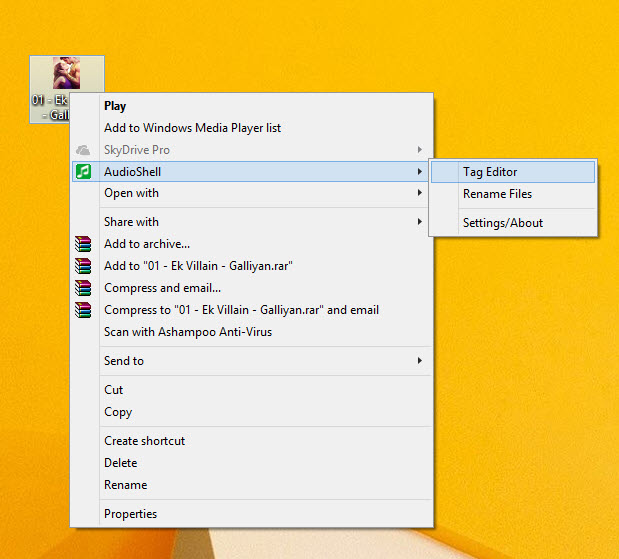
AudioShell is a very popular music tag adding tool for Windows, the best part is it works with Windows Explorer. It comes as two options, first display the tags of a music file in Windows Explorer’s preview pane, the second offers quick access to a tag editor that you can use to add, remove or edit tags. The program supports almost all audio formats like MP3, Apple iTunes aac (m4a, m4p, m4r and m4b), Windows Media, Ogg, FLAC, Wav and much more.
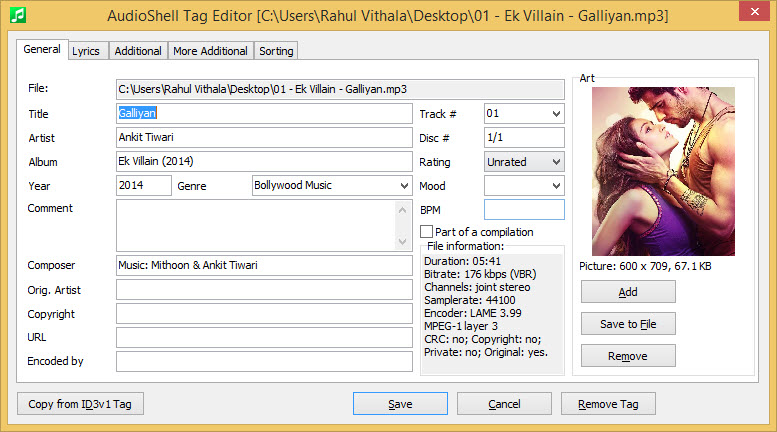
AudioShell is an excellent music tag editing tool for Windows, which smoothly integrates with Windows Explorer, via the right-click drop-down menu. It can both display the tags of a music file in Windows Explorer’s preview pane, and give quick access to a tag editor for adding, removing or editing tags, by right-clicking on audio files. The tag editor panel is easy to use, presenting five tabs for adding data or re-naming files using variables. Unfortunately, in Windows 8.1, the preview pane is missing from Windows Explorer, but the tag editor works like a charm. AudioShell supports practically all audio formats including WAV, FLAC, AAC (M4A, M4P, M4R and M4B), WMA, MP3, OGG, WV and others.
In summary, AudioShell is an essential program for music listeners who want their sonic library to be well-organized, informative and easily accessible.
Supported files and tags formats:
- mp3 (all ID3 tag versions)
- Windows Media (wma, asf and wmv files)
- Apple iTunes aac (m4a, m4p, m4r and m4b) and mp4 and aiff files
- ogg, flac, opus, speex (vorbis comment tags)
- mpc, mp+, monkey’s audio, wav pack, optim frog, true audio – APE tags, APEv2 tags
- wav – ID3v2.3 tag in ‘id3 ‘ RIFF chunk and LIST INFO chunk
- dsf (DSD/Direct-Stream Digital) – ID3v2.3 tag
More in Windows
How to Disable the AutoRun Feature in Windows 10
Autorun is a useful function that directs the OS to do something on insertion of CD or USB devices to the computer. The instructions saved on the autorun.inf file on the device instructs the OS to perform specific actions while the device mounting. It can prompt to run specific programs, play videos, pictures or music and do…

Top 5 Desktop Customization Tools For Windows
When it comes to desktop customization Windows allows maximum freedom to users. Using some best tools you can transform your system completely with a new look. A cleaner desktop environment is good and productive, a messy desktop eventually looks ugly and disturbs the mood. So here is the list of Top 5 Desktop Customization Tools…
Add Tabs To Windows File Explorer With BrightExplorer
The file explorer is the main feature of any operating system. It lets you browse files located on the computer. Surprisingly Microsoft has not updated the user interface and features of File Explorer of Windows in ages.
The week in tech, minus the noise.
New reviews, fixes and the stories that matter — once a week, straight to your inbox.
We only use your email to send the newsletter. Unsubscribe any time. See our privacy policy.
Comments