

AppleMacSoft DRM Converter 3 for Mac Review
Have you bought your favorite music file from the iTunes store? But not able to enjoy it in other devices? It seems like the DRM protection of the file makes conflicts. These kind of media files are always a barrier for the users. Having some of the most favorite music doesn’t seem to be good…


applemacsoft-drm-converter-3-mac-review
Have you bought your favorite music file from the iTunes store? But not able to enjoy it in other devices? It seems like the DRM protection of the file makes conflicts. These kind of media files are always a barrier for the users. Having some of the most favorite music doesn’t seem to be good unless they can be enjoyed everywhere. Removing the DRM protection is a must for the purpose.
There are many software’s available on the internet which tagged as a DRM converter. But, most of them can’t deliver the expected output for the users. If you are one of those who tried many of them, it is the time to try the AppleMacSoft DRM Converter 3 for Mac. That absolutely does what it tagged.
Having this in your Mac means you are now able to convert any of your media files even they are DRM protected. The fast processing capacity and numerous features make it stand out of the crowd. There are many more to explore the software. So, let’s have a look.
What is AppleMacSoft DRM Converter
AppleMacSoft DRM Converter stands for converting all iTunes media files such as Apple music, video, audiobooks, etc… to a vast range of formats that supports almost all known devices. Regardless of the DRM protection, it can convert them to the normal audio formats for supporting in all platforms like PCs, mobiles, Sonos, Apple TV, Android and many more.
Compatibility no more stands a chance on your audio files. DRM converter let you enjoy any of your favorite music in almost all devices you own.
It implements an easy and legal way of converting the DRM protected music files. You can rip audio files from videos and convert them to numerous popular formats. Uncompromised audio quality with fast processing speed also differs it from the competitors.
Features of the AppleMacSoft DRM Converter 3 for Mac
There are numerous DRM converters available on the market. But, the AppleMacSoft DRM Converter 3 has its own uniqueness in between them. Looking to the features is a must before opting the software. So, let’s have a look at some of the best features of the software.
User-Friendly Interface
User Friendliness is taken as one of the most important plus points that must be in a good software. In the case of the AppleMacSoft DRM Converter 3, it’s simple but very efficient to produce the right results without having enough concern. The functions are very friendly and enable the user’s access in an easy manner. It has a yet simple but powerful way for converting the media files to any of your favorite formats. The User-friendliness of the interface makes the task very simple with easy navigation steps.
Remove DRM Protection
DRM Protection is no more a problem. The AppleMacSoft DRM Converter 3 is that much capable of removing the DRM protection of music files in a very fast method. No, need to wait for the process to complete. Just follow the instructions to convert the files and the protection will be automatically removed from the file thus making it usable in any of your sweet devices.
If you have bought music files from iTunes store and not able to enjoy in other devices, this is the right time to choose the DRM protection software and this software fit the slot most suitable.
Convert Audio Files
The best and main use of the AppleMacSoft DRM Converter 3 for Mac is the seamless audio file conversion. It’s not only built for the DRM protection removal of the music files. It can convert any type of music files regardless of the protection. You could convert the files either they are protected or not. The output formats create a long list to support any of your devices seamlessly.

All you wanted to do is to select the music files to convert and the output format and click a button. The process will start for you and give you what you have expected.
Impressive Audio Quality
Just converting the audio files in any of the formats doesn’t seem to be impressive if the audio quality is poor. But, in the case of this software, the audio quality is just amazing. It catches each bit of data from the file and outputs maximum possible quality for the files. Users could also tweak the bit rate and sample rate to optimize the output file to fit their needs.
Rip Audio from iTunes Video
Want to extract the audio files from the iTunes video? The AppleMacSoft DRM Converter can also help you there. Even if the video has DRM protection, the software can do the task. It can convert the video files to almost all audio formats including MP3, M4A, M4R, and many more. Nevertheless to say that it has a good speed of conversion and a good output quality as mentioned before.
Seamless Output Formats
The output formats provided by the software creates a long list including MP3, AAC, AC3, AIFF, AU, FLAC, M4A, M4R, MKA, etc… The large list can support any of your devices seamlessly without the compatibility issue. Never again avoid your favorite music due to the compatibility issue. Here is the AppleMacSoft DRM Converter to do the task for you.

Completely Integrated with iTunes
No need to import each one of the music files separately to the software. The software completely integrates with the iTunes and fetches the files from the iTunes. You could select any one of your iTunes music as per your demand even an entire library. DRM converter 3 is very friendly to the iTunes thus no chance for any bugs or errors.
Tweak Options
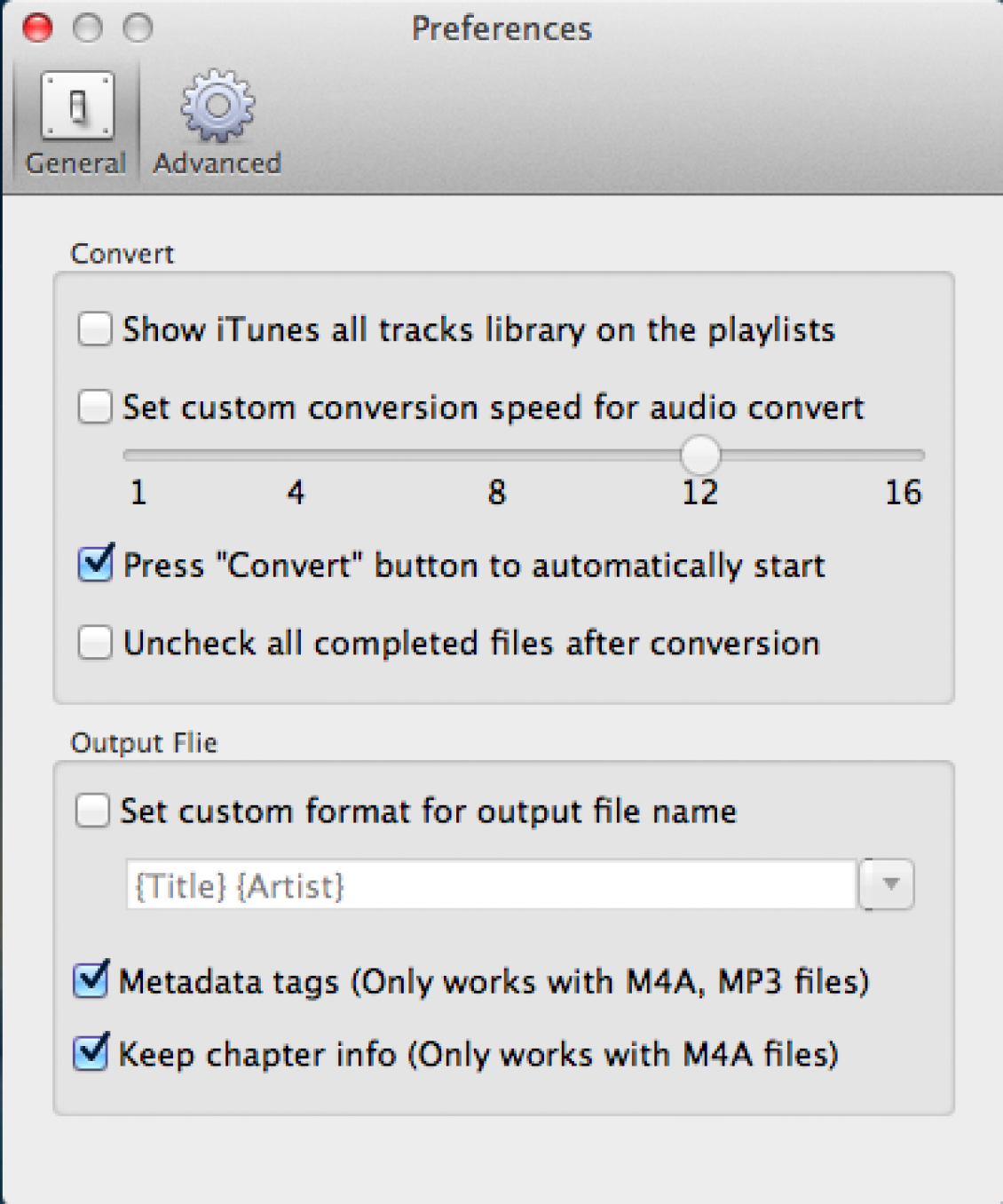
The AppleMacSoft DRM Converter 3 not limiting the users with the default functionality for the tasks. Users could change almost all settings of the software and configure them to fit the needs. Sample rate, Bit rate, Channels, Codec all can be changed as you need. It’s a good advantage of the software that can’t see on regular DRM software. You could change them from the Preferences panel or at the time of the conversion process. All to do is just checking some boxes and changing the values. No, fear of any errors.
Pros
- A legal method to convert DRM protected files
- Can convert audio files even not protected by DRM
- Excellent Audio quality
- User-Friendly Interface
- iTunes Integration
- Numerous Output Formats
- Rip Audio
Cons
- Windows version is not yet out
Verdict
AppleMacSoft DRM Converter 3 Mac is a good software to give a try. If you really want to enjoy the DRM protected music files in all your devices, the software can help you. As it does something more than a DRM protection removal tool, it has its own uniqueness. It also converts the unprotected music files, rips videos and converts them to almost all known formats. The complete iTune integration also differs it from the competitors. So, giving a try doesn’t make you hesitate of it. So, give a try.
More in Software Reviews

MacX DVD Ripper Pro – A Fast DVD Ripper Alternative to HandBrake
There are not many DVD RIP software available in the market. MacX DVD Ripper Pro is one of the finest DVD Ripper, for both Mac and Windows. MacX DVD Ripper Proclaims itself to be the fastest DVD Ripper with solid reasons and comparisons. One of the compelling reason is the use of Level-3 GPU Hardware…
Tuneskit DRM Media Converter for Windows – DRM Removal Software Review
DRM (Digital Rights Management) is a technology used by certain media distributors to protect the content distribution beyond their control. Many people are against this technology as this is used to restrict the ownership of the purchased media content. For example, a video or TV Show purchased from iTunes can only be played on Apple…
Leawo TunesCopy Ultimate Review – A Complete DRM Removal Tool
In a world of media and streaming services iTunes is a very popular name in the industry. iTunes has changed the music industry to the next level. You can stream and buy any song as soon as they available on the market. When you bought media via iTunes it is fully copyright protected. This content…
The week in tech, minus the noise.
New reviews, fixes and the stories that matter — once a week, straight to your inbox.
We only use your email to send the newsletter. Unsubscribe any time. See our privacy policy.
Comments