

Android Nougat Tips And Tricks
Android Nougat has been released with a wide range of features. However, many users are yet to experience to capabilities of the Nougat because of the less market share. You will be able to work with Android Nougat only if you purchase premium handsets such as Google Pixel, Nexus, LG G6 and Samsung Galaxy S8…


Android 7.0 Nougat
Android Nougat has been released with a wide range of features. However, many users are yet to experience to capabilities of the Nougat because of the less market share. You will be able to work with Android Nougat only if you purchase premium handsets such as Google Pixel, Nexus, LG G6 and Samsung Galaxy S8 series. You will have to shell out a huge amount of money more than a laptop to purchase the smartphones loaded with Android Nougat. In this article, we will examine the tips and tricks associated with Android Nougat.
Improved functionality
If your Android Nougat powered phone is running slow, you have to check the background services. You have to stop unnecessary services since it will consume resources. To stop the services, navigate to the developer settings page and stop the services, which you think is unnecessary. After stopping, restart the handset.

Work with settings quickly
Working with settings menu is a breeze. You will find that the main menu is hidden in the left margin. You can access settings option whenever required. It is possible to navigate horizontally.
Language Modification
You can add a secondary language under Talk option. The search results from Google are displayed in two languages. However, you will find the button to remove languages on the top right of the display.
Manage battery power
Sometimes, the apps get disconnected in standby mode. Even though it enhances battery life, the apps such as Messenger will not be able to deliver any notifications. It is possible to deactivate battery optimization in the battery settings. If you press and hold the battery symbol, you will view an optimization button in the top right corner. You can see Do not optimize option for a relevant app(s) of your choice.
Make use of Quick-Start tiles
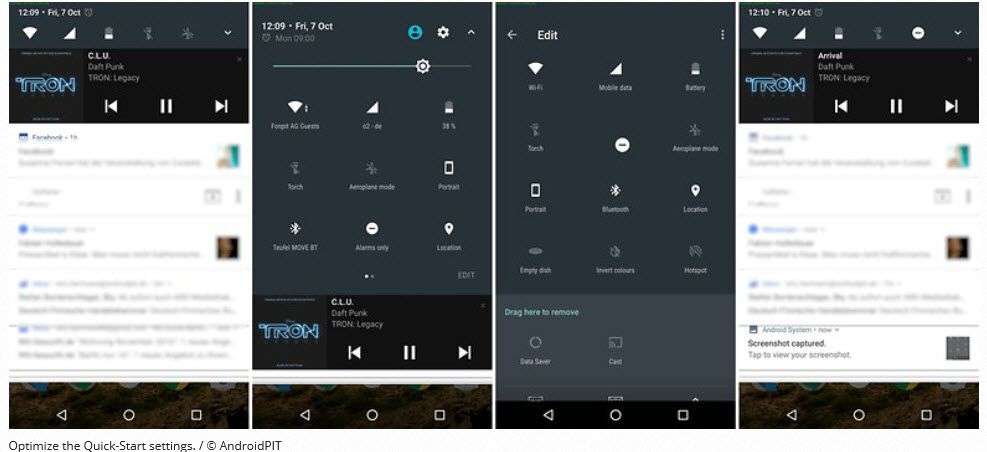
You can arrange the Quick-Start tiles by pulling down the quick settings from the top using two fingers.
Display alerts without sound
With Android Nougat, it is possible to display alerts without sounds. You just need to press and hold a notification. After that, choose the option for notifications without sound. You can filter apps under Notifications inside settings.
In addition to the above tips, there are tricks associated with split-screen functionality, file encryption and much more.
More in News

Best Google Search Tricks To Improve Productivity
We search for information on Google every day. As a user, you will provide the required content and Google will display the results in a paginated format. However, you can do more with Google searches by applying the below-mentioned tips and tricks. Make use of quotes If you make use of the quotes in the…
Google I/O 2026: Gemini 3.5 Flash & Autonomous Agents Redefine the Android Ecosystem
Google is officially moving beyond prompt-and-response AI. At Google I/O 2026 in Mountain View, the company laid the groundwork for an “Agentic” future where artificial intelligence operates autonomously in the background. Powered by the newly unveiled Gemini 3.5 Flash model, these agents are designed to execute complex tasks across the web, your local Android device,…
How To Check Own Phone Number Without Balance – Jio, Airtel, Vodafone
Imagine you recently purchased a new SIM card from a major provider. It will take some time for you to get the mobile number after inserting the SIM card. In some case, you forgot the mobile number and you are unable to make any calls due to the expiration of recharge coupon. You can easily…
The week in tech, minus the noise.
New reviews, fixes and the stories that matter — once a week, straight to your inbox.
We only use your email to send the newsletter. Unsubscribe any time. See our privacy policy.
Comments