

How to Convert YouTube to MP3 with YT Saver YouTube Converter
It is a fact that YouTube has become part of our lives. It is resourceful for education, business, entertainment, and many more categories it includes. Literally, you can watch whatever you want on YouTube. We all know that YouTube works only when you have an active Internet connection. What if you are going to a…


How to Convert YouTube to MP3 with YT Saver YouTube Converter
It is a fact that YouTube has become part of our lives. It is resourceful for education, business, entertainment, and many more categories it includes. Literally, you can watch whatever you want on YouTube.
We all know that YouTube works only when you have an active Internet connection. What if you are going to a remote location or living in a non-signal zone area? So there are absolutely zero chances of accessing YouTube content.
In this situation, YouTube downloaders come as life savers. Meet YT Saver for the best YT video downloading experience. Also, it is the best YouTube to MP3 converter.
Which is the Best YouTube to MP3 Converter?
As discussed above, YT Saver is the best YouTube to MP3 converter to download. It has plenty of options to start with.
It has 10,000 popular sites supported to download videos and convert content into MP3. The sites include YouTube, Spotify, Facebook, Instagram, SoundCloud, Vevo, Mixcloud, Bandcamp, etc.
Another aspect we look at in a video downloader is the number of formats supported. This program supports nearly 20+ output formats like Videos: MP4, MOV, WMV, AVI, FLV, MKV, HEVC MP4, HEVC MKV, 3GP, iPhone/iPod, iPad, Android Phone, Android Tablets
Audios: MP3, M4A, MKA, WAV, AAC, FLAC, AIFF, OGG.
YT Saver is best for downloading high-definition videos along with 4k content. It supports various resolutions include 480p, 360p, 720p, 1080p, 2K, 4K, 8K.
The program also has the capability of downloading playlists, channels, and albums from YouTube, and Spotify in one click.
How to Convert YouTube to MP3 on PC/Mac?
It is a pretty easy process to convert YouTube to Mp3 on PC/Mac with YT Saver.
Step 1: Download and Install YT Saver on your Mac/Windows

Step 2: Copy the YouTube video URL from the address bar
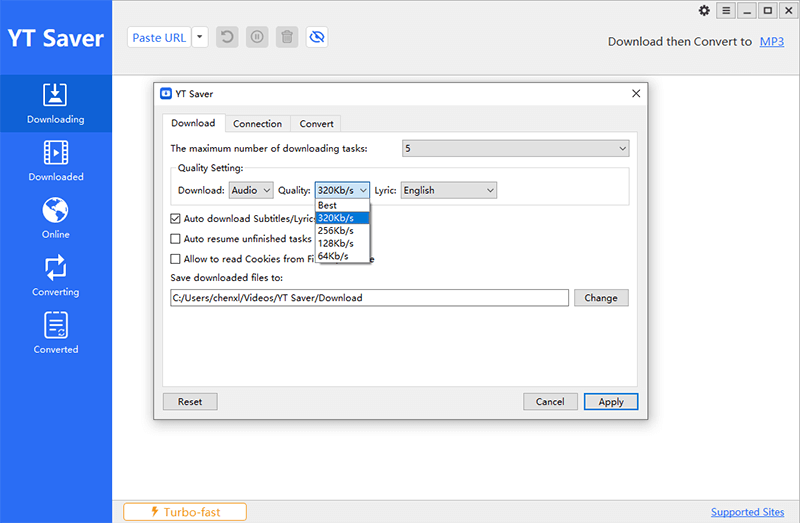
Step 3: Set the output format mp3.
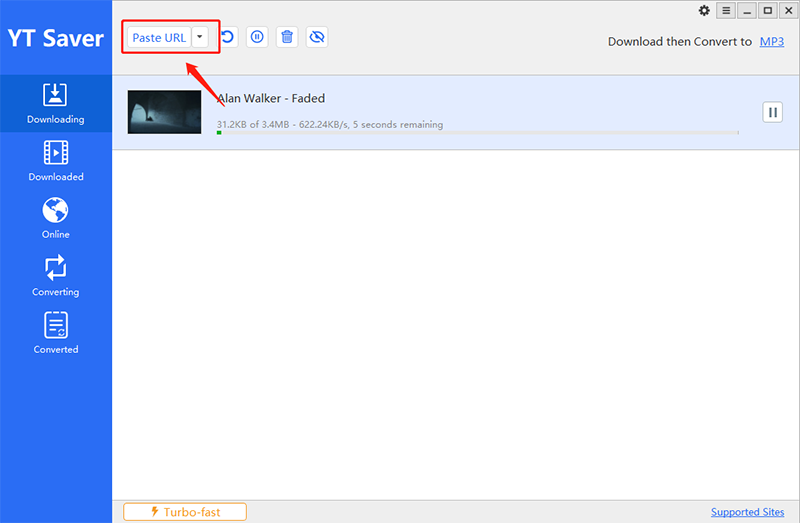
Step 4: Paste the YouTube video URL to the software
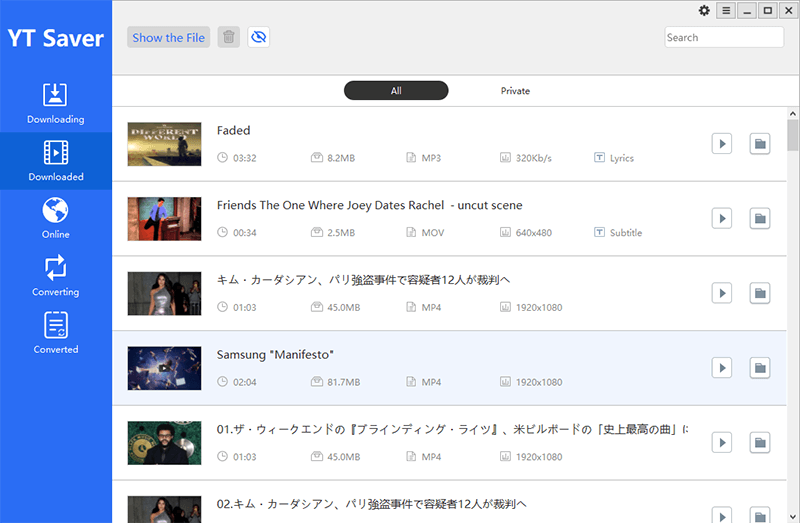
Step 5: Download YouTube music to mp3 directly.
Conclusion
We tested the program personally for 4 days and used all the features extensively. It is the best YouTube to MP3 converter available. It has almost all features, and formats supported. For a complete software experience, you have to upgrade to the Pro.
More in Featured

DRmare Spotify Music Converter For Windows Review
You must have seen that people are using Spotify for music streaming nowadays and gone are the days when we used to download songs for offline playing. However, we still see that offline music downloads are a thing but just that you need a premium subscription of Spotify for the same. Because Spotify does not…
How to Convert MP4 to AVI
A peek into the world of file formats presents a picture of a thousand and one file extension formats that abound, many of which may not be supported by our devices. The challenge posed by the inability of most file formats to be accepted across all devices, however, has been resolved, thanks to conversion applications.…

InVideo Review: Create Professional Videos Online
Creating videos is no more the job of a professional video editing tool. Not everyone has the skills to craft videos that look professional without proper training. This is why the significance of alternatives such as an online video editor increased over time. Such a tool makes producing high-quality videos a matter of minutes. Even…
The week in tech, minus the noise.
New reviews, fixes and the stories that matter — once a week, straight to your inbox.
We only use your email to send the newsletter. Unsubscribe any time. See our privacy policy.
Comments