Your organic traffic is down. Your content is still being read but not on your site. It is being read in Google’s AI Overviews, inside ChatGPT answers, and as Perplexity citations. For the first time in the history of SEO, you cannot see the traffic you are losing.
Until now.
Clix SEO is a modern all-in-one WordPress SEO plugin built for how search actually works in 2026. This is not another meta-tag manager with a new coat of paint. It is a rethinking of what an SEO plugin should do when the search engines it is optimizing for are large language models as much as they are crawlers.
Clix SEO combines the SEO fundamentals every site needs content scoring, schema markup, XML sitemaps, redirects, integrations with three genuinely novel capabilities that the current generation of SEO plugins does not yet offer: an AI Citations Tracker, an Entity Knowledge Graph, and a built-in AI content detector.
The plugin comes in two versions. The free version, which will be available on the WordPress plugin directory, includes real-time content scoring, schema output, sitemaps, Google Search Console and Analytics integration, the AI content detector, and a site-wide analytics dashboard. The premium version adds the AI Citations Tracker, the Entity Knowledge Graph, Schema Templates with token replacement, the Role Manager, the 404 Monitor, and the Redirect Manager.
Clix SEO is developed by Rahul Vithala, a longtime tech writer, SEO expert and founder at thetechhacker.com, with over a decade of hands-on SEO experience.
Why Clix SEO exists: The market gap
Today’s most of the WordPress SEO plugins in wide use today were designed between 2010 and 2017, when SEO meant meta tags, XML sitemaps, and a handful of schema fields. Their internal architecture reflects that era: a metabox that helps you optimize a single post, a redirect table, a sitemap generator, and a dashboard that shows what percentage of posts have a green light.
The search process has undergone a structural change since those plugins were designed. Three shifts, in particular, are now impossible to ignore.
Shift 1: AI answers intercept intent before a click happens
When a user asks a question in ChatGPT, Perplexity, Claude, or on Google’s AI Overviews, the answer arrives fully formed on the results page. The traditional funnel search query, list of links, click, and land on your site are broken. Being cited in the AI’s answer is the new featured snippet, and for many high-intent queries it is the entire user experience.
Shift 2: Citation in an AI response is measurable, but not by SEO plugins built for links
Every one of those AI tools sends identifiable signals when it visits your site: distinct user agents for its crawlers (GPTBot, PerplexityBot, ClaudeBot, Google-Extended, and so on) and identifiable referrer headers when a human clicks through from the AI’s citation panel. That means AI citation is not an opaque black box it is trackable if a plugin knows to look for it. Almost none of the incumbent SEO plugins do.
Shift 3: Search engines now reason about entities, not just keywords.
Modern search algorithms build knowledge graphs of the real-world entities they encounter people, places, products, organizations, and topics and score sites based on how coherently those entities relate to each other across the domain. A site that writes about “solar panels” everywhere from the same author, category, and product taxonomy sends much stronger authority signals than a site that mentions the term in scattered posts. Legacy SEO plugins have no way to visualize or measure this connective tissue.
Clix SEO was built around these three shifts, on top of a rock-solid classic SEO foundation.
The features, one by one
Real-time content scoring
The core of any SEO plugin is a scoring engine that grades a post as it is being written. Clix SEO’s engine assigns four independent scores on a 0–100 scale SEO, Readability, Technical, and an Overall composite and displays them as animated conic-gradient circles inside the post editor sidebar, updating in real time as the writer types.
Under the hood, the SEO score checks focus keyword presence across the SEO title, URL slug, meta description, the first paragraph of the post, subheadings, and image alt attributes. The Readability score computes Flesch reading ease alongside sentence length, paragraph length, passive voice ratio, and transition-word density. The technical score evaluates HTTPS, slug quality, meta-length compliance, JSON-LD presence, and canonical correctness. The overall score is a weighted composite of the three.
What sets the writer experience apart is the prioritized fix list. Instead of showing a wall of green and red dots, Clix SEO surfaces the two or three checks that will produce the biggest score jump for the least effort, turning the metabox from a scorecard into a to-do list.
AI Citations Tracker
This is the flagship feature and the single strongest headline angle. No other mainstream WordPress SEO plugin, at the time of writing, it sports a first-class dashboard that tracks citations from ChatGPT, Perplexity, Claude, Google AI Overviews, and Microsoft Copilot. Some third-party SaaS tools track subsets of this externally; Clix SEO is the first to bring it inside WordPress as a native admin experience.
The AI Citations Tracker detects and logs every visit to your site that originates from an AI search tool. It does this by inspecting two signals on every front-end request: the incoming referrer host (which tells you that a human clicked through from an AI answer panel) and the visiting user agent (which tells you that an AI crawler fetched the page to inform an answer).
The detection map covers:
-
ChatGPT (chat.openai.com, chatgpt.com, GPTBot, ChatGPT-User, OAI-SearchBot)
-
Perplexity (perplexity.ai, PerplexityBot, Perplexity-User)
-
Claude (claude.ai, anthropic.com, ClaudeBot, anthropic-ai)
-
Google AI and Gemini (gemini.google.com, Google-Extended, GoogleOther)
-
Bing Copilot (copilot.microsoft.com, BingChat)
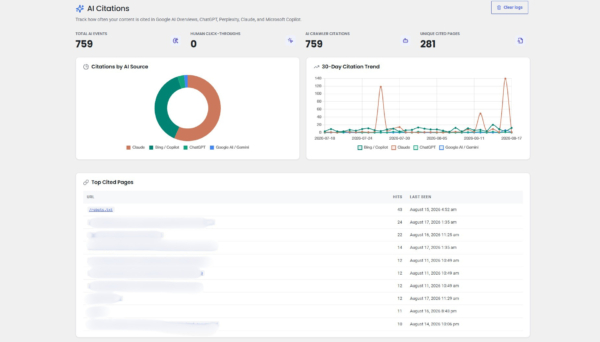
Every detected event is written to a dedicated database table with the source, the kind of event (either a bot citation or a human click-through), the target URL, the referrer, a sanitized user-agent string, and a hit counter. The dashboard then surfaces this data through:
-
Four KPI cards (total events, human click-throughs, AI crawler citations, unique cited pages)
-
A doughnut chart breaking down citations by source
-
A 30-day multi-line trend chart with one series per AI tool
-
A top-cited-pages table
-
A live recent-activity feed
A subtle detail matters here: the tracker distinguishes between an AI crawler citing the page and a human clicking through from the AI’s answer. The first is an inclusion signal your content is being considered as source material. The second is a conversion signal—your content is compelling enough that the reader wanted to see the original.
Privacy and safety are handled correctly by default. IP addresses are never stored in raw form; they are hashed with the site’s AUTH_SALT and used only as transient keys for a per-IP rate limiter. The tracker also enforces a configurable row cap on the log table so it can never grow unbounded.
Entity Knowledge Graph
A visual, interactive knowledge graph of a site’s entities is not offered by any mainstream WordPress SEO plugin as a native admin dashboard. Enterprise SEO SaaS platforms sometimes surface entity data in reports; Clix SEO renders it live inside wp-admin, built from the site’s own database.
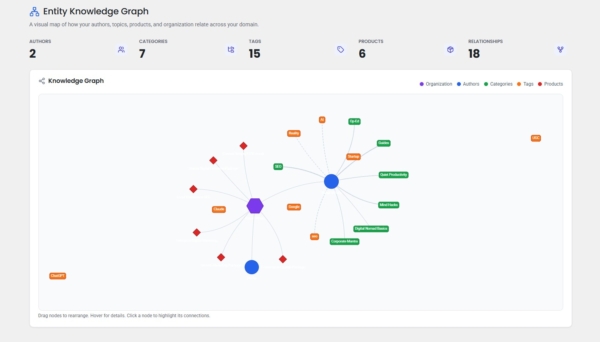
The Entity Knowledge Graph is a live, force-directed visualization of how the entities on your site connect to one another. On the page, you see nodes for your organization at the center, your top authors, your top categories and tags, and—if WooCommerce is active—your top products. Edges connect authors to the topics they write about most, with edge thickness scaled to reflect the number of posts they share.
The graph is built server-side from real co-occurrence data, not from configuration. Every published post contributes one edge for each of its author/category pairs and one edge for each of its author/tag pairs. Categories that are frequently used together in the same posts pull toward each other. Authors who write about many topics spread outward; authors who specialize appear tightly clustered around a small set of tags.
The practical value is diagnostic. Editorial teams use the graph to spot:
-
Topical authority gaps (“we say we cover cloud infrastructure, but no author is central to that cluster”)
-
Author over-specialization (“all our AI content sits on one person”)
-
Orphan taxonomies (categories that no author frequents)
It also gives content strategists a concrete artifact to bring into planning meetings—much more persuasive than a spreadsheet of category counts.
AI content detector
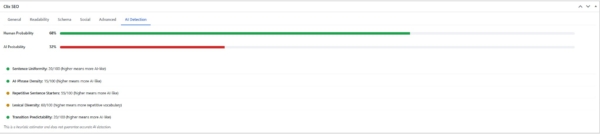
A built-in, on-server AI-content estimator is not part of any mainstream WordPress SEO plugin. Some standalone SaaS tools offer this; Clix SEO bundles it into the editor experience with no external API calls.
The AI content detector runs a heuristic analysis on every post to estimate how likely it is that the text was generated by an AI writing tool. It examines five signals:
-
Sentence-length uniformity (human writing tends to vary more)
-
Predictable transition-phrase density (words like “moreover” and “furthermore” cluster heavily in machine text)
-
Overall AI-phrase density using a curated dictionary of tell-tale constructions
-
Lexical diversity (the ratio of unique words to total words)
-
Repetitive sentence starters
Each signal produces its own sub-score, and the composite runs on a 0–100 scale visible from a dedicated tab in the post metabox. Because the estimator runs entirely on your own server, it makes no third-party API calls, requires no tokens or credentials, does not send your drafts anywhere, and works identically whether the site is public or behind a staging password.
The intended use is editorial guardrail, not policing. Publishers using AI writing tools use the score to catch drafts that read too obviously mechanical before they publish, and content-audit teams use it to sweep archives from before human editorial standards were formalized.
Schema Templates with Token Replacement
Reusable, tokenized JSON-LD templates that auto-attach by post type are offered by a small subset of SEO plugins, typically as a paid add-on. Clix SEO includes this as a power-user feature.
Schema Templates lets a site owner build reusable JSON-LD templates and auto-apply them to any post type. Templates use a token syntax—{title}, {permalink}, {excerpt}, {author}, {date}, and more that resolves per post at render time. The result is that a single article template attached to the Post type will produce correct, per-post structured data across the entire site without touching individual posts.
The supported schema @types covers the full range that Google and Bing actually reward: article, product, FAQ, how-to, event, recipe, video, local business, and custom types.
XML sitemaps with auto-heal
The sitemap module produces a fast, lightweight sitemap index plus per-type sitemaps for posts, pages, categories, tags, authors, and (when WooCommerce is active) products. Image references are automatically bundled into each URL entry.
Two small but useful implementation details set it apart:
-
An “auto-heal” behavior that detects stale WordPress rewrite rules on every admin load and flushes them at most once per day (which fixes the “my sitemap returns 404 after a theme change” problem before the site owner ever notices)
-
An optional auto-ping to Google and Bing on every publish
Redirect Manager + 404 Monitor
The Redirect Manager supports 301, 302, 307, and 410 redirect types, tracks hit counts and last-accessed timestamps per rule, and exposes full CRUD through the REST API for bulk imports and external automation.
Paired with it is a frontend 404 logger that captures every miss on the site—the requested URL, the referrer, and the frequency—with wildcard exclusion patterns and bot-filtering to keep the log signal-heavy. Every logged 404 has an inline “Promote this” form: pick a destination, pick a redirect type, save, and the miss becomes a fix without ever leaving the log page.
Google Search Console + GA4 + Social profiles
The Integrations page consolidates the three most common external connections a WordPress site needs:
-
Google Search Console: Accepts either the HTML meta verification tag or the full <meta> snippet—the plugin extracts the token and outputs the correct verification tag no matter which format the user pastes in.
-
GA4: Accepts a Measurement ID and renders the gtag.js snippet site-wide, with checkboxes for IP anonymization, excluding administrators, and excluding logged-in users.
-
Social Profiles: Covers nine networks—Facebook, Twitter/X, Instagram, LinkedIn, YouTube, Pinterest, TikTok, GitHub, and Wikipedia—with the URLs automatically feeding into the site’s Organization schema as sameAs entries.
Role Manager
The Role Manager exposes a matrix of eight granular capabilities—view analytics, edit metabox, manage schema templates, manage redirects, edit sitemap, edit robots.txt, run analyses, and manage settings—mapped against every registered WordPress role.
This lets a site owner grant editors access to analytics without letting them touch global settings or grant authors permission to see and edit only their own SEO scores.
Analytics, Status & Tools
The Analytics page renders averages for SEO, readability, technical, and overall scores across the entire content library, along with:
-
A score-distribution doughnut chart broken into excellent/good/average/poor buckets
-
A 30-day trend line for the average overall score
-
Top-performing and needs-attention tables
-
A Content Gaps panel that counts posts missing meta descriptions, missing focus keywords, marked noindex, and missing social sharing images
The Status & Tools page rounds out the admin experience with a diagnostics panel, a built-in robots.txt editor with live preview, and a JSON export/import for every Clix SEO setting.
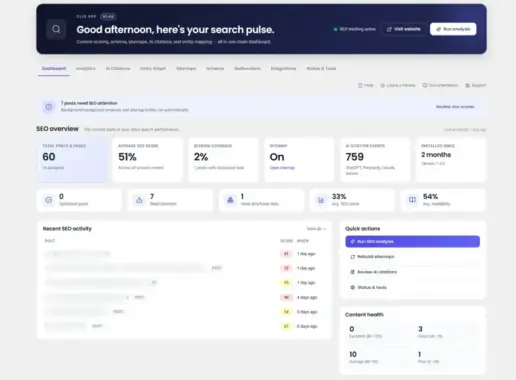
The revamped dashboard
The visual style of the dashboard is a genuine differentiator. Most SEO plugins ship a utility-oriented admin UI that inherits WordPress’s default dashboard look. Clix SEO ships a modern, hero-driven dashboard with a time-aware greeting, gradient KPI cards, and Lucide-style iconography an aesthetic more common in modern SaaS products than in WordPress plugins.
The dashboard opens on a dark-navy gradient hero card with a soft indigo glow, a time-aware greeting that changes across the day (“Good morning” / “Good afternoon” / “Good evening, here’s your search pulse”), a live pulsing indicator that reads “SEO tracking active”, and two primary CTAs: Visit website and Run analysis.
Below the hero, a sub-navigation strip mirrors the sidebar’s main sections in a horizontal tab layout for one-click access. The KPI grid uses a “featured first card” pattern: the primary metric sits inside a light-indigo gradient card, and the remaining metrics are plain white cards, giving the eye a natural anchor.
Three workflows that show Clix SEO in action
Workflow 1: The publisher who is losing traffic to AI
A mid-sized publication has watched its organic search traffic decline over the last twelve months as Google’s AI Overviews began answering more of the questions its content ranks for. The team suspects correctly that their content is still being cited, but the citations are not producing clicks.
After activating Clix SEO and enabling AI Citations tracking, the team watches a real dashboard fill up over the next two weeks: hundreds of ChatGPT and Perplexity crawler hits on their evergreen posts, a smaller but growing volume of human click-throughs from Perplexity’s citation panel, and a clear pattern of which article topics get cited most heavily.
This is not a traffic recovery in itself, but it converts an invisible loss into a measurable channel, which is the first step toward optimizing for it.
Workflow 2: The content strategist mapping topical authority
An editorial team is planning next quarter’s content calendar. They want to double down on topics where they already have authority and identify gaps where they publish sporadically.
Historically this analysis has meant exporting a spreadsheet of category counts and eyeballing patterns. With Clix SEO’s Entity Knowledge Graph, the strategist opens a live map of the site’s topics, authors, and products in about two seconds.
Clusters are visible immediately: three authors cluster around cloud infrastructure topics, one author dominates AI content alone, and an entire category “developer tools” has no author edge going into it at all. The strategist takes screenshots of the graph into the planning meeting; the resulting conversation is more concrete and more decisive than a spreadsheet could have produced.
Workflow 3: The agency owner standardizing across ten client sites
An agency manages SEO for ten client WordPress sites. Each site has slightly different settings, and onboarding a new client historically meant reconfiguring dozens of options one at a time.
With Clix SEO, the agency creates a reference configuration on a single “template” site, exports it as a JSON file from Status & Tools, and imports it into each client site. Titles and meta patterns, sitemap rules, robots.txt content, and integration settings all reproduce in one click.
Combined with the Role Manager, the agency then grants each client’s in-house editor exactly the capabilities they need without exposing the full admin surface. The onboarding time for a new client drops from an afternoon to under half an hour.
What’s free and what’s premium
Clix SEO Free, distributed through the WordPress plugin directory under the GPL v2 license, is genuinely usable on its own it is not a crippled trial for the paid version. It includes:
-
Real-time content scoring
-
XML sitemaps
-
JSON-LD schema output
-
Google Search Console and Analytics integration
-
Social profile management
-
The AI content detector
-
The site-wide analytics dashboard
-
The robots.txt editor
-
The JSON export/import
Clix SEO Premium adds the six features that require the deepest engineering:
-
The AI Citations Tracker
-
The Entity Knowledge Graph
-
Schema Templates with token replacement
-
The Role Manager
-
The 404 Monitor
-
The Redirect Manager
The free plugin never nags, never disables features it advertises, and never asks for a license key. The premium features live under a single “Go Premium” page that lists what is inside and links out to the purchase page. That is the whole upsell.
Final thoughts
The featured snippet moved. Your SEO plugin should know that.
Clix SEO is built for a world where AI answers intercept intent, citations are measurable, and search engines reason about entities. It brings real-time scoring for the classic web and citation tracking for the AI web into one single platform.
For more product updates, technology explainers, troubleshooting guides, and practical how-to articles, subscribe to TheTechHacker and keep following thetechhacker.com for the latest news in technology.
Leave a Reply