

How to Fix Twitch Subscription Problems: See and Cancel Subs at twitch.tv/subscriptions
Ever opened your bank statement and spotted a Twitch charge you’d completely forgotten about? Happens to the best of us. You subscribe to a streamer during a great stream, maybe gift a couple of subs in chat, and a few months later you have no idea what’s still renewing. The good news is that Twitch…

How to See and Cancel Twitch Subscriptions
Ever opened your bank statement and spotted a Twitch charge you’d completely forgotten about? Happens to the best of us. You subscribe to a streamer during a great stream, maybe gift a couple of subs in chat, and a few months later you have no idea what’s still renewing. The good news is that Twitch keeps everything in one place, twitch.tv/subscriptions, and once you know where to look, checking or cancelling takes a minute. In this guide I’ll show you how to see your Twitch subscriptions, how to stop them renewing on the web, iPhone and Android, and what to do when a sub just won’t show up.
If you’re new to subs and want to know what you actually get for your money, start with our older guide on what a Twitch subscription is and how it works. This one is all about managing and cancelling them.
Quick answer: Go to twitch.tv/subscriptions while signed in to see every channel you’re subscribed to and when each one renews. To cancel, click the gear icon next to the channel and choose “Don’t Renew Subscription”. You keep the sub until its end date. If you subscribed inside the iPhone or Android app, cancel it from your App Store or Google Play subscriptions instead.
Where to See Your Twitch Subscriptions
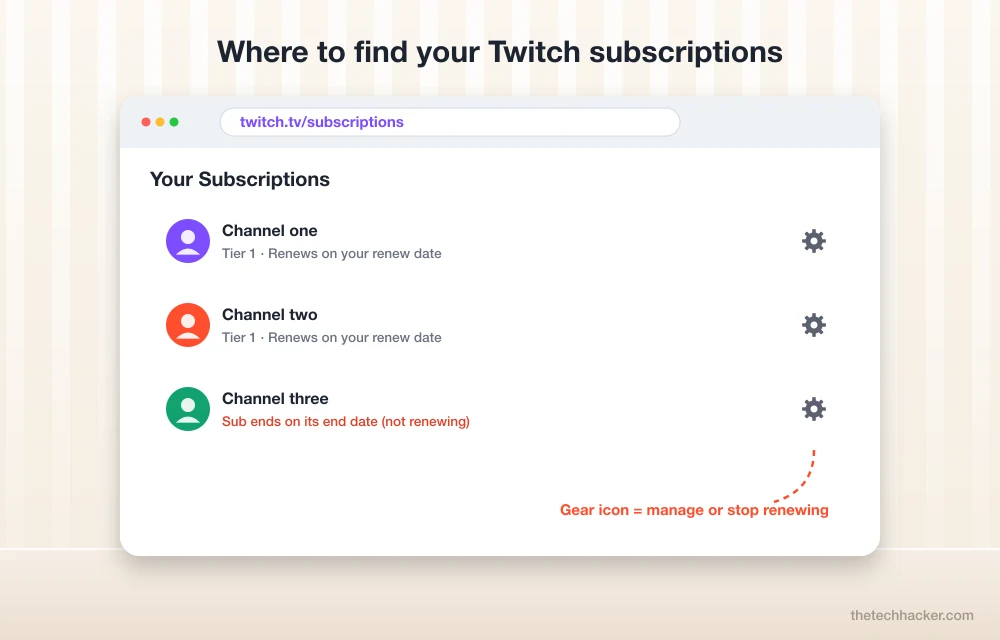
Sign in to Twitch in a web browser and open twitch.tv/subscriptions. You can also get there by clicking your profile picture in the top right corner and choosing Subscriptions. It’s easier on a computer, honestly, because the page shows more than the app does.
On that page you’ll see a card for every channel you support. Each one shows the tier you’re paying for and the important bit, the renew date. That’s the day Twitch charges you again. Look for an “Expired” or past-subscriptions section too, which lists subs you’ve already ended, along with any gift subs that ran out. If you pay for Twitch Turbo (ad-free Twitch everywhere), that’s a separate thing and lives at twitch.tv/turbo, not on your channel subs list.
How to Cancel a Twitch Subscription on a Computer
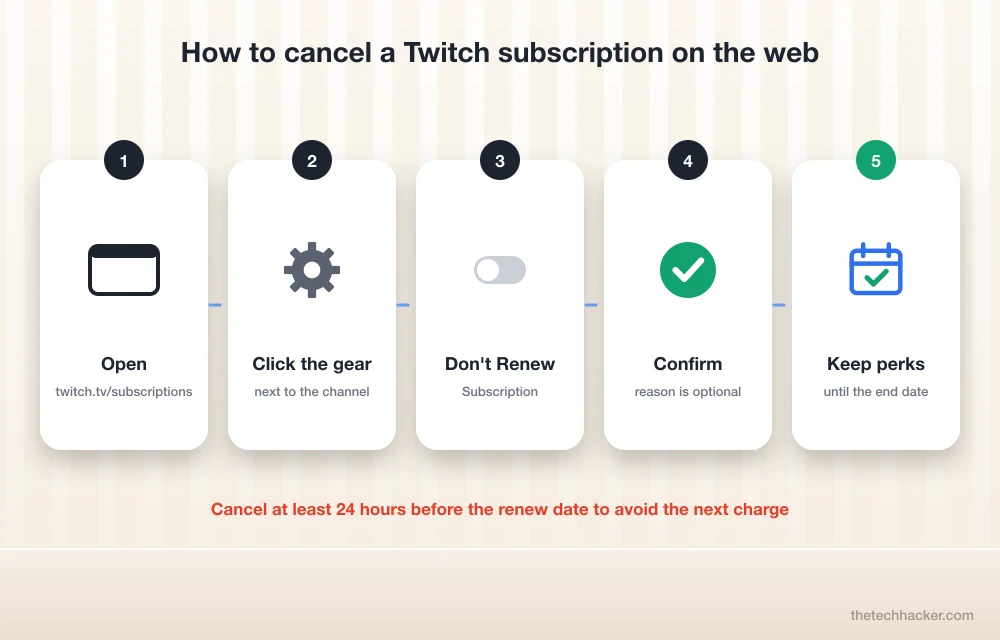
Cancelling on Twitch isn’t really “cancelling” in the instant sense. You’re switching off the auto-renewal. Here’s how it goes. Open twitch.tv/subscriptions, find the channel, and click the little gear icon on its card. Pick Don’t Renew Subscription. Twitch will ask why you’re leaving, which is optional, and then you confirm with the same button one more time.
That’s it. The card now shows when your sub ends instead of when it renews, and you keep the emotes, badge and other perks for that channel until then. There’s no refund for the days you have left, but there’s also no reason to rush, because nothing is taken away early.
Note: Timing matters. Twitch says you need to cancel at least 24 hours before your renew date to avoid being charged for the next month, according to its refund policy page. Cancel on the day it renews and you’ll probably pay for one more month.
How to Cancel a Twitch Subscription on iPhone or iPad
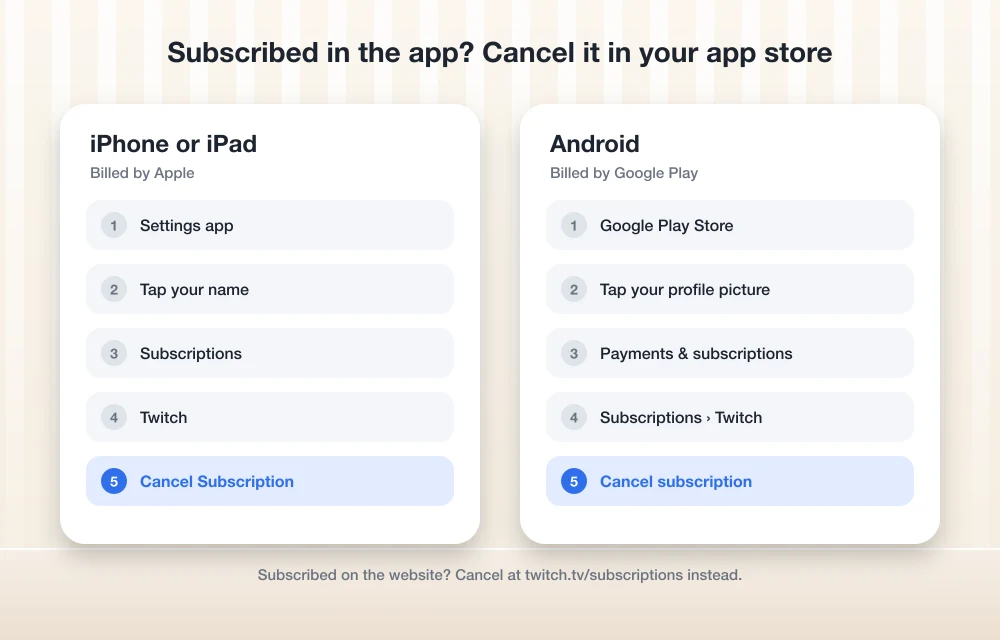
This catches a lot of people out. If you subscribed from inside the Twitch app on your iPhone, the payment went through Apple, not Twitch. So Twitch can’t stop it, Apple has to. Open the Settings app, tap your name at the top, then Subscriptions. Find Twitch in the list, tap it, and choose Cancel Subscription. Apple’s own guide to cancelling a subscription from Apple has the same steps if your screen looks a bit different.
Did you subscribe on the Twitch website and only watch on your iPhone? Then the iPhone steps won’t show anything, and you need to cancel at twitch.tv/subscriptions in a browser instead. Safari on the phone works fine for this.
How to Cancel a Twitch Subscription on Android
Same idea as the iPhone. A sub bought inside the Android app is billed by Google Play, so you cancel it there. Open the Google Play Store, tap your profile picture, go to Payments & subscriptions, then Subscriptions, pick Twitch and tap Cancel subscription. Google’s Play Store help page walks through the same thing.
Not sure where you bought it? Check your email. Twitch sends receipts for web purchases to your Twitch email, while app purchases come from Apple or Google.
What About Prime Subs and Gift Subs?
If you have Amazon Prime linked to Twitch, you get one free channel sub every 30 days. These don’t quietly renew and charge you, because they’re free and tied to your Prime membership. Once the 30 days are up, you can use your Prime sub again on the same streamer or move it to someone else. So there’s nothing to cancel there, just don’t renew it.
Gift subs are even simpler. If someone gifted you a sub, it runs out on its own and never charges you. If you gifted subs to others, those were one-time payments, so they won’t renew either.
Twitch Subscription Not Showing or Still Charged? Try These Fixes
The sub isn’t on my subscriptions page. First, make sure you’re signed in to the right account. It’s easy to have an old Twitch account you forgot about. If you bought the sub in the iPhone or Android app, it may not appear the same way on the web page, so check your App Store or Google Play subscriptions as well.
I cancelled but got charged again. Check the date you cancelled. If it was less than 24 hours before the renew date, that charge may have already gone through. Also look at where the charge came from. An Apple or Google charge means the sub is still active in that store, even if Twitch’s page looks clean.
I can’t find the gear icon. You’re probably in the app. The mobile app doesn’t always show the same options, so open twitch.tv/subscriptions in a browser instead, either on your computer or your phone’s browser.
I want my money back. Twitch handles refunds for web purchases through its support site, and the rules are on its refund page. For app purchases, ask Apple or Google, since they took the payment.
Want to go the other way and earn from subs yourself? Have a look at how to make money on Twitch and how to set up donations on Twitch. And if you’re done with Twitch altogether, here are some Twitch alternatives worth trying.
Frequently Asked Questions
How do I see all my Twitch subscriptions?
Sign in on the Twitch website and go to twitch.tv/subscriptions, or click your profile picture and pick Subscriptions. You’ll see each channel, its tier and the renew date. Subs bought in the iPhone or Android app can also be checked in your App Store or Google Play subscriptions.
How do I cancel a Twitch subscription?
On the web, open twitch.tv/subscriptions, click the gear icon next to the channel and choose Don’t Renew Subscription, then confirm. If you subscribed inside the Twitch app, cancel it in iPhone Settings under your name and Subscriptions, or in Google Play under Payments & subscriptions.
Do I lose my sub benefits right away if I cancel?
No. You keep the emotes, badge and other perks until the end date shown on the subscriptions page. Cancelling only stops the next renewal.
Does Twitch give refunds for subscriptions?
Generally you don’t get money back for the time left on a cancelled sub. Twitch’s refund page explains the rules for web purchases, and subs bought in the iPhone or Android app are refunded through Apple or Google.
Do Prime Gaming subs renew automatically?
No. A Prime sub is free and lasts 30 days. After that you choose whether to use it on the same streamer again or on someone else, so it never charges you.
Final words: twitch.tv/subscriptions is the page to bookmark. Check it once in a while, switch off what you don’t watch anymore, and remember that app subs are cancelled through Apple or Google. If something still looks off with your billing, tell us in the comments and we’ll try to help you sort it out.
More in Guides
How to Make Money on Twitch?
You might have heard about people playing games, live streaming, and earning money out of that. Streaming mediums are available in plenty and it’s hard to choose anyone from those. The most popular especially for Gaming is Twitch. How to make money on Twitch? Earning money is not easy, but is quite easy! We mean…
How to Fix Slow Netflix
As of March 2022, 190 nations have access to Netflix, with access to over 15,000 titles. It wouldn’t be a surprise to find your favorite show on this globally-expanding OTT platform. It’s popular because it is an affordable, monthly subscription service that gives you access to many TV shows, movies, and documentaries. Netflix does not require a…

How To Manage And Cancel Subscriptions On iPhone And iPad
The subscription model services business exponentially increased in recent years. Many popular websites, games, music and video streaming services are offering a subscription-based model to enjoy their services. A subscription service offers unlimited use of service under the subscription period. The subscription model is not new to Apple iOS users. The subscription service of Apple…
The week in tech, minus the noise.
New reviews, fixes and the stories that matter — once a week, straight to your inbox.
We only use your email to send the newsletter. Unsubscribe any time. See our privacy policy.
Comments