

How to Fix Node.js Errors After Upgrading to Node 24 or Node 26
Disclosure: TheTechHacker has no paid relationship with the projects or companies mentioned here. You bump Node, run npm start, and the terminal fills with red because a native module “was compiled against a different Node.js version.” On top of that, a dependency can’t find _stream_readable and a flag that’s been sitting in your scripts for…

Photo by Gabriel Heinzer on Unsplash
Disclosure: TheTechHacker has no paid relationship with the projects or companies mentioned here.
You bump Node, run npm start, and the terminal fills with red because a native module “was compiled against a different Node.js version.” On top of that, a dependency can’t find _stream_readable and a flag that’s been sitting in your scripts for months is suddenly a “bad option,” which isn’t exactly the morning you had planned.
A lot of developers are upgrading this week whether they planned to or not, since the Node.js project scheduled security releases for November 11, 2026 across the 26.x, 24.x and 22.x lines, with the top issue rated High on all three. Node 20 already hit end-of-life in April and Node 26 is the newest line, so if you’re jumping a major version to pick up the patches, the sections below walk through the errors that usually show up and how to fix them.
node_modules and reinstall, or run npm rebuild, to fix native module version errors. Update any dependency that still imports the old _stream_* modules, which Node 26 removed. Swap res.writeHeader() for res.writeHead(). Drop --experimental-transform-types and use a real TypeScript build step. Install Node with a version manager so you can roll back in seconds.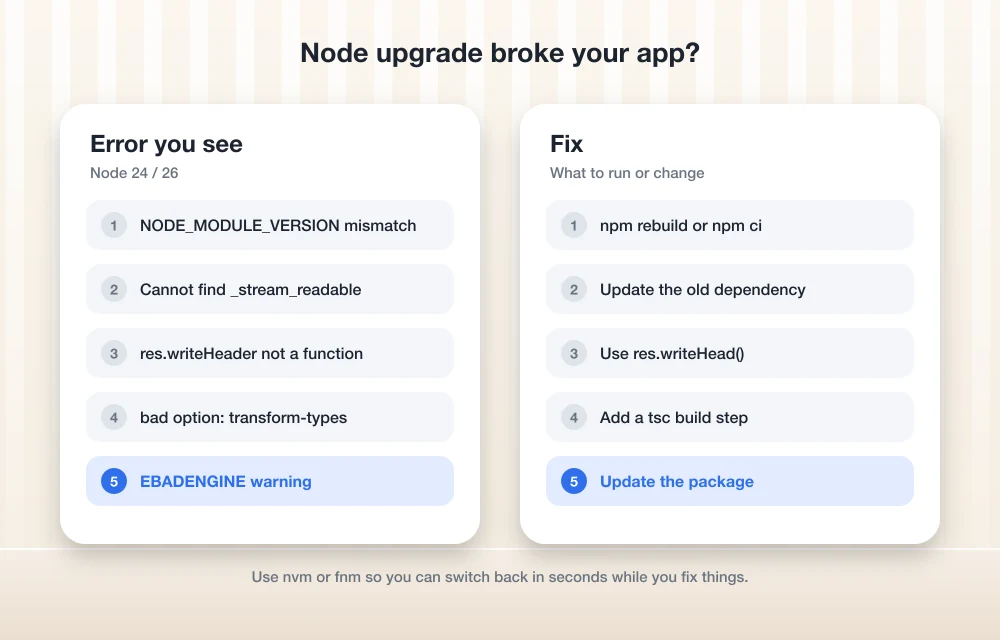
First, Pick the Right Version to Upgrade To
Before you fix anything, it’s worth making sure you’re upgrading to a line that still gets security fixes, so run node -v and compare what you’ve got against this list:
- Node 26 was released on May 5, 2026 and moved to LTS in October 2026, which makes it a good target for new projects.
- Node 24 is also LTS, and it’s the safest jump for most apps coming off 20 or 22.
- Node 22 is still patched in the November 11 release, but since it’s the oldest supported line, you should start planning your move off it.
- Node 20 and older are end-of-life. The Node.js security release notice says EOL versions are always affected when a security release happens, and they just don’t get the fix.
My usual approach is to go from 20 to 24 first, fix whatever breaks, and then treat 26 as a separate step later on, because two smaller jumps are way easier to debug than one big one.
Install Node With a Version Manager (So You Can Roll Back)
If you installed Node with the installer from the website, switching versions is painful, whereas a version manager lets you keep two versions side by side and flip between them per project. With nvm on macOS or Linux it looks like this:
nvm install 24
nvm use 24
node -v

# pin it for the project
node -v > .nvmrc
On Windows, nvm-windows or fnm do the same job, and the nice part is that if the upgrade goes badly, nvm use 22 gets you working again while you sort things out.
How to Fix the Most Common Node Upgrade Errors
1. “was compiled against a different Node.js version”
This is the classic one, and it happens because native addons (packages with C++ code, like bcrypt, sharp, better-sqlite3 or canvas) are built for a specific Node ABI called NODE_MODULE_VERSION. Node 26 uses version 147, so anything that was compiled for an older Node simply refuses to load:
Error: The module '.../build/Release/addon.node'
was compiled against a different Node.js version using
NODE_MODULE_VERSION 137. This version of Node.js requires
NODE_MODULE_VERSION 147.
You can fix it by rebuilding, or by doing a clean install if you’d rather start fresh:
npm rebuild

# or the clean way
rm -rf node_modules
npm ci
If npm ci fails because the package doesn’t have a prebuilt binary for the new Node yet, update the package to its latest version, since popular native packages usually publish new prebuilds soon after a Node major lands.
2. “Cannot find module ‘_stream_readable'”
Node 26 removed the old internal stream modules, which are _stream_readable, _stream_writable, _stream_duplex, _stream_transform, _stream_passthrough and _stream_wrap. Your code probably doesn’t import them directly, but some old dependency deep in the tree might, and you can track down which one with:
grep -rl "_stream_readable" node_modules --include=*.js | head
npm ls <package-name>
Once you know the culprit, update that package or the parent that pulls it in, and in your own code switch the import over to node:stream instead:
// before
const Readable = require('_stream_readable');

// after
const { Readable } = require('node:stream');
3. “res.writeHeader is not a function”
The http.Server.prototype.writeHeader() alias is gone in Node 26, and since it was always just an old name for writeHead(), the fix is a simple rename:
res.writeHead(200, { 'Content-Type': 'application/json' });4. “bad option: –experimental-transform-types”
Node 26 removed this flag entirely. Plain type stripping still works for simple TypeScript, but anything that needs real transformation (enums, namespaces, parameter properties) needs a proper build step, so I’d move those scripts to tsc or run them through a tool like tsx in development. After that, take the flag out of your package.json scripts and Dockerfiles, and pay extra attention to your CI configs because that’s the place it’s easiest to forget about.
5. EBADENGINE warnings during install
This one’s a warning rather than an error, but it’s still worth reading, because it means a package’s engines field says it doesn’t support your Node version. Usually that’s just an old version range nobody got around to updating and the package works fine, but if something breaks at runtime, that package should be your first suspect, so update it or check its changelog for a release that supports your Node line.
6. New deprecation warnings in the console
Node 26 added runtime deprecation warnings for a few APIs, including module.register() and some crypto and stream items, and while they won’t crash anything today, they’re a heads-up that the next major will. To find out where a warning is coming from, run:
node --trace-deprecation server.js7. localStorage is suddenly undefined
If you were relying on Node’s built-in localStorage, it now returns undefined in Node 26 unless you start Node with --localstorage-file pointing to a file. Most server code probably doesn’t want localStorage in the first place, so this is a good moment to swap it for a real store.
Don’t Forget CI, Docker and Your Host
A local upgrade is only half the job, so you’ll also want to update the Node version in these places:
- Your CI workflow needs the new version too, for example the
node-versionin a GitHub Actions setup step. - The base image in your
Dockerfileshould match, so something likeFROM node:24-alpine. - Update the
enginesfield in your ownpackage.jsonso teammates get a clear warning if they’re on the wrong version. - If your hosting platform has its own Node setting, change that as well.
After that, run your full test suite on the new version before you deploy anything. If you’re jumping to 26, read the full list of breaking changes in the Node.js 26.0.0 release notes, which is long, but scanning the “semver-major” section only takes about ten minutes and can save you a lot more time than that.
If you build on WordPress instead of Node, our guide on how to test a WordPress plugin for security and performance follows the same “test before you ship” idea. For anyone working with AI APIs, we also have an explainer on how JSON prompting works, and if you want the bigger picture on where app development is heading, take a look at how low code is changing app development.
FAQs
Which Node.js version should I use in November 2026?
I’d go with Node 24 or Node 26, since both are LTS. Node 22 is still getting patches but it’s the oldest supported line, and Node 20 is already end-of-life.
How do I fix NODE_MODULE_VERSION errors after upgrading Node?
Run npm rebuild, or delete node_modules and run npm ci for a clean install. If a native package still fails after that, update it to a version that ships prebuilt binaries for your Node release.
Why does Node 26 say it can’t find _stream_readable?
Node 26 removed the legacy internal _stream_* modules, so an older dependency is probably still importing one of them. You can find it with npm ls and update it, and if the import lives in your own code, switch it to node:stream.
Do I have to upgrade for the November 11 security release?
If you’re on 22, 24 or 26, you just need to update to the patched release in your own line, which doesn’t involve a major jump at all. On 20 or older there’s no patch coming, so a major upgrade is the only way to get the fix.
Upgrades tend to break in predictable ways, which is actually good news, because it means you can work through the errors above one at a time and keep the old version installed until the tests pass, and you’ll be patched before the week is out.
You might also like
This Copy Of Windows Is Not Genuine – Easy Error Fixing
“This Copy Of Windows Is Not Genuine” is a common message we usually saw when the trial period of Microsoft Windows period is over or in a pirated version of the OS. After installing Microsoft Windows Operating System of any version it will run for free, after one or two months the Operating system continuously…

How to Fix 5.1 Channel Surround Sound not Working Error in Windows 10
Brief: This article shows how to fix 5.1 channel surround sound not working error in Windows 10 with a few popular methods. As we know, Windows 10 is a fantastic operating system. However, it fails to impress us when they release the latest update with full of bugs. This situation is most common for Windows…

How to fix Android “not registered on a network” error
Android “not registered on network error” is a quite annoying problem when we try to insert the SIM card on Android device. It is the most common problem we usually see on Android-based smartphones. This error message pop-up when the user trying to make a call on the problematic smartphone. It happens when the device…
The week in tech, minus the noise.
New reviews, fixes and the stories that matter — once a week, straight to your inbox.
We only use your email to send the newsletter. Unsubscribe any time. See our privacy policy.
Comments