

This Copy Of Windows Is Not Genuine – Easy Error Fixing
“This Copy Of Windows Is Not Genuine” is a common message we usually saw when the trial period of Microsoft Windows period is over or in a pirated version of the OS. After installing Microsoft Windows Operating System of any version it will run for free, after one or two months the Operating system continuously…

“This Copy Of Windows Is Not Genuine” is a common message we usually saw when the trial period of Microsoft Windows period is over or in a pirated version of the OS. After installing Microsoft Windows Operating System of any version it will run for free, after one or two months the Operating system continuously shows the error message This Copy Of Windows Is Not Genuine with limited functionality.
Reasons for the Microsoft Windows Is Not Genuine Issue
The genuine error of Windows OS is mainly due to two reasons. It comes after the end of the trial period of original Windows or Microsoft pirated copy detection by “KB971033” update. If you delete this update you can bring back its state.
It is always advisable to turn on Install updates automatically, but, in this case, it is better to turn off the automatic updates feature. To do this follow steps.
- open the control panel and go to windows update.
- Here click on “Install updates automatically (Recommended)”.
- Select “never check for updates (Not recommended)”
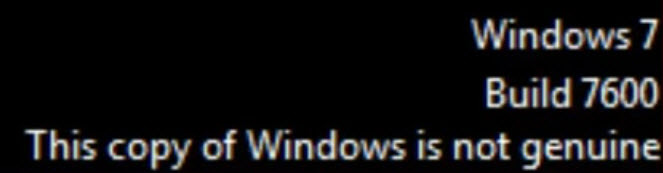
If your system is already updated with genuine detection update and message start appearing on screen follow these below steps. This procedure involves fix for Windows 7 genuine error.
How to fix This Copy Of Windows Is Not Genuine error message?
Most people first Google using this term “How to remove genuine Microsoft software“. It is a simple process if you follow steps.
- Open the command prompt using Start Button by searching “cmd” in the search box. Or you can open it directly pressing “Start+R” buttons on the keyboard.
- To perform this step, you need be assigned Administrator Privileges to command prompt.
- In command prompt type SLMGR -REARM.
- SLMGR is Windows software licensing management tool which stores the licensing information in it. Whereas REARM is a command to reset the licensing status of the machine.
- Here the Windows shows a confirmation message, click on ok.
- Now restart your PC to changes take effect.
If all goes well you never receive an error message, try again with the same command or try with SLMGR /REARM.
This procedure of fixing Windows validation issue works with both Windows 32Bit as well as 64Bit versions. If you are facing, any issues try two commands after failed attempts.
The above steps remove the error message and still, the Balck screen appears on the page. You can change it to your customized wallpaper by going into system properties.
The above-discussed processes are most easy methods to fix this copy of windows is not genuine error in windows 7. Hope you are like this tutorial, please comment below if you have any suggestion or doubts.
More in How-to
How To Fix Slow File Copy Speed In Windows 10
Copying, moving files, and folders on a computer is a regular task. Most of the copying and moving tasks are common between hard disk to another hard disk either internal to external. Recently my friend faced a slow file copying issue and he asked the best suggestion to improve the data transfer speed. He is…
How To Fix The 0x8024401c Error In Windows 10
0x8024401c is a common error code usually appear on the Windows update page on your computer. It is an error caused by the registry keys of Windows update and you can easily fix them by running the registry script on your computer. Before going to proceed the below methods, first, check your Windows is activated…
How to fix Access denied error on Windows 10 administrator account
Windows 10 is a security-oriented operating system. It has an administrator account facility that controls entire OS permissions and controls. When you create an account for the first time on Windows 10, it will be set as the administrator account and it rules the complete system. If you want you can create a new user…
The week in tech, minus the noise.
New reviews, fixes and the stories that matter — once a week, straight to your inbox.
We only use your email to send the newsletter. Unsubscribe any time. See our privacy policy.
Comments