

Best Domain Registrars in 2026: GoDaddy vs Namecheap vs Cloudflare vs Squarespace vs Porkbun
I compare GoDaddy, Namecheap, Cloudflare Registrar, Squarespace Domains and Porkbun on the things that cost you later: renewal prices, WHOIS privacy, DNS and transfers. I only list prices I could confirm on official pages.


Photo by Kari Shea on Unsplash
A domain registrar sells you a yearly lease on a name. And the first-year price? Rarely the one that matters. Watch the renewal charge that shows up twelve months later, because it’s often higher than whatever you paid at checkout.
GoDaddy, Namecheap, Cloudflare Registrar, Squarespace Domains and Porkbun all sell the same .com names. Where they differ is narrower: what you pay after year one, whether your contact details stay private, how DNS works, and how much friction you hit when you leave. I wrote a much longer list of domain registrars back in 2017, and the market’s shifted a lot since then.
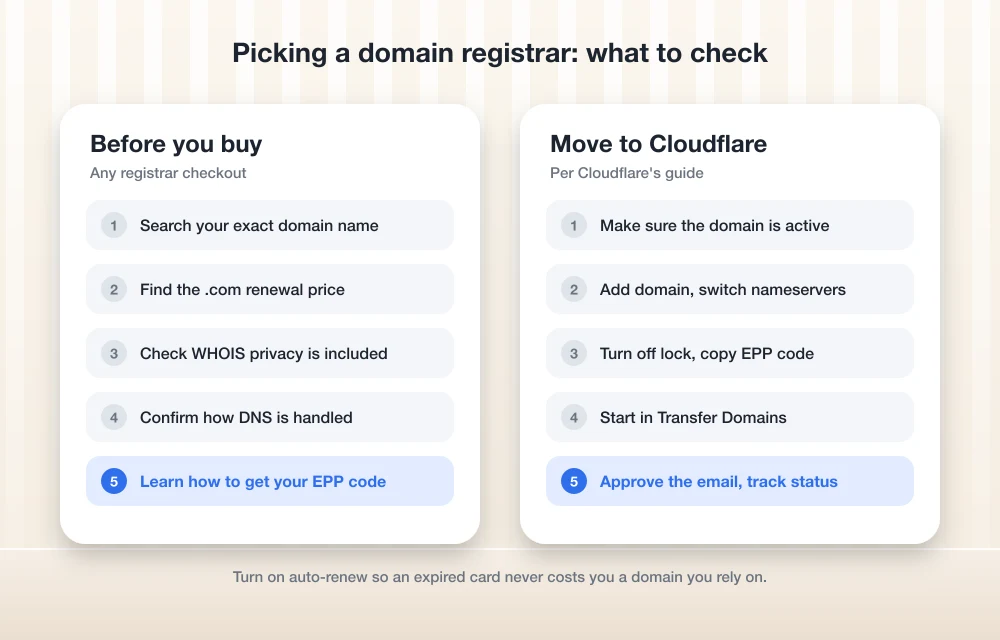
Quick answer: If you want the lowest long-term cost and you’re fine using Cloudflare’s DNS, Cloudflare Registrar is my pick. It sells registrations and renewals at wholesale prices with no markup, so there’s no bigger bill waiting in year two. For GoDaddy, Namecheap, Porkbun and Squarespace Domains, compare the .com renewal price (not the first-year promo), check whether WHOIS privacy is included free, and see how transfers out work before you commit.
What actually matters when you pick a registrar
You don’t buy a domain. You rent it from a registrar, and you keep paying every year to hold onto it, which is where the real cost sits. Nobody owns one outright.
Renewal price beats the first-year price
Each extension like .com is run by an organization called the registry, and it charges registrars a wholesale price. Registrars add their own markup on top. Some slash the first year to win the sale, then claw the difference back on renewals. Not great for you.
So compare the renewal price for the extension you actually want. A deal that saves a few dollars once can cost you more over five years, and that’s easy to miss at checkout.
WHOIS privacy
WHOIS is the public lookup that shows who registered a domain. Privacy protection (some registrars call it redaction) keeps your personal contact details out of it. If it isn’t automatic and you skip it, spammers have a much easier time harvesting your details.
Policies differ by registrar, and sometimes by extension. I couldn’t confirm the current WHOIS privacy policy for any of these five from their official docs. So treat it as a line item you check in your cart.
DNS
DNS is the internet’s address book: it tells browsers where your website lives and tells other mail servers where to deliver your email. Most registrars include it. You can usually host it somewhere else if you’d rather.
Your web host is a separate layer. Say your site runs on a managed WordPress host like the one in my Kinsta hosting review; your DNS records just point visitors at that server. Cloudflare’s the exception in this group. Its registrar only works if you also use Cloudflare’s DNS.
Transfers
A transfer moves your domain from one registrar to another. Roughly three steps: switch off the domain lock at your current registrar, copy the authorization code (also called an EPP code, basically a one-time password for the move), then approve the request.
ICANN, the body that oversees domain name rules, has a Transfer Policy that sets timing rules for moves. I haven’t confirmed how those rules stand in 2026. If you’re planning a move around a deadline, check ICANN’s official page first.
Domain registrar comparison at a glance
| Feature | Cloudflare Registrar | GoDaddy | Namecheap | Porkbun | Squarespace Domains |
|---|---|---|---|---|---|
| Pricing model | At cost, no markup | Check official page | Check official page | Check official page | Check official page |
| Renewal vs. first year | Same wholesale price | Not confirmed | Not confirmed | Not confirmed | Not confirmed |
| Free WHOIS privacy | Not confirmed in official docs | Not confirmed | Not confirmed | Not confirmed | Not confirmed |
| DNS | Must use Cloudflare DNS | Not confirmed | Not confirmed | Not confirmed | Not confirmed |
| Transfer in | Yes, adds one year | Not confirmed | Not confirmed | Not confirmed | Not confirmed |
Every cell comes from the registrar’s own official pages. Where those pages didn’t settle a detail, the cell says “Not confirmed” rather than showing a guessed figure. Plenty of those, yes.
The best domain registrars, compared
Cloudflare goes first because it’s the one whose pricing model I could confirm. The other four follow alphabetically, so don’t read their order as a ranking.
1. Cloudflare Registrar
Cloudflare’s official plans page describes its registrar as at-cost domain registration with no markup pricing. The registrar page goes a step further: registrations and renewals at wholesale prices, and if you move your domain over, that at-cost pricing applies to all future renewals.
That’s the big advantage. No cheap first year followed by a jump; you pay roughly what Cloudflare pays.
The catch? Cloudflare Registrar requires your domain to use Cloudflare for authoritative DNS (Cloudflare calls this a full setup). If you already run DNS with another provider and want to keep it there, that’s a real tradeoff. For most small sites, though, it just means your DNS records and domain sit in one dashboard. Convenient, really.
UK readers, and US businesses running UK sites: Cloudflare says it supports transfers of .uk, co.uk, org.uk and me.uk domains.
What I liked
- Registrations and renewals at wholesale, no markup
- No first-year promo that suddenly jumps at renewal
- Every transfer in adds a year to your registration
- Handles .uk, co.uk, org.uk and me.uk transfers
What could be better
- You’re tied to Cloudflare’s DNS
- The advertised starting price is for the cheapest extension, not .com
- Moving a domain between Cloudflare accounts wipes its settings in the old account
Cloudflare Registrar
That’s the lowest price across all extensions, not the .com price. Renewals are charged at the same wholesale rate.
- No markup on registration
- Renewals at wholesale
- Requires Cloudflare DNS
Starting price as listed on Cloudflare’s official plans page when I wrote this. Prices change, and your .com price won’t match it, so check the price for your exact domain in the Cloudflare dashboard.
2. GoDaddy

GoDaddy’s the best-known name in domains, so it has to be in any comparison. But I couldn’t confirm its current .com first-year price, its renewal price, or whether WHOIS privacy is free by default from its official pages.
Considering GoDaddy? Go to its domains page, search your exact name and walk through checkout. Read every line in the cart before you pay, and write the renewal price down somewhere you’ll actually see it next year.
3. Namecheap
Namecheap’s pitch is right there in the name. But a cheap first year and a cheap renewal aren’t the same thing, and I haven’t confirmed either number for .com from Namecheap’s own pricing page.
On that page, check three things: the .com promo price, the renewal price, and whether privacy protection and DNS cost extra. Since Namecheap publishes its pricing openly, the renewal figure shouldn’t be hard to find.
4. Porkbun

Porkbun is the least-known name here, which is exactly why you should read its official listings before deciding. I couldn’t confirm its .com registration price, its renewal price, or whether WHOIS privacy and SSL are free from its own pages.
Start at Porkbun’s domains page, search your name, and put the renewal number next to the others on your shortlist. That’s the comparison that counts.
5. Squarespace Domains

Squarespace Domains makes the most sense if you build your site on Squarespace, since your website and domain then live with one company. Still choosing a builder? My website builders for small business comparison puts Squarespace against Wix, Shopify and WordPress.
I couldn’t confirm its .com price, renewal price, WHOIS privacy policy or DNS features from official pages. So check domains.squarespace.com before you buy. The renewal figure especially.
How to transfer a domain to Cloudflare Registrar
If Cloudflare’s at-cost renewals suit you, this is how the move goes, based on Cloudflare’s official transfer guide. Menu names at your current registrar will differ, so I’ve kept those steps general.
Check your current account
Make sure your account at your current registrar is still active. Expired domain? Renew it there first.
Add the domain to Cloudflare
Add your domain to Cloudflare and look over the DNS records it finds. Then switch the nameservers at your current registrar to the ones Cloudflare assigned.
Remove the lock and get your code
At your current registrar, turn off the domain’s transfer lock and copy the authorization (EPP) code.
Start the transfer
From your Cloudflare Account Home, go to Transfer Domains. You’ll get a list of the domains available for transfer.
Approve the move
Approve the transfer from the email your current registrar sends, or from that registrar’s dashboard.
Track the status
Check Account Home > Overview > Domain Registration. You might see “Transfer in progress,” “Pending approval” or “Transfer rejected.”
On cost: Cloudflare says each transfer adds one year to your domain registration. So you’re paying for a year you’d need anyway, not paying for the move itself.
Managing a lot of domains? Cloudflare’s changelog says its Registrar API beta has supported transfers since September 30, 2026. Before an API transfer, the domain needs a zone in your Cloudflare account already, and DNSSEC has to be off. Most extensions also need an authorization code.
Cloudflare or another registrar: how to decide
If total cost over the next five or ten years is what you care about, Cloudflare Registrar is the safest option I can back with confirmed facts. Wholesale renewals mean no price jump. And the DNS requirement is a fair trade for most small sites.
Prefer GoDaddy, Namecheap, Porkbun or Squarespace Domains? That works too. Just do the checks the official sources didn’t settle here: find the renewal price, confirm privacy is included, and learn how to get your authorization code before you need it, not on the day you’re trying to leave.
Whichever you pick, turn on auto-renew. Losing a domain your business depends on because a card expired is entirely avoidable.
Frequently Asked Questions
Why does the renewal price matter more than the first-year price?
You pay the renewal price every year you keep the domain. A first-year discount applies once. Over several years, a higher renewal price usually outweighs that cheap first year.
Does Cloudflare Registrar charge a markup on domains?
No. Cloudflare says it offers registrations and renewals at wholesale prices with no markup. Its advertised starting price is for the cheapest extension, though, so check the price for your exact domain in the dashboard.
Can I use Cloudflare Registrar with a different DNS provider?
No. Cloudflare Registrar requires your domain to use Cloudflare for authoritative DNS, which Cloudflare calls a full setup.
Does transferring my domain to Cloudflare add time to my registration?
Yes. Cloudflare says each transfer adds one year to your domain registration.
Is WHOIS privacy free at every registrar?
Not necessarily. Policies vary by registrar and sometimes by extension. I couldn’t confirm the current policy for these five from official docs, so check the checkout page or the registrar’s help center before you buy.
Featured image: Kari Shea on Unsplash.
Disclosure: TheTechHacker has no paid relationship with the companies in this article.
You might also like
Best Sites To Buy Cheap Domain Names
If you want to start a business site or you have an idea to start a rich info site or a personal blog first thing that you’re going to need is a Domain name(TLD-Top level domain). There are tons of Websites available to buy or sell domains on the Internet. Choosing the cheapest domain registrar is…

10 Best Domain Registrars
Domain registrars provide the service that allows you to purchase and register domain names. Although the creation of a website is simple nowadays, you simply can’t evade this process. The domain name must be registered, and if you want to do so, you’ll need a quality domain registrar to do that. Sure, it sounds simple…

Best Website Builders for Small Business: Wix vs Squarespace vs Shopify vs WordPress (2026)
Comparing Wix, Squarespace, Shopify, WordPress and GoDaddy for US small businesses, using official pricing and help pages. Covers payment fees, bookings, domains, ownership and the gap between intro and renewal prices.
The week in tech, minus the noise.
New reviews, fixes and the stories that matter — once a week, straight to your inbox.
We only use your email to send the newsletter. Unsubscribe any time. See our privacy policy.
Comments