As a creator, you want easy access to quality, cost-effective images, videos, music, & design assets to safely use in your real-world projects. The best royalty-free sites save you time, minimize your risk of copyright infringement, and allow you to consistently publish on your blog/social media/YouTube/channel, & brand campaign.
Why these sites are important:
While free and royalty-free libraries may be seen as simple convenience tools, these types of libraries also assist creators in finding usable forms of media without any licensing difficulties when timelines are tight or budgets are limited
For many creators, this can be helpful during the creation of blog headers, short-form video clips, product explanations, social posts, & presentation decks.
Most of these libraries will provide a mix of images/photos/videos/illustrations and occasionally music, allowing an individual creator or team of creators the ability to produce complete content without bouncing back and forth between several different sources.
What is important in choosing a media library to bookmark?
Before you add a media site to your bookmarks, you should check 5 things: the clarity of the license for the assets you want to use; the quality of the assets; whether the platform has search filters; the variety of media available from the platform; and the download limits for the assets.
Some platforms only carry stock photography while others will have stock photography & videos or vector graphics or a combination of all three ©¾ including sound files.
If you are a regular creator, you want platforms that are easy to search and large enough to provide content for several different formats.
1.Pexels:
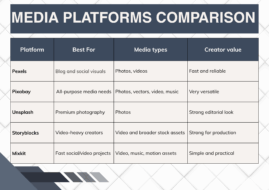
The platform known as Pexels is an amazing resource for anyone creating digital content; they can find visually-appealing imagery or videos relatively easily.
Pexels has a strong selection of high-quality stock images and stock videos that provide a polished look while not appearing too staged; therefore, it is an excellent resource for creators to use when they are developing visuals for simple blog post headers, social media content, landing pages, or as quick campaign visuals.
Pexels is a great option due to the browseability of their library and the high quality of their media.
For a consistent and reliable source for daily creative work, you cannot go wrong with putting Pexels on your bookmark list.
2. Pixabay
Pixabay is an expansive media library that contains images, illustrations, vectors, videos, and even music.
Because of their multiple types of media, Pixabay is very useful to creators who are looking for all of their assets in one place.
Pixabay is especially useful to creators when they are looking for media to support blogs, slides, graphics, or non-heavyweight video editing.
The advantage of Pixabay is the abundance of available content. You can find an illustration for a blog, a video clip, and a background music track without leaving the site.
For creators who like a single resource for all types of media content, Pixabay is an excellent resource.
3. Unsplash:
If you’re looking for a premium and editorially-sourced library of high-res images, Unsplash is an excellent choice. Unsplash can provide you with hero shots, lifestyle shots, and unique backgrounds as well as examples of branded products or services that will be more than just “average”. Many people who create visual content have saved Unsplash as a favorite site to get modern-style, attractive images that can be used on their blogs or social media marketing efforts. Branding experts agree that if you want to create a polished web design and marketing strategy, high-quality images should be given priority over image quantity.
For brands that are looking for polished photography that is clean and professional in quality, Unsplash is at or near the top of their list.
4. Storyblocks
Although Storyblocks is traditionally known as a source for stock videos, it also has one of the largest royalty-free online libraries of various media types available to creators of multi-media content.
Storyblocks is great to use for your stock video footage needs, including for things like explanatory videos, commercials, opening segments of videos, tutorial videos, as well as branded or other types of motion graphics.
The main benefit that Storyblocks provides is creating the potential for a more complete workflow for your video creation process rather than relying on the static image that you’ve created.
You will find that Storyblocks will be particularly useful for YouTube content creators, marketers and agencies that frequently need access to a scalable library of stock footage.
If your content development strategy involves the creation of videos as part of your regular content strategy, make sure to add Storyblocks to your bookmarks.
5. Mixkit
Mixkit is a great free resource for creative professionals looking for video clips, songs and motion graphics with a straightforward workflow.
It is well-suited for short-form content, social media videos, and rapid-turnaround creative projects.
For creators looking to access clean assets quickly and easily without spending time searching, its no-nonsense approach is ideal.
Mixkit is a lifesaver when you need to get your hands on ready-to-use media for reels, promos, and light editing.
Mixkit’s content library may not be as extensive or diverse as some of the larger libraries but it gets the job done efficiently and is very creator-friendly.
How creators should use them
A smart way to work with royalty free media platforms is to have a small tool kit of several platforms to use versus putting on sole reliance of one site for all your needs. For example, you might want to utilize Unsplash for your hero images, Pexels for your blog visuals, Pixabay for your vectors or music needs, story blocks for your video needs, and Mixkit for any fast social video edits that you might need.
Having this approach will help give you greater coverage and help ensure your content stays consistent across everything that you create.
It will also help to lower the risk of you using duplicate visuals across every post.
Final thoughts
In conclusion, royalty-free media platforms are now a necessity for creators that wish to publish content quickly and with a more professional appearance.
Of the five royalty-free media platforms above, those are the five platforms that can fulfill the primary media needs of most creators: photos, illustrations, videos, music, and mixed media.
If you bookmark just a few trustworthy sources, you can expedite your workflow, reduce your risk and greatly improve your ability to scale your content.
Leave a Reply