

Facebook’s dark mode for Android finally starts rolling out
Facebook for Android got a redesign earlier this year as the company announced it at its F8 developer conference for this year. However, the one missing

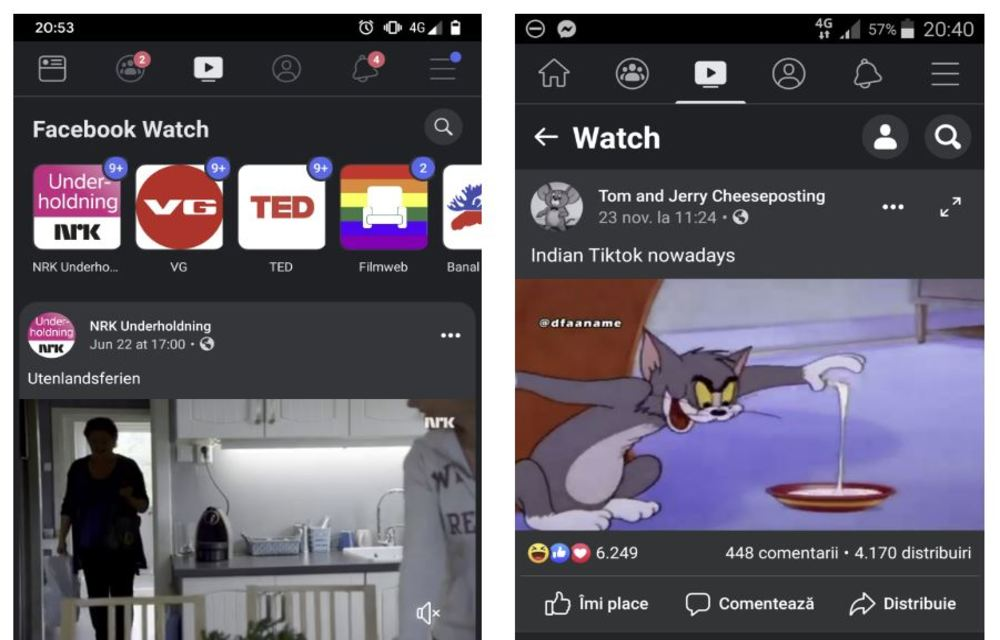
Facebook for Android got a redesign earlier this year as the company announced it at its F8 developer conference for this year. However, the one missing feature from that redesign was a dark mode which has become the centre point of app design in 2019. You would be aware that both Android and iOS now have native dark mode support.
It is also seen that most of the Android and iOS applications have received dark mode support as well. However, Facebook’s suite of apps are late to get dark mode support while only Messenger and Instagram currently have dark mode support. Things are going to change, however, as Facebook for Android is starting to get dark mode support.
The one feature that has been requested by millions is finally rolling out and you would now be able to use Facebook in dark without straining your eyes or blinding them with white background. But the thing to note here is that Facebook’s dark mode for Android is not available to everyone. From the posts we have seen of users getting dark mode, we can say that the feature has started rolling out in parts.
It is assumed that the company wants to test this feature with a few users and then go for a wider rollout instead of messing up the feature for everyone at once. This is acceptable since Facebook is a huge company and it does not want to face the wrath of its users if anything goes wrong. As per the report from GizChina, this “dark mode is already accessible among some users, especially in India, Malaysia and Italy”. It is likely that India, Malaysia and Italy are chosen as some of the first regions were dark mode might be tested. So if you are in one of these regions, you are likely to see the dark mode for Facebook on Android.
More in News

How to Turn Off Facebook Camera Roll Suggestions on iPhone and Android
Facebook’s camera roll suggestions look at the photos and videos on your phone and suggest ones you might want to share as a post or story. Some people like the nudge. Many don’t want a social app looking through their gallery at all, and the feature got fresh attention on November 14 when Italy’s privacy…

How to Edit an Instagram Story After Posting (and What You Can’t Change)
For years, a typo in an Instagram Story meant deleting it, reposting it and losing every view it had already picked up. That’s finally over. On November 18, 2026, Instagram head Adam Mosseri announced that you can now edit a Story after it goes live. You get 15 minutes, though, and you can’t change everything.…
How to Fix Android Auto Not Connecting After the One UI 9 Update
Android Auto stopped working after your Galaxy phone got One UI 9? Here’s what Google said about its fix, how to make sure you get it, and the wired and wireless workarounds worth trying while you wait.
The week in tech, minus the noise.
New reviews, fixes and the stories that matter — once a week, straight to your inbox.
We only use your email to send the newsletter. Unsubscribe any time. See our privacy policy.
Comments