

Spotify DJ Gets 9 New Voices and a Way to Turn Off the Talking Between Songs
Spotify's AI DJ adds nine new voices, including Casey, Tess and Lane in the US, and a toggle to turn off talking between songs. How to switch it on.

Spotify began rolling out nine new voices for its AI-powered DJ feature on November 10, 2026, along with a new option that lets listeners turn off the DJ’s commentary between songs, the company said in a post on its newsroom. The update is available to Spotify Premium subscribers in the markets where DJ is already offered, and Spotify said the rollout starts on November 10, so some users may see it later than others.
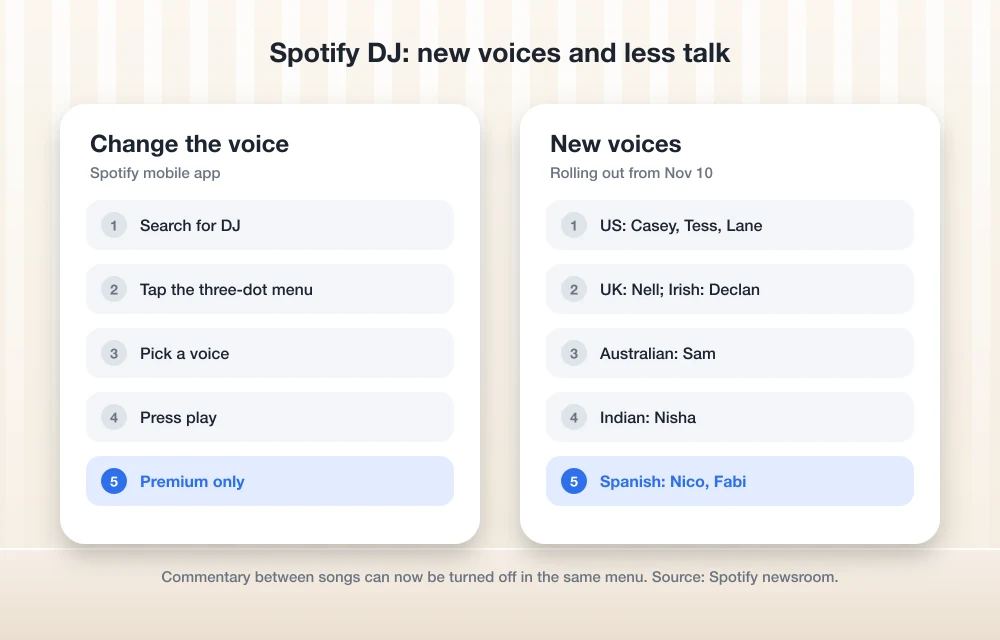
Until now, English-language listeners had one main DJ voice, known as DJ X. The new lineup adds seven English voices with American, British, Irish, Australian and Indian accents, plus two Spanish-language voices.
Quick answer: Spotify’s DJ now offers nine extra voices, including three American options (Casey, Tess and Lane), and a setting to switch off the talk between songs. To try it, open Spotify on your phone, search for DJ, tap the three-dot menu, pick a voice, and press play. The commentary toggle sits in the same menu. Both features require Spotify Premium and are rolling out gradually from November 10.
The new DJ voices
In its November 10 announcement, Spotify listed the following voices and described each one in its own words:
| Voice | Accent | How Spotify describes it |
|---|---|---|
| Casey | US | “Laidback energy, warm, bit of a drawl.” |
| Tess | US | “Direct but inviting, has a bit of an edge. In-the-know.” |
| Lane | US | “Southern accent, brings a younger, positive energy.” |
| Sam | Australian | “Gregarious, fun, likes to keep things not-so-serious.” |
| Nell | UK | “Mellow, slower energy, and deeply knowledgeable.” |
| Declan | Irish | “Straightforward, passionate, and a bit of a music nerd.” |
| Nisha | Indian | “Inviting, with contagious energy.” |
| Nico | Mexican Spanish | “Down to earth, present, and right there with you.” |
| Fabi | Mexican Spanish | “Witty, friendly, and always a step ahead.” |
DJ X, the original English voice, stays available alongside the new options, according to Spotify.
Turning off the commentary
The second change gives listeners more control over how much the DJ talks. Spotify said listeners can now toggle off commentary between songs so the music keeps playing with fewer interruptions, and it pointed to moments like dinner parties as an example. Spotify noted that the DJ will still give brief acknowledgements when you start a session or tap the DJ button to change the vibe.
How to change the DJ voice
Spotify gave these steps for its mobile app:
- Open Spotify on your phone and search for DJ.
- Tap the three-dot menu and select a voice.
- Press play.
The commentary setting is in the same three-dot menu, according to Spotify’s post. To change direction mid-session, tap the DJ button to move to a different genre, artist, mood or set of recommendations. Spotify’s DJ help page covers the basics of the feature, including where it’s available.
Who gets it
Both the new voices and the commentary control are for Premium subscribers in markets where DJ is already available, which includes the US, and they are rolling out from November 10. Spotify did not say how long the rollout will take, so if the options don’t appear yet, updating the app and checking again over the next few days is the practical next step. Spotify’s post did not list the markets by name, and it gave steps for mobile devices only.
Background
Spotify first launched DJ in English in 2023, added a Spanish-language voice in 2024, and began letting listeners make voice requests to the DJ in 2025. This is the first time English-language listeners can choose between several DJ personalities. Spotify has been adding more social and personalized features over the past year, including the direct messaging we covered in our report on Spotify going social with DMs. If you care more about sound quality than AI hosts, our guide to the best hi-res music players and our Astell&Kern PD5 review cover dedicated players.
FAQs
How do I change the voice on Spotify DJ?
Open Spotify on your phone, search for DJ, tap the three-dot menu, pick a voice, and press play. You need Spotify Premium in a market where DJ is available.
Can I turn off Spotify DJ talking between songs?
Yes. Spotify added a toggle to turn off commentary between songs, rolling out from November 10, 2026. The DJ still gives a brief acknowledgement when you start it or change the vibe.
Is Spotify DJ free?
No. Spotify says the new voices and controls are for Premium users in markets where DJ is offered.
Disclosure: TheTechHacker has no paid relationship with Spotify or any company mentioned here.
More in News
Bose Recalls About 635,000 S1 Pro Speaker Battery Packs Over Fire Risk: How to Check Yours
Bose is recalling about 634,759 S1 Pro and S1 Pro+ battery packs over fire risk. Check the serial prefixes, get a free replacement and dispose of packs safely.

Google’s November Pixel Drop Rolls Out With Gemini on Pixel 10, Custom Widgets and $29.99 Pixel Tag
Google's November 2026 Pixel Drop brings Gemini Intelligence to Pixel 10, custom widgets and a new Call Screen. Pixel Tag goes on sale Nov 11 for $29.99.
DigiCert Breach: Company Discloses Unauthorized Access to Business System Holding Customer Data
DigiCert disclosed unauthorized access to a business system holding archived customer data. Here's what's confirmed, what's reported and what to do next.
The week in tech, minus the noise.
New reviews, fixes and the stories that matter — once a week, straight to your inbox.
We only use your email to send the newsletter. Unsubscribe any time. See our privacy policy.
Comments