

This tool from Adobe will tell you if an image is Photoshopped or not
We have seen that the cases of images being Photoshopped on top of the other are continuously increasing. As a reason, people get manipulated into

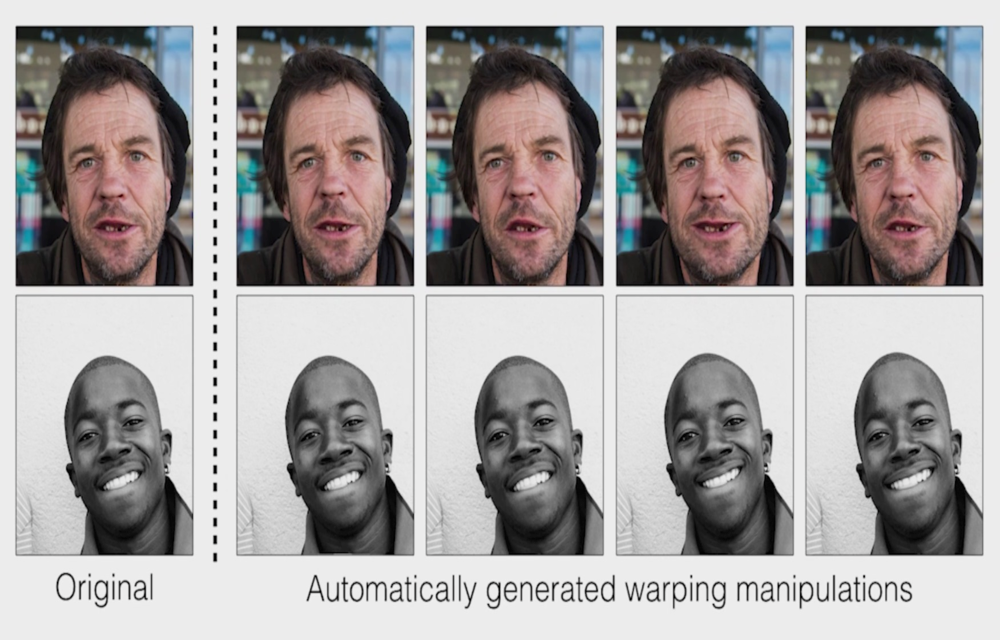
We have seen that the cases of images being Photoshopped on top of the other are continuously increasing. As a reason, people get manipulated into thinking that the edited image as the original one. However, that is not the case and there can severe damages due to this type of work.
There have been discussions regarding the ways to tackle this type of images. As we all know, it is tough for the human eye to say that an image is definitely photoshopped or not.
Thus, we have to take help of machines but there is no proper software in place for this matter. That was until now as we have a system which will detect if an image is edited or not. This tool has been created by Berkeley and creators of Photoshop itself, Adobe.
This tool will tell you that the image is Photoshopped or not for starters. But that is not where the abilities of this tool end. Because this tool can also tell you how to undo the edits and get the original picture.
As this is a tool made by Adobe, it only works on their own tool which is Photoshop. Also, the tool works on a feature inside Photoshop called “Face Aware Liquify” which allows subtle or major adjustments to face.
There is still a long way to get a universal detection tool but this is a good start. Also, it is observed that most of these edits are done using Photoshop so it should solve the problem in most cases. The researchers trained the tool to identify images that have been manipulated and it had 99% accuracy in identification.
Adobe’s Richard Zhang who has worked on this project said that “We live in a world where it’s becoming harder to trust the digital information we consume, and I look forward to further exploring this area of research.”
More in News
Best Video Editing Software in 2026 for Windows and Mac: 6 Picks Compared
I compare Adobe Premiere, DaVinci Resolve, Final Cut Pro, PowerDirector, Filmora and CapCut desktop on features, learning curve and how each one is sold, so you can pick the right editor for Windows or Mac.
Best E-Signature Software: DocuSign vs Adobe Acrobat Sign vs Dropbox Sign (2026)
I compare DocuSign, Adobe Acrobat Sign, Dropbox Sign, PandaDoc, signNow and Zoho Sign for US small businesses, covering ESIGN Act basics, envelope limits and which tool fits freelancers, real estate, HR and sales teams.

Best CapCut Alternatives for US Creators in 2026: Mobile and Desktop Picks
Thinking about leaving CapCut or keeping a backup editor? Here are the CapCut alternatives I’d look at in 2026 for phone and desktop, with what the companies officially confirm and what they don’t.
The week in tech, minus the noise.
New reviews, fixes and the stories that matter — once a week, straight to your inbox.
We only use your email to send the newsletter. Unsubscribe any time. See our privacy policy.
Comments