

How to Track Your Flight and Get Delay Alerts Before a Thanksgiving Storm Hits
Storms could hit Thanksgiving travel. Set airline, Wallet and FlightAware alerts, track your inbound plane, check FAA ground stops, use weather waivers, and know your refund rights.


Thanksgiving week is one of the busiest times of the year to fly, and this year the weather is already lining up to make it harder. Forecasters are tracking a possible coastal storm in the Northeast starting Sunday, a system off the Southeast coast that could become Tropical Storm Kyle, an atmospheric river in California midweek, and snow and ice on mountain passes in the West. The travelers who get rebooked first are usually the ones who knew about the delay first. This guide sets you up to get flight alerts before the gate agent announces them, and covers what you’re owed if your flight is canceled.
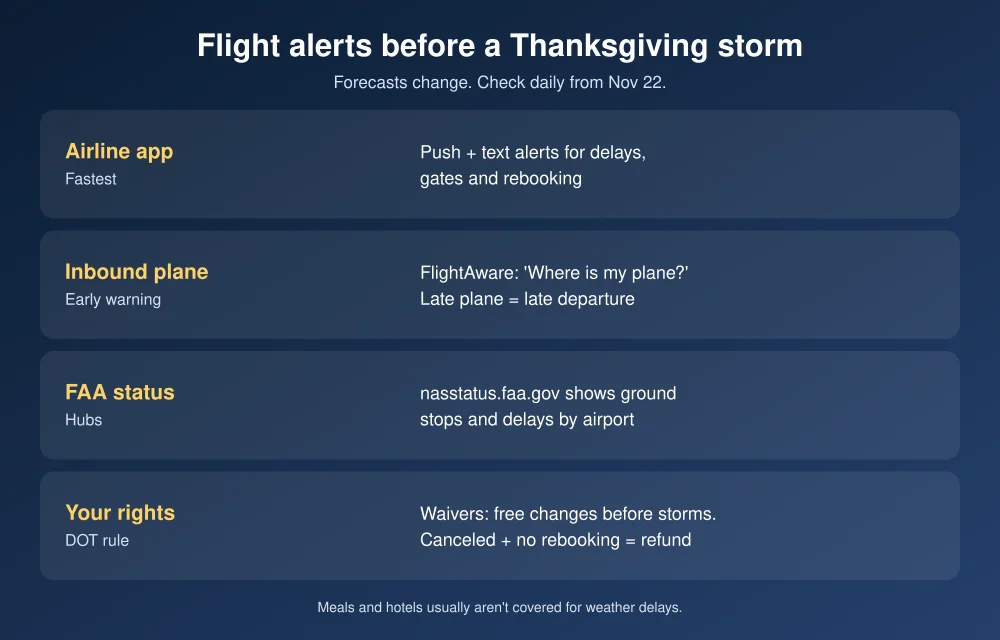
Quick answer: To track a flight and get alerts before a storm, turn on push and text alerts in your airline’s app (your airline usually tells you first), add your boarding pass to Apple Wallet or Google Wallet for live gate and time updates, and set a free alert on FlightAware that also shows where your inbound plane is. Check the FAA’s airport status map for ground stops, and watch your airline’s travel alerts page for weather waivers that let you change flights for free. If the airline cancels and you don’t accept a rebooking, DOT rules say you’re owed a refund, whatever the reason.
The forecast so far
Forecasts this far out change, so treat these as things to watch, not certainties:
- Northeast: The National Weather Service is tracking a possible coastal storm around Sunday, November 22 into Monday, with 1 to 2 inches of rain possible near New York City, northeastern New Jersey and coastal Connecticut. A track farther offshore would mean less impact.
- Southeast and Mid-Atlantic coast: The National Hurricane Center is watching a system offshore that could become Tropical Storm Kyle. Strong winds, rough surf and coastal flooding are expected this weekend either way.
- California: An atmospheric river could slow travel, with the worst expected Tuesday and Wednesday.
- Mountain West: Snow and ice are the main risk on passes in the Rockies, Sierra Nevada and Cascades.
Check weather.gov for your departure and connecting cities each day. Your connection matters as much as your origin. A clear sky in Dallas won’t help if your plane is stuck in a ground stop at Newark.
Step 1: Turn on your airline’s alerts
Your airline knows about a delay before any tracking app does, because it’s the one making the call.
- Install your airline’s app and sign in with the account the trip is booked under.
- Open the trip and turn on push notifications for flight status, gate changes and rebooking.
- Add a mobile number for text alerts too. Texts get through when an app’s notifications don’t.
- If you booked through a travel site, add the trip to the airline app with your confirmation code. Otherwise, alerts may go to the travel site and arrive late.
Real alerts come from the airline’s app or its official short code. Scammers send fake cancellation texts during storms, so read our guide on how to spot fake flight cancellation texts before you tap any link.
Step 2: Put your boarding pass in your phone’s wallet
- iPhone: After check-in, tap Add to Apple Wallet in the airline app. Supported passes update automatically with gate and time changes. You can also tap a flight number in Messages or Mail to see a live preview of the flight.
- Android: Add the pass to Google Wallet from the airline app for status updates on your lock screen.
Step 3: Track the plane that’s flying in
This is the trick most travelers miss: your flight can’t leave until its plane arrives. If the inbound aircraft is two hours late leaving Chicago, your departure will slip, often before the airline updates your flight.
- Search your flight number on FlightAware.
- Look for the inbound flight (FlightAware labels it “Where is my plane?”) and check its status.
- Create a free account and set an alert for your flight so you get updates by email or push.
A quick Google search of your flight number also shows its live status. Note that Google Flights’ “Track prices” tracks fares, not delays.
Step 4: Check for ground stops
When weather hits a big hub, the FAA can stop or slow flights heading there. The FAA National Airspace System Status page shows ground stops, ground delay programs and closures by airport in real time. If your destination or connection airport shows a ground stop, expect delays even if your gate says “on time.”
Step 5: Use weather waivers before the storm
When major weather is forecast, airlines often post travel waivers on their travel alerts pages. They let you move to a different date or route without a change fee or fare difference, within limits. This is the best time to act:
- Check your airline’s travel alerts page daily from Sunday, November 22.
- If a waiver covers your airport, rebook early, ideally onto a flight before the storm. The best seats go fast once a waiver posts.
- Avoid tight connections through storm-affected hubs. A nonstop flight or a longer connection is safer this week.
What you’re owed if your flight is canceled
- Refunds: Under DOT rules, if an airline cancels your flight or significantly delays it and you don’t accept a rebooking or voucher, you’re entitled to a refund of the ticket, regardless of the reason, including weather. Significant delays are generally 3 hours or more for domestic flights and 6 hours or more for international flights.
- Meals and hotels: Airlines’ commitments on meals and hotels cover delays within their control, such as maintenance or crew problems. Weather usually isn’t covered. Each airline’s commitments are listed on the DOT’s airline customer service dashboard.
- Rebook while you wait in line: If your flight cancels at the airport, rebook in the app or call the airline while you’re standing in line. Whichever gets you a seat first wins.
Stuck at the airport on Thanksgiving Day? See how to watch the NFL Thanksgiving games without cable.
FAQs
What is the best way to get flight delay alerts?
Turn on push and text alerts in your airline’s app first, since the airline announces delays. Add a free FlightAware alert as a backup, and track your inbound plane to spot delays early.
How do I know if my plane is delayed before the airline says so?
Check the inbound aircraft on FlightAware. If the plane that’s supposed to operate your flight is running late, your departure will usually be delayed too.
Do I get a refund if my flight is canceled because of weather?
Yes. Under DOT rules, if the airline cancels your flight and you don’t accept a rebooking or voucher, you’re owed a refund whatever the reason. Meals and hotels usually aren’t covered for weather.
What is a travel waiver?
A travel waiver is a temporary policy an airline posts before major weather that lets affected passengers change flights without a change fee or fare difference, within the airline’s limits.
Featured image: Google.
Disclosure: TheTechHacker has no paid relationship with any airline, app or company mentioned here.
More in News

How to Spot Fake Flight Cancellation Texts Before Thanksgiving Travel
Thanksgiving week is the busiest stretch of the year for travel scams, and fake flight cancellation messages are one of the nastiest. A text arrives saying your flight was canceled, it uses your airline’s name and sometimes a real-looking flight number, and it gives you a number to call or a link to “rebook.” The…
Is There a Blackout on November 17? No, It Is a Nationwide Emergency Alert Test
Yes, the FEMA emergency alert test happened Nov 17 and is complete. Phones were not part of it, and there was no blackout, 90-day blackout or hack.

United Airlines Outage Delays Flights: What Happened and What You Are Owed
A United Airlines technology issue delayed flights on Nov 16. What United said, and the refunds, meal vouchers and hotels passengers are owed.
The week in tech, minus the noise.
New reviews, fixes and the stories that matter — once a week, straight to your inbox.
We only use your email to send the newsletter. Unsubscribe any time. See our privacy policy.
Comments