

Whatsapp Enabled New Two-Step Verification
Whatsapp Enabled New Two-Step Verification to enhance the security of the app and to ensure users stays in their secure wall from hackers.
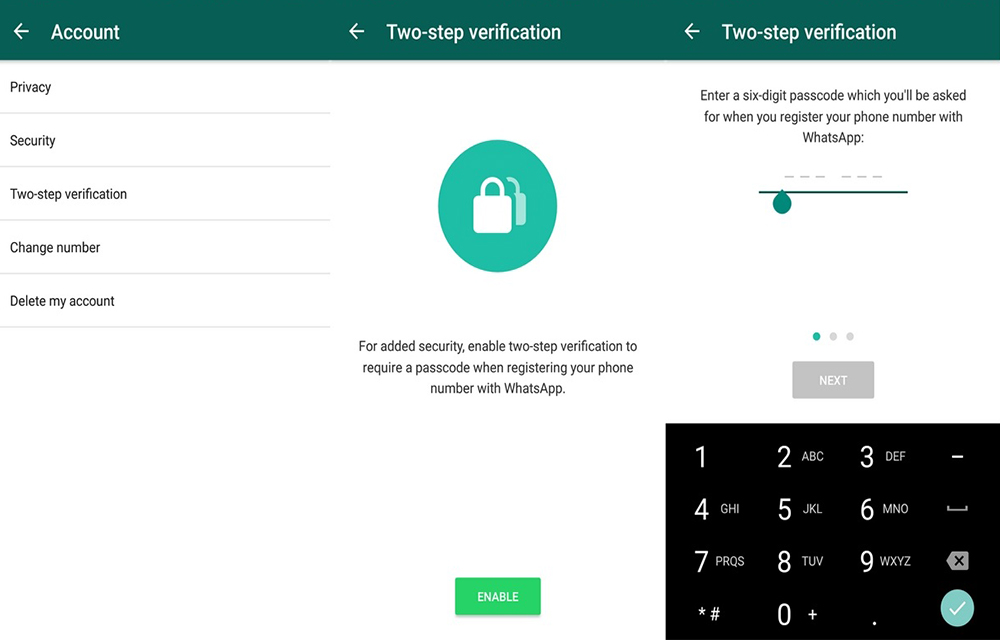
Looks like yours and mine favorite messaging and other naughty things platform just got way better and secure. A Beta and much Better version of Whatsapp is currently out in the wilds with two-step verification for Fort-Knox-like security improvement. It gets even better as the new Whatsapp beta version -version 2.16.341 and above- can additionally croon audio messages in the background while you tap your thumbs and other fingers off. Previously, to play audio messages you were forced to stay on that particular chat window. But now, you can freely switch between chat windows and even apps while listening to voice messages and audio files sent to you via Whatsapp.
If you do have the beta update available right now on your device, then welcome to Neverland. To enable the nifty and newfangled feature, just head over to Settings > Account > Two-Step verification and grandly press ‘Enable’. You will then be asked to input a super-secret 6 digit passcode you must thereafter re-input each time you register that particular phone number with Whatsapp. After inputting the passcode, you will be also asked to provide a recovery email in case your memory gets wiped clean by aliens and you sadly can’t remember your code anymore. After that, a window sprouts up showing ‘Two-Step Verification Is Enabled’, and you will additionally get options to either disable it, or change your passcode or your email address.
With the two-step verification ruling your chat world, no one can thereafter log into your Whatsapp account or re-register with your number even if they do have access to your phone number.
Well, wipe off your drool and listen up: if you want the beta now, better get a move on and go join the beta program. Or you can always wait till it’s officially available on the Google Play store Playground and go chat up a storm.
More in News

How To Resolve DirectStorage CPU Overload in Windows
Optimize your system’s performance by managing DirectStorage effectively and preventing 100% CPU usage.
How to fix WhatsApp crashes in specific group chats on iPhone, Android
You open WhatsApp to check a group message, and the app closes immediately. You try again, but the same thing happens. Other conversations may work normally, while one particular group keeps crashing the app. It is frustrating, especially when that group is used for work, family updates, or important announcements. The good news is that…

How to Fix GTA 6 Server Errors: Check If GTA 6 Is Down on Launch Night
It is midnight, the countdown hits zero, and GTA 6 just sits there on a loading screen, or worse, says it can’t start. On a launch this big, with millions of people hitting the same servers at once, that is going to happen to someone. Before you start deleting and reinstalling 200 GB, take two…
The week in tech, minus the noise.
New reviews, fixes and the stories that matter — once a week, straight to your inbox.
We only use your email to send the newsletter. Unsubscribe any time. See our privacy policy.
Comments