

“Windows 1.1 Stranger Things” Edition released by Microsoft
Many of us might not have been here when Microsoft released the first version of Windows. That is because this version of Windows was released in 1985 and

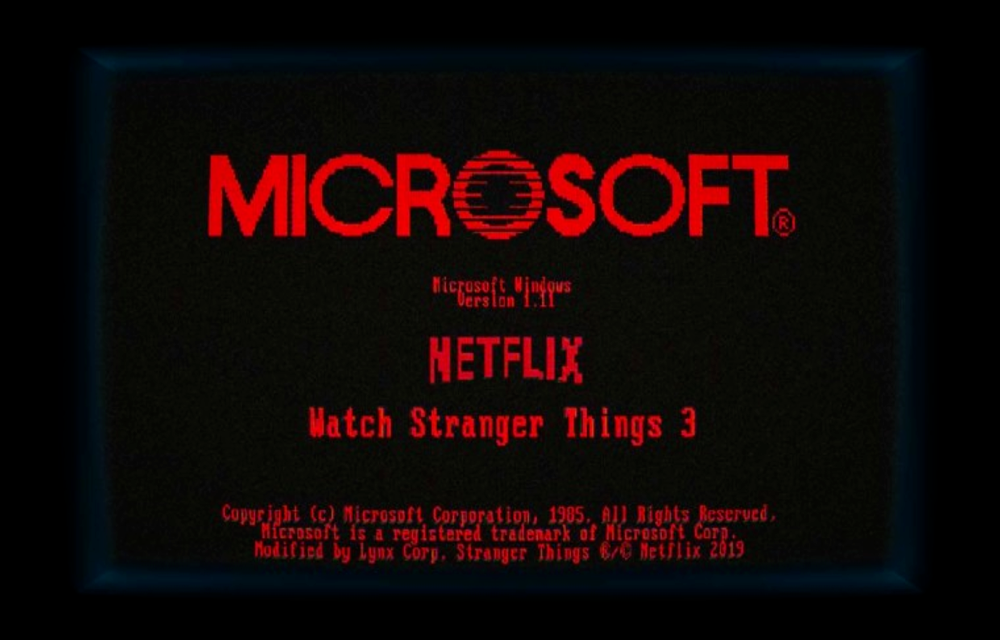
Many of us might not have been here when Microsoft released the first version of Windows. That is because this version of Windows was released in 1985 and it was named as Windows 1.0. Currently, we are at Windows 10 but that does not mean we had 8 other versions of Windows. Rather, the name of Windows versions kept on changing and we have had many versions in between. Still, Microsoft went down the nostalgia train and reminded people about the first ever version of Windows released in 1985.
On this, people started wondering why exactly is Microsoft doing it. Some users also started questioning if a new-yet-old version of Windows is releasing. On this, Microsoft twitter handlers kept saying that something is coming. Now is the time that Microsoft has finally revealed why it was teasing Windows 1.0 to its fans.
And the reason is one of the most unexpected ones that you might have imagined. This was a way to promote Stranger Things by Microsoft which is also based out of 1985. Therefore, Microsoft kept reminding people that Windows 1.0 was also released in the same year. Last weekend, Microsoft even released an app which is named as Windows 1.11 which can be installed on Windows 10.
https://twitter.com/Windows/status/1147915716236075008
This app includes most of the Stranger Things themed items and gives you a nostalgic feel of using the first-ever version of Windows also named as “Windows 1.1 Stranger Things” Edition. However, there are two things that you might want to note before downloading the app.
First is that the app is fairly big in terms of size at 775 MBs which means that it might use up data if you are on a limited data connection. Another important thing is that the app is only available in the US for some reason. Microsoft thinks that people don’t watch Stranger Things (our words, not Microsoft’s) so the app is geo-restricted to US location only.
More in News
Windows 11 23H2 Enterprise and Education Reach End of Updates on November 10, 2026
Windows 11 23H2 Enterprise and Education get their last update on November 10, 2026. Here's who is affected, how to check your version and how to upgrade.

How to Fix Windows Activation Error 0x80041008 After the November Update
If you manage Windows PCs or servers and your activation scripts started failing this week with error 0x80041008, the November security update is the cause. Microsoft confirmed the bug on November 13 and released out-of-band updates the same day to fix it. The error shows up when you run slmgr.vbs commands to set a KMS…
How to Fix USB Headset or Speakers With No Sound (Code 10) on Windows 11
More guides: See all our Windows 11 fixes. Update (November 11, 2026): Microsoft has now fixed this bug. The November 10 security update, KB5132061 for Windows 11 versions 24H2, 25H2 and 26H2 (KB5132059 on 26H1), fixes USB Audio 1.0 devices failing to start with Code 10, so installing it from Settings > Windows Update is…
The week in tech, minus the noise.
New reviews, fixes and the stories that matter — once a week, straight to your inbox.
We only use your email to send the newsletter. Unsubscribe any time. See our privacy policy.
Comments