

Unroot any Android Device using Universal Unroot
Unroot any Android Device using Universal Unroot: There are a lot of reasons why people want to unroot their device. The reason may be Loose of warranty, Malicious Software or poor performance of device due to the software error. You can easily unroot your device in one click using Universal Unroot. Install the app from…


Unroot any Android Device using Universal Unroot: There are a lot of reasons why people want to unroot their device. The reason may be Loose of warranty, Malicious Software or poor performance of device due to the software error. You can easily unroot your device in one click using Universal Unroot.
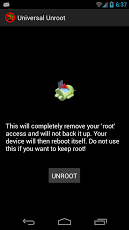
Install the app from Play Store and open it. Simply hit the ‘Unroot’ button and allow Root access when asked for permission. The device will then reboot, and you will be completely Unrooted when you boot back up. Universal Unroot supports x86, ARM, and MIPS based devices. This is a great app for those who are trying to complete a warranty hardware or a repair. If you only want to temporarily lose Root Access, this app is not for you. Unrooting is permanent and cannot be undone with this app. Only use this if you truly want to lose Root Access.
I’m probably imagining a scenario where you saw your friend running some apps and doing some other cool stuff on his Android phone, and you asked him and he told you he ROOTED his Android phone. You decided to do the same to your phone, but now, the initial fun of using a rooted device has worn off, and you want to unroot your Android phone.
If you’re at a crossroad as in the scenario above, this guide is for you.
So you’re probably wondering if it’s possible to unroot a rooted Android device? Yes, it is very much possible, thanks to the Universal Unroot app for Android.
Universal Unroot will unroot your phone at the tap of a button? Great, right? So if you’ve got any rooting app like SuperUser installed on your Android device, the Universal Unroot app will surely help you to escape from the clutches of SuperUser – it’s obvious you’re tired of it.
Launch the app and follow the on-screen instructions to unroot your device. The Universal Unroot app can also unroot devices that were rooted using various apps like Chainfire SuperSu and Koush SuperUser and will work on Android devices which also have ARM Cortex chips.
The easy to use interface makes it one of the few best software for unrooting a rooted Android Phone. The Universal Unroot app isn’t free, but it doesn’t cost a premium. It would set you back by $0.99 but will give you one-tap access to unroot any Android device.
After it unroots the device, it will also reboot and remove traces of the previous rooting.
There are tons of ways to unroot a rooted Android phone, but are they worth it? If you’re not sure as to what to do, then embrace Universal Unroot. It gets the job done!
More in Android
How to Unroot Android Smartphones
So you need to Unroot android smartphone right? Today we are going to give your the steps for unrooting your android smartphone to roll back all the changes you made by rooting. Before that, have a look at the problems of rooting to get a basic idea about the complications you may face on a…
What to do if you Can’t Download or Install Latest Android Update
Tried updating your android device many times? Fixed all the errors during the update and still Can’t Download or Install Latest Android Update? In this article, we are going to provide some methods to try if you are unable to download or install the latest android update on your smartphone even after several tries. We will…
Google I/O 2026: Gemini 3.5 Flash & Autonomous Agents Redefine the Android Ecosystem
Google is officially moving beyond prompt-and-response AI. At Google I/O 2026 in Mountain View, the company laid the groundwork for an “Agentic” future where artificial intelligence operates autonomously in the background. Powered by the newly unveiled Gemini 3.5 Flash model, these agents are designed to execute complex tasks across the web, your local Android device,…
The week in tech, minus the noise.
New reviews, fixes and the stories that matter — once a week, straight to your inbox.
We only use your email to send the newsletter. Unsubscribe any time. See our privacy policy.
Comments