

How To Take App Backups On Android?
We know the importance of taking a backup, backup saves our data, and we can restore it in needy times. Android devices are not an exception for the data loss situations. Accidentally or by some hardware problems we may loose our precious app data present on the device. Luckily, Google Play store has a ton…


We know the importance of taking a backup, backup saves our data, and we can restore it in needy times. Android devices are not an exception for the data loss situations. Accidentally or by some hardware problems we may loose our precious app data present on the device. Luckily, Google Play store has a ton of backup apps to secure your data in the device. AppWereabbit is one of them, and the app is designed to take a complete backup of your Android device without any effort
AppWererabbit is a useful handy program with tons of features. It is a perfect apps manager in Android. Not only organizes it also backup apps automatically. Unlike other Android backup apps, AppWererabbit follow simple method to manage and backup your apps. You can manage, share and backup your apps and its data.
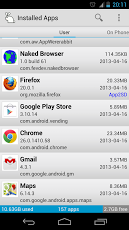
Key Features:
- Automatic cleaning when the device is low on internal storage space
- Backup apps to SD card
- Support Multiple version backup
- Share app-links or backed up apps
- Automatically backup apps on a new installation to a custom folder.
- Identify apps that support App2SD, and facilitate the moving process
- Import and Export application list for restoration later
- Backup apk (allow organization by custom labels)
- Backup app’s data (ROOT & BusyBox required)
- Export apk (allow custom backup name)
When sharing apps, you can share links via social media networks or even share backed up files via email, Dropbox or Google Drive accounts. The user interface is simple and clean. If you want to use the auto-backup feature, you need to click on Settings > Basic and enable the Auto backup feature. Overall, it is a very good backup tool and app manager for Android.
In this article we discussed the free version of the app, there is a paid version available in the Play Store to purchase. It is unclear what the Pro version offers.
More in Mobile
Avast Mobile Security And Antivirus Review
After PC, Android devices need extra protection from thieves and hackers attacks, recent reports state that Android attacks anonymously increased in the recent years.

Why Your Android Need Root? Top Reasons To Root Your Android Device
Android is the most popular mobile operating system in the World. It is very easy to customize, tweak Android, but some customizations need rooting. If you want to know about what is rooting, how it works and what are the reasons to root here are the complete details. What is Android Rooting? Rooting means you…

Inside Mobile App Development: What Developers Should Take Care Of
Along with Apple iOS and Google Android, mobile technology went further than it ever could in the last two decades. These two operating systems have revolutionized the mobile platform, with apps and app stores. Now, each platform has over a million apps and billions of downloads for popular ones. How does the development community fit…
The week in tech, minus the noise.
New reviews, fixes and the stories that matter — once a week, straight to your inbox.
We only use your email to send the newsletter. Unsubscribe any time. See our privacy policy.
Comments