

How To Backup Android Apps Without Root
For the average user, there are plenty of apps available to backup your Android apps. It is necessary to backup apps regularly, there are so many reasons. Experimenting with a device like installing new ROM’s, unlocking bootloader, rooting will cause the data loss. We are here to help you take a complete backup of your…


For the average user, there are plenty of apps available to backup your Android apps. It is necessary to backup apps regularly, there are so many reasons. Experimenting with a device like installing new ROM’s, unlocking bootloader, rooting will cause the data loss.
We are here to help you take a complete backup of your Android device apps with ease.
Related Articles:
- Backup Your Android Phone Completely With GCloud Backup
- Manage and Auto Backup Apps using AppWererabbit for Android
1. AirDroid
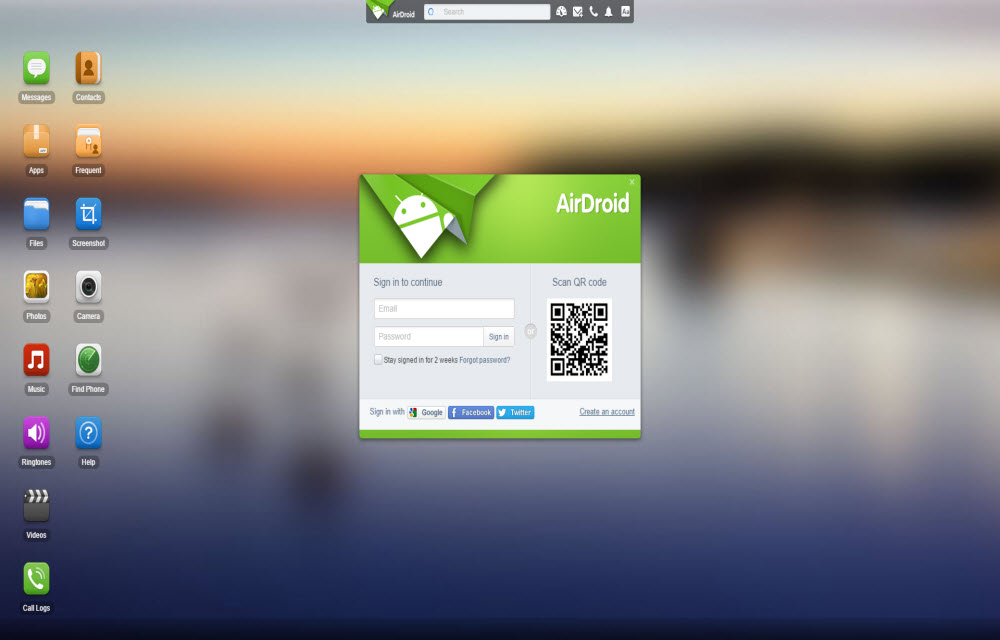
Using AirDroid you can wirelessly manage Android phone from your PC or Mac using web browser. It offers one of the best and easy way to take a backup of your Android device.
- First, download and install AirDroid app from Google Play Store.
- Next, create an account and open the AirDroid web portal in PC. Now authenticate your device with PC using barcode.
- In AirDroid web user interface you’ll see a list of available options on the left side. Here click on the App icon which will open a new window showing all the apps installed on your phone.
- From the list of app, you can choose all or select desired apps you want to backup.
- After selecting apps click on the Download button on the top right corner of the window to start back up.
- After successful backup AirDroid makes a zip file of backup which downloadable on your computer.
- The downloaded AirDroid backup Zip file contains all the apps of the same version.
- Whenever you want to restore simply extract the Zip file and transfer apps to your device and manually install. You can easily install multiple apk files on your device with Mass Apk Installer.
2. Holo Backup
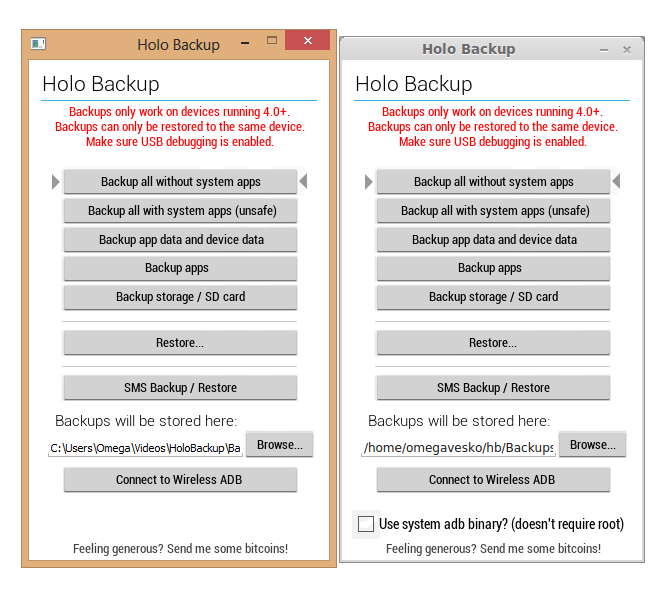
Using the app, you can create your device backup without root. It is formerly called Simple ADB Backup, it uses ADB backup feature to make full backups of your Android phone/tablet.
If you want to completely backup Android, read our ultimate Android Backup guide.
More in How-to
How to Remove Unwanted Built-In Apps from Android Device
Many smartphone manufacturers are installing their default apps and sponsors apps on their devices. Only a few of them are useful, and many are consuming a lot of space on your device without productivity. Nowadays every Android phone comes with built-in apps; most probably they are not required by regular usage. These apps consume a lot…
How To Add A Recycle Bin To Your Android Device
We usually see and use a recycle bin on our computers. A recycle bin useful for deleting unwanted stuff from our computer. It also acts as a backup place if we accidentally remove any file. The same concept is useful for other platforms too. Fortunately, we can avail this facility for Android platform.
Problems of Rooting Android Devices
Anyone of you doesn’t like any limitations. And in your smartphone too, the limits set by the providers may be irritating you for the past few days. You might find out rooting of your Android device to break the limitations set by the developers will help you. Eagerness to access the world behind those limitations…
The week in tech, minus the noise.
New reviews, fixes and the stories that matter — once a week, straight to your inbox.
We only use your email to send the newsletter. Unsubscribe any time. See our privacy policy.
Comments