

Improve Your Browser’s Performance With Auslogics Browser Care
New software installations on your PC may add some unnecessary add-on’s, extensions, homepages and toolbars to your browser’s. This will leads to slow down and some time it even crash your browser. To get rid of these install Auslogics Browser Care on your PC. Auslogics Browser Care is very light weight program sizes only…

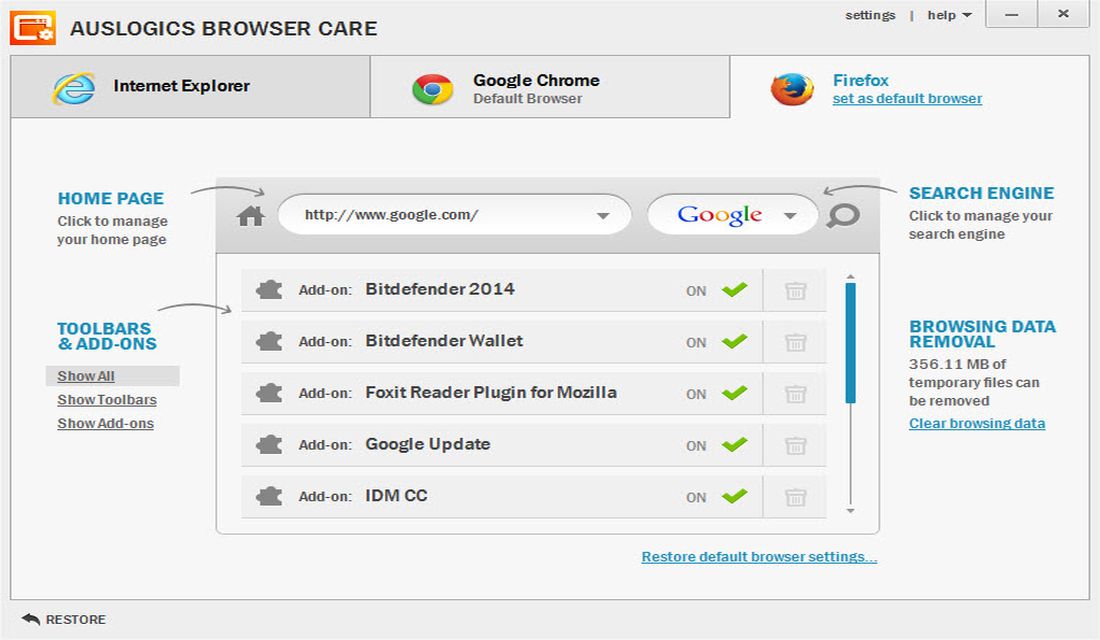
New software installations on your PC may add some unnecessary add-on’s, extensions, homepages and toolbars to your browser’s. This will leads to slow down and some time it even crash your browser. To get rid of these install Auslogics Browser Care on your PC.

Auslogics Browser Care is very light weight program sizes only 6MB. After installation it starts with a simple and very intuitive user interface. It displays tabs showing three major browsers at the top. It allows you to either temporarily disable unwanted add-on’s and extensions or remove them from your browser completely.
Auslogics also allows you to change the default search engine of the web browser from a list of popular search engines like Google, Bing, Yahoo, Amazon, eBay, Wikipedia and much more. Overall it is a very good utility to maintain your browser at full performance, it works on Windows Vista, 7 and 8.
According to Auslogics:
With Browser Care you can view and manage all your installed browsers in one place. This includes the list of all plugins for each browser along with their status and safety rating, as well as the webpage and search engine that are set as default. If your home page has been hijacked, this tool lets you change it to the page you’d like to start your browsing sessions with. If you’ve never used the search window in your browser because it is linked to a search engine you don’t like, Browser Care lets you set your favorite search engine as default in all your browsers for faster and more convenient searches. Never find the time to clear browser cache? This tool lets you easily sweep out temporary internet files from all your installed browsers.
System Requirements:
- Win 8 (32 or 64 bit), Win 7 (32 or 64 bit), Vista SP2 (32-bit only), XP SP3 (32-bit only)
- 10 MB available hard disk space
- 32 MB RAM
You might also like

25 Tips to Speed Up Your Windows 10 PC
I remember when my old Windows 10 laptop started feeling old. Apps took a lot of time to open, and just switching tabs made it groan. Turns out, millions of people are in the same issue; even as Windows 11 pushes forward, Windows 10 runs on over 1 billion PCs worldwide and holds about 36%…

Speed Up Your YouTube Buffering Rate With This Simple Trick
For watching videos every one first choice is YouTube. YouTube is a gigantic library of videos uploaded by people around the world. YouTube requires a fast internet connection to buffer a minimum 480p video. Unfortunately, only a few people can afford the speedy internet connections and availability is limited to developed areas.

What is Arc Browser? Why it is so popular?
When choosing a web browser for your Mac, you have plenty of options like Safari, Chrome, Firefox, and Edge—familiar choices that have held the fort for years. Yet, these browsers, despite their familiarity, have largely remained unchanged in their design and functionalities. However, the Arc browser by The Browser Company seeks to redefine the browsing…
The week in tech, minus the noise.
New reviews, fixes and the stories that matter — once a week, straight to your inbox.
We only use your email to send the newsletter. Unsubscribe any time. See our privacy policy.
Comments