

Customize And Add Widgets To Your Mac OS X Desktop With Übersicht
Rainmeter is a fantastic desktop customization tool available for Windows. Unfortunately, Rainmeter is not available for Mac. For Mac users, Übersicht is a desktop customization tool and alternative to GeekTool. Using Übersicht you can build custom widgets anywhere on your Mac OS X desktop. It is simple, lightweight, and extremely effective when compared to the…

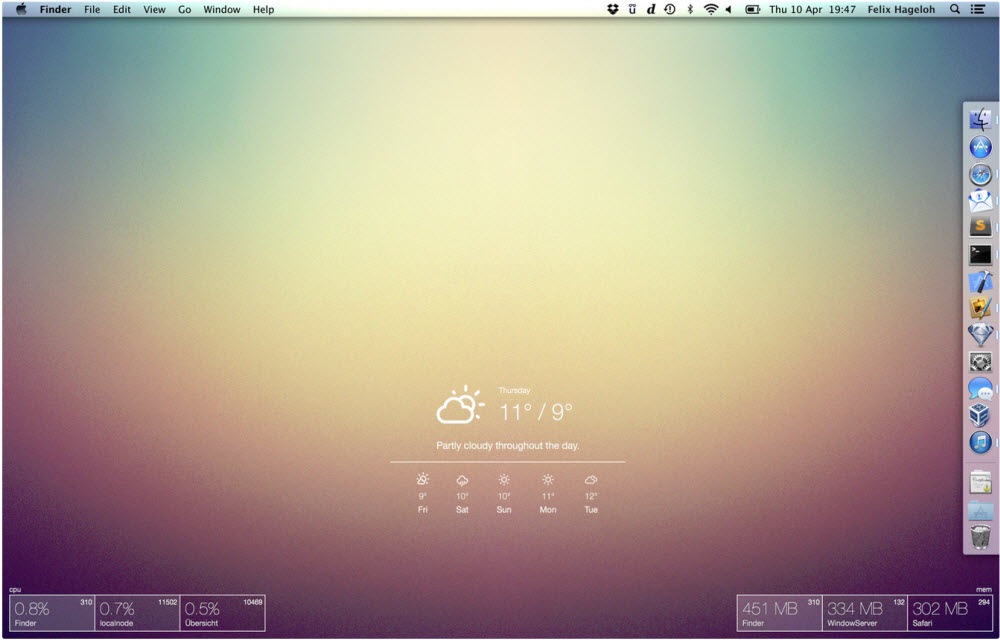
Rainmeter is a fantastic desktop customization tool available for Windows. Unfortunately, Rainmeter is not available for Mac. For Mac users, Übersicht is a desktop customization tool and alternative to GeekTool.
Using Übersicht you can build custom widgets anywhere on your Mac OS X desktop. It is simple, lightweight, and extremely effective when compared to the competitors.
Übersicht lets you run system commands and display their output on your desktop in little containers, called widgets. Widgets are written using HTML5.
This means it will be very easy to write the code and customize it based on your requirements. It can display the data in different tables, charts, graphs, etc. It is extremely responsive as well. It will work perfectly regardless of the screen size you have and the resolution of your display.
Must read: GeekTool is a Rainmeter alternative to Mac

Übersicht is a new entry into the market, only a few numbers of widgets are available. It requires a little-bit coding knowledge to build custom widgets. After installing you can quickly add a status monitor for a quick glance of your Mac status. Übersicht is free. If you are a developer you can build widgets easily with JavaScript or CoffeeScript. So, from now, whenever you need a custom widget on your Mac, you don’t have to depend on the paid options. Because you can create your own widget easily using this amazing desktop customization tool for Mac.
Here is an example of a minimal script written on the program. Credits go to the Übersicht.
command: "echo Hai Bros!"

refreshFrequency: 6000 # ms

render: (output) ->

"<h2>#{output}</h2>"

style: """

left: 30px

top: 30px

color: #fff """
Features of Übersicht
- Create your own widgets on Mac easily
- Very lightweight when compared to the alternatives
- Extremely responsive and works perfectly on any screen sizes
- Compatible with almost all Mac OS X versions
More in Mac

GeekTool Is A Rainmeter Alternative To Mac
Customization of the desktop is a habit of some creative people. When it comes to PC customization Rainmeter comes in our mind. Rainmeter is a great program to makeover Windows PC with a ton of great customization option. But sadly Rainmeter is not available for Mac. So GeekTool is a great Rainmeter alternative for Mac. Using…

Mac running slow? Speed up Mac with these easy fixes
Is Mac running slow? Speed up Mac with these easy fixes: Mac’s are fantastic machines designed for pure productivity. We can’t imagine a slow running mac. It is like a sports car with an old engine. Many people feel Mac won’t slow down. It is a myth and they will go slow down over time.…
Mac Performance Tips: 8 Ways To Turbocharge Your Mac
Is your Mac slowing down? Are you struggling to run programs and applications that once caused little or no problem? Don’t panic – just observe these 8 steps to help restore your machine to maximum working capacity! 1. Reduce Your Startup Applications Much like loading an Olympic runner with a shed load of luggage on the…
The week in tech, minus the noise.
New reviews, fixes and the stories that matter — once a week, straight to your inbox.
We only use your email to send the newsletter. Unsubscribe any time. See our privacy policy.
Comments