

How To Block Pokemon Go Articles and Everything Related
Pokemon Go is a great game. The Nintendo came again into the limelight with the augmented reality based Pokemon Go app. People went crazy with the game, and we see everyone playing around us. But unfortunately, the net is flooded with so many Pokemon Go articles resulting the annoying. We see some popular websites and…

How To Block Pokemon Go Articles and Everything Related
Pokemon Go is a great game. The Nintendo came again into the limelight with the augmented reality based Pokemon Go app. People went crazy with the game, and we see everyone playing around us. But unfortunately, the net is flooded with so many Pokemon Go articles resulting the annoying. We see some popular websites and our friends are publishing the articles and status updates about the Pokemon Go.
Related Pokemon Go Articles:
How long does it take to create an overnight success? For John Hanke it’s taken him 20 years to create Pokémon Go.
The response is overwhelming and sometimes irritating. If you are one of those who want to ditch the Pokemon Go related stuff from your browsing and Facebook, follow the below steps.
1.How to Ditch Pokemon Go on your Facebook
Facebook is offering the particular keyword block feature to the users. If you want to get rid of the Pokemon Go articles on your Facebook timeline, simply follow the below steps.
To block Pokemon Go related articles on Facebook:
- Go to Settings
- From General, click on Page Moderation.
- Here type the words you want to block
- Type: Pokemon Go, Pokemon, pokemongo separated by commas
- Now save changes
The above steps will simply block Pokemon Go articles on your Facebook timeline.
How To Avoid Pokemon Go Articles in Google Chrome
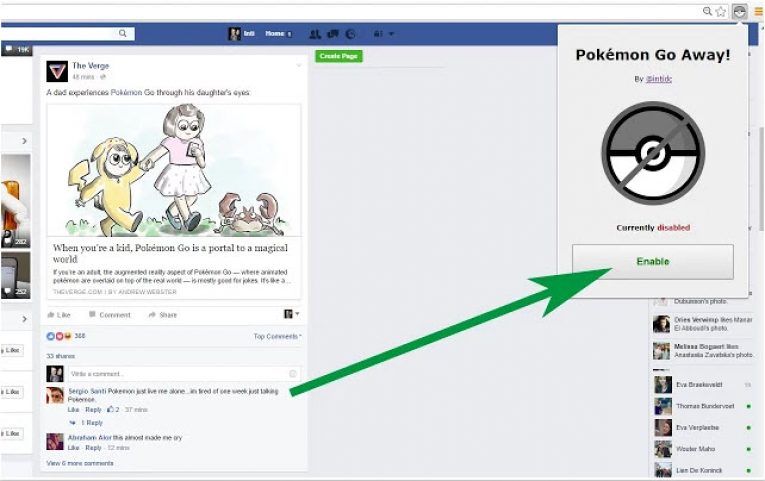
If you want to avoid the Pokemon Go stuff in the browsing, luckily you have a Chrome extension. Pokemon Go Away is a Google Chrome extension which removes the all the related stuff from Facebook, Twitter, and many more sites. When you open a new page of any website with Pokemon Go link you can check the blocking status in the Menu bar.
Pokemon No! is another Chrome extension works on any web page. All you need to press the enable button. It starts the hunting of the Pokemon Go stuff in your browsing and blocks.
More in Guides

How to Download Pokemon Go APK
From the Niantic’s Real World Gaming Platform, Pokemon Go is already made a flood in the gaming world. The completely different game is said to be a real-world gaming experience where the real world will be the setting. Apart from just sitting on your bed for having a gaming session, the Pokemon Go brings a…

How to Build Topical Authority in a Niche
Trying to rank for a competitive topic by publishing one article at a time can feel like filling a bucket with a teaspoon. You publish something, optimize it, share it, wait, check Search Console, and hope Google notices. Sometimes it works. Often, another site with dozens of closely related articles keeps outranking you anyway. The…

How to Block Spam Emails in Gmail: A simple guide
Who doesn’t use Email? It is an evergreen tool used for communication both personally and in a professional way. It is a worldwide popular platform used for better communications. One of the major advantages of using email is that you can easily and quickly send electronic files such as Photos, PDFs, documents, etc. Everyone who…
The week in tech, minus the noise.
New reviews, fixes and the stories that matter — once a week, straight to your inbox.
We only use your email to send the newsletter. Unsubscribe any time. See our privacy policy.
Comments