

How To Check Own Phone Number Without Balance – Jio, Airtel, Vodafone
Imagine you recently purchased a new SIM card from a major provider. It will take some time for you to get the mobile number after inserting the SIM card. In some case, you forgot the mobile number and you are unable to make any calls due to the expiration of recharge coupon. You can easily…

Phone Number
Imagine you recently purchased a new SIM card from a major provider. It will take some time for you to get the mobile number after inserting the SIM card. In some case, you forgot the mobile number and you are unable to make any calls due to the expiration of recharge coupon.
You can easily verify your own mobile number even if you don’t have any balance. However, you need to provide the relevant code as provided by your provider. Normally, mobile service providers will not reveal the code that needs to be used to fetch the mobile number. In this article, we will provide you with the list of codes that you need to make use of to know the phone number even without any balance.
How to Check
You need to provide the required code based on the mobile provider on your phone dialer and make a call just like you perform an ordinary phone call. You will view a small popup window with the required details. If you are asked to confirm, you need to hit OK button.
An interesting point to note is that the codes will work even if you have Zero balance. Moreover, the service is completely free and can be done from the comforts of your home.
Airtel
- *121*9#
- *400*2*1*10#
- *140*175
- *1#
- *282#
- *141*123#
- *140*1600#
Aircel
- *234*4#
- *122*131#
- *131#
- *888#
- *1#
Reliance
- *111#
- *1#
Vodafone
- *555*0#
- *777*0#
- *111*2#
- *131*0#
- *555#
Tata Docomo
- *580#
- *124#
- *1#
BSNL
- *99#
- *1#
Videocon
- *1#
Idea
- *789#
- *147#
- *131*1#
- *100#
- *1#
Telenor
- *1#
When you make use of your smartphone, you should know about the various tips and tricks so that you can make optimum use of the mobile service. The above codes will also work with feature phones as well.
You need to make use of a particular code based on your service provider to check own phone number without balance. However, we have not tested the code completely. Please share your comments below. You can also let us know any other code which you are aware of with the name of the service provider.
More in News
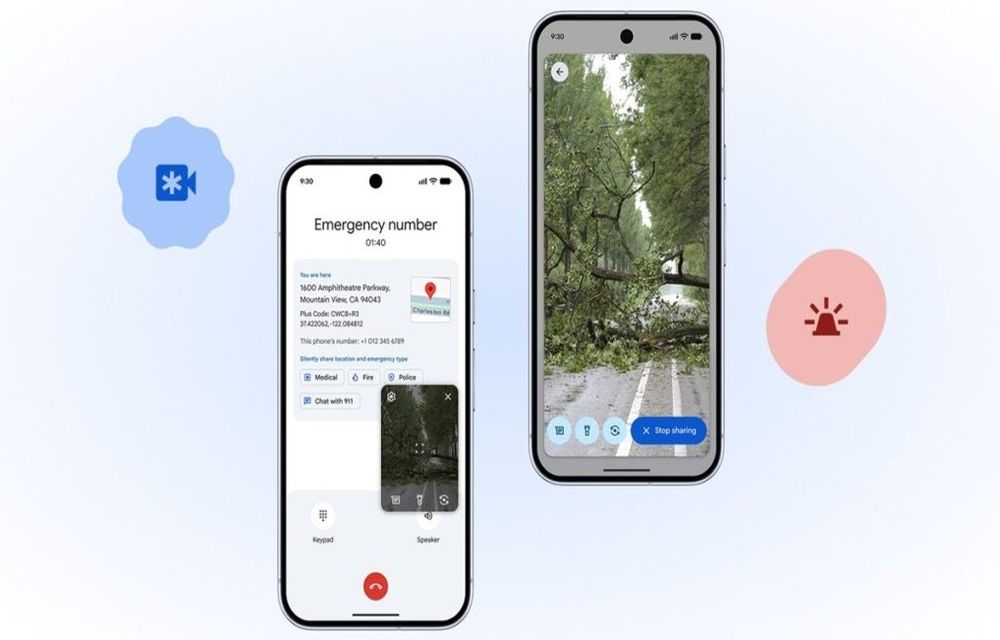
Google’s Emergency Live Video on Android: Real-Time 911 Streaming
Google is rolling out a new Emergency Live Video feature on Android that lets 911 and other emergency dispatchers request a secure live video stream from a caller’s phone to better understand what is happening in real time. This aims to improve response during car crashes, medical crises, and fast-moving disasters where every second and…
Google I/O 2026: Gemini 3.5 Flash & Autonomous Agents Redefine the Android Ecosystem
Google is officially moving beyond prompt-and-response AI. At Google I/O 2026 in Mountain View, the company laid the groundwork for an “Agentic” future where artificial intelligence operates autonomously in the background. Powered by the newly unveiled Gemini 3.5 Flash model, these agents are designed to execute complex tasks across the web, your local Android device,…

Now You Can Play Board Games With Bluetooth Powered Dice+
Android and iOS game lovers have good news; Digital game die, Dice+ is available to purchase. You can play games like Backgammon etc. Dice+ is a Bluetooth powered die which directly talks with your tablet or smartphone. Right now the number of games that support the dice is fairly small. SDK is already released for…
The week in tech, minus the noise.
New reviews, fixes and the stories that matter — once a week, straight to your inbox.
We only use your email to send the newsletter. Unsubscribe any time. See our privacy policy.
Comments