

November 2026 Patch Tuesday: Outlook Zero-Day Fixed, USB Audio Code 10 Bug Finally Solved
Patch Tuesday landed on November 10 this month, and for once the Outlook part of the release matters more than the Windows part. Microsoft fixed a spoofing bug in Outlook (CVE-2026-124194) that it says was already being exploited before the patch was ready, and that fix doesn’t come through Windows Update at all, it comes…

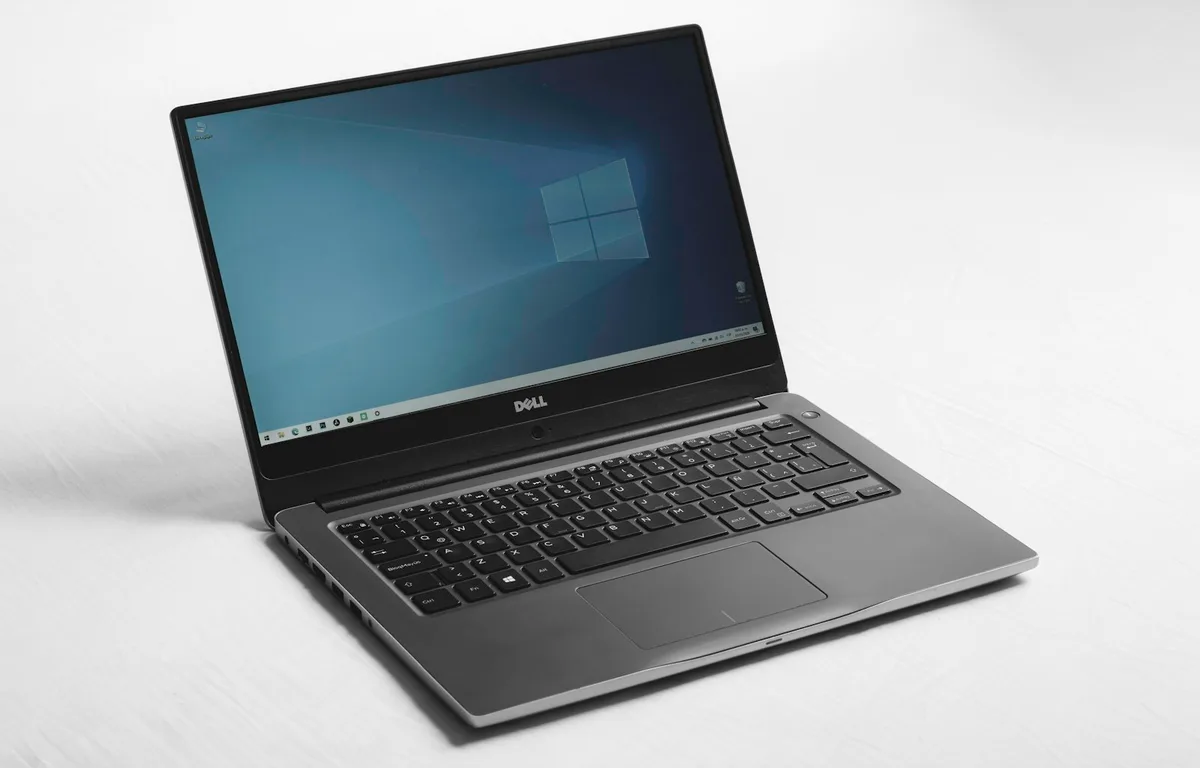
Photo by Erick Cerritos on Unsplash
Patch Tuesday landed on November 10 this month, and for once the Outlook part of the release matters more than the Windows part. Microsoft fixed a spoofing bug in Outlook (CVE-2026-124194) that it says was already being exploited before the patch was ready, and that fix doesn’t come through Windows Update at all, it comes through Office’s own updater, which a lot of people never look at.
There’s good news in the same batch too. The USB audio bug that has been throwing Code 10 errors in Device Manager since the September update is finally fixed, according to Microsoft’s release notes for KB5132061, so the headset that went quiet two months ago should work again once the update is in.
Below I’ve put the steps in the order I would do them on my own PC, with Office first and Windows second, and then a short section for people who look after a handful of machines at a small office, because two of this month’s changes can trip up older scripts and file shares.
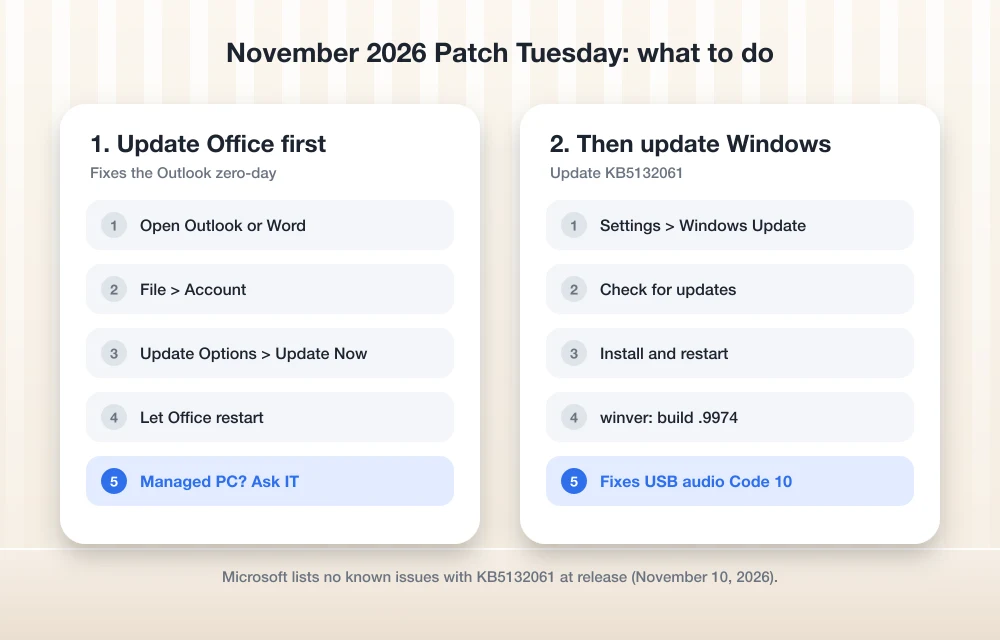
Quick answer: Update Office first, from File > Account > Update Options > Update Now in Outlook or Word, because that’s where the fix for the Outlook zero-day (CVE-2026-124194) is delivered. Then install KB5132061 from Settings > Windows Update and restart. Microsoft lists no known issues with the Windows update at release.
The Outlook Zero-Day: What CVE-2026-124194 Actually Does
Microsoft’s Security Update Guide entry for CVE-2026-124194 describes it as a Microsoft Outlook spoofing vulnerability and marks it as exploited, and since it also says the flaw wasn’t publicly disclosed before the fix shipped, that usually means someone found it being used in real attacks rather than reading about it in a research paper.
According to Microsoft, an attacker sends you a specially crafted message file and talks you into opening it in Outlook, at which point Outlook can connect out to a network location the attacker controls without showing the warning you’d normally get for external content. That quiet connection can hand over your NTLMv2 hash, which is a piece of your Windows sign-in data that an attacker can then use to authenticate as you on other systems.
There are a few details in Microsoft’s FAQ that are worth knowing before you either panic or shrug the whole thing off:
- Microsoft rates it Moderate, with a CVSS score of 6.5, which sounds fairly low until you remember that it’s already being used, and an exploited Moderate bug is a bigger real-world risk than a Critical one that only exists in theory.
- The Preview Pane is not an attack vector, so simply seeing a message in your inbox list or reading pane won’t trigger anything, and the attacker still needs you to actually open the malicious file.
- Microsoft’s list of affected products includes Microsoft 365 Apps for Enterprise as well as Office LTSC 2024 and 2021, and both the 32-bit and 64-bit editions are on it.
What trips a lot of people up is that installing the Windows cumulative update does nothing for this bug, because Outlook gets its fix through Office’s own update channel, so a PC that proudly shows “You’re up to date” in Windows Update can still be running a vulnerable copy of Outlook.
How to Update Outlook and Office Right Now
On most home and small business PCs Office updates itself in the background, but it can take days to get around to it, and I’d rather not sit and wait on an exploited bug when forcing the update yourself takes about two minutes.
- Open Outlook, or any other Office app such as Word, since that’s where Office keeps its update controls.
- Go to File > Account (in Outlook it may appear as File > Office Account), which is the page that shows your Office version and update settings.
- Click Update Options and then Update Now, and let it close and reopen your Office apps when it asks, because the update can’t finish while they’re running.
- When it’s done you should see a message saying you’re up to date, and the version number under About will have changed, which is a handy way to confirm the new build actually went on.
If the Update Options button is missing or grayed out, that means your organization is managing Office updates, so it’s your IT admin who needs to push the November build out, and I’d send them a quick note mentioning CVE-2026-124194 so it doesn’t just sit in a queue.
Until the update is installed, the practical defense is the boring one, which is not opening attachments or message files you weren’t expecting even when the sender name looks familiar, because spoofing bugs are exactly the kind of thing that makes a fake message look real.
What the Windows 11 November Update Fixes
On the Windows side, Microsoft’s KB5132061 release notes list the update for Windows 11 versions 26H2 and 25H2 as well as 24H2 Enterprise and Education, and it takes them to OS builds 26300.9974, 26200.9974 and 26100.9974 respectively. Windows 11 version 26H1 gets a package of its own, which is KB5132059.
| What’s fixed or changed | Who should care |
|---|---|
| USB Audio 1.0 devices failing to start with error Code 10 in Device Manager | Anyone whose USB headset, speakers or DAC went silent after September |
| Adding an Active Directory-published printer failing with error 87 | Offices that add printers from the company directory |
| Remote Desktop connections failing on the client with a certificate mismatch after the October 2026 preview update | Anyone who connects to work PCs over RDP |
| HDMI and DisplayPort audio failing on certain AMD graphics cards (24H2) | People using a monitor or TV for sound on an AMD GPU |
| NTLM clients now offer message signing by default for non-anonymous connections | IT admins with older file servers or apps |
| Stricter PowerShell script signature checks for invalid UTF-8 encoding | Anyone running signed PowerShell scripts |
The USB audio fix is the one most regular people will notice, because Microsoft had only listed that bug as “Mitigated” through October and the workaround of forcing the device into 2-channel stereo didn’t help everyone. We covered the full story and the stopgap steps in how to fix USB headset or speakers with no sound (Code 10) on Windows 11, and once this update is installed you can switch your device back to its normal format if you changed it earlier.
The Remote Desktop fix in this update deals with the certificate mismatch problem, which is a separate bug from the 0xC000000D “token is invalid” error that blocked non-admin users, so if that second one is what you’re dealing with, our guide on fixing Remote Desktop error 0xC000000D still applies, although being on the November update covers both.
How to Install the November Update on Windows 11
Open Settings > Windows Update and click Check for updates, and you should see the 2026-11 cumulative update for your version, which installs and then asks for a restart. Once the PC is back up, press Win + R, type winver and make sure the build number ends in .9974 on 24H2, 25H2 or 26H2, since that’s the quickest way to confirm the update actually landed.
If you look after a few office PCs yourself, Microsoft says the update is available through WSUS and the Microsoft Update Catalog, and because it ships with a servicing stack update bundled in, you no longer have to install that piece separately.
Two Changes IT Admins Should Check This Week
Most home users can install this and forget about it, but if you look after a small business network, the NTLM and PowerShell changes are the two that could turn into a support ticket.
Along with offering NTLM signing by default, Microsoft has added auditing so you can find connections that aren’t using signing, and I’d check those logs after rollout so that an older NAS or a copier’s scan-to-folder setup (or some legacy app nobody remembers installing) doesn’t quietly stop working on you.
On the PowerShell side, Microsoft says signed scripts containing invalid UTF-8 encoding may now fail signature validation, and its advice is to re-save them as UTF-8 with a byte order mark and sign them again, so if you rely on logon scripts or scheduled maintenance tasks, I’d test one on a patched machine before pushing the update everywhere.
And since this whole month kicked off with an Outlook bug, if your team’s Outlook is misbehaving in other ways too, our walkthrough on fixing Outlook not syncing email in Microsoft 365 goes through the usual suspects.
FAQs
What is the Outlook zero-day in November 2026 Patch Tuesday?
It’s CVE-2026-124194, an Outlook spoofing flaw that Microsoft marks as exploited, and it works by getting you to open a crafted message file that makes Outlook connect to an attacker’s server without a warning, which can leak your NTLMv2 hash.
Does the Windows update fix the Outlook vulnerability?
No, it doesn’t, because the Outlook fix comes through Office updates, so you’ll need to update Office separately from File > Account > Update Options > Update Now even after Windows Update says you’re current.
Does KB5132061 fix the USB audio Code 10 problem?
Yes, Microsoft’s release notes say the update fixes an issue where USB Audio 1.0 devices might fail to start and show error Code 10 in Device Manager, so your headset or speakers should work normally again once it’s installed.
Are there known issues with the November 2026 Windows 11 update?
At release Microsoft says it isn’t currently aware of any issues with KB5132061, though it’s always worth taking another look at the release notes if something breaks after you install it.
Bottom line: Update Office first because of the exploited Outlook bug, and then install the Windows update and restart, which gets you the security fixes along with the USB audio repair and the Remote Desktop and printer fixes in one go.
Disclosure: TheTechHacker has no paid relationship with Microsoft or any company mentioned here.
You might also like
How to Fix USB Headset or Speakers With No Sound (Code 10) on Windows 11
Update (November 11, 2026): Microsoft has now fixed this bug. The November 10 security update, KB5132061 for Windows 11 versions 24H2, 25H2 and 26H2 (KB5132059 on 26H1), fixes USB Audio 1.0 devices failing to start with Code 10, so installing it from Settings > Windows Update is now the first thing to do. More on…
iOS 27.2.1 Is Out: What the Bluetooth and iMessage Security Fixes Mean for Your iPhone
Apple pushed iOS 27.2.1 out on November 9, only two weeks after iOS 27.2, and if you glanced at the update screen you probably saw the usual one-liner about “bug fixes and security updates” and moved on. I’d actually tap Download on this one, because when you open Apple’s security notes, most of what got…

How to Fix Remote Desktop Error 0xC000000D: “The Token That Was Passed to the Function Is Invalid”
A standard user opens Remote Desktop, points it at their work PC and gets stopped with error 0xC000000D and the message “The token that was passed to the function is invalid,” while anyone with an admin account can still connect to that same machine without a problem. The firewall rules haven’t changed and the VPN…
The week in tech, minus the noise.
New reviews, fixes and the stories that matter — once a week, straight to your inbox.
We only use your email to send the newsletter. Unsubscribe any time. See our privacy policy.
Comments