

How to turn off the Microphone in Facebook
Facebook has been listening to your conversations since 2014. Many claim Facebook is involved in listening to your conversation with your smartphone microphone. When we install apps, we certainly give permissions to run the app with full features. One of them is giving access to the microphone. When you install Facebook app, it asks to…


How to turn off the Microphone in Facebook
Facebook has been listening to your conversations since 2014. Many claim Facebook is involved in listening to your conversation with your smartphone microphone. When we install apps, we certainly give permissions to run the app with full features. One of them is giving access to the microphone. When you install Facebook app, it asks to access your camera and microphone.
Recently Kelli Burns, a communications professor at South Florida states that she believes Facebook listening all conversations while the app is open. This passive listening technology by Facebook is in the news for users security concerns.
Why is Facebook doing this? They listen to users conversation to show relevant ads better. For example, if you are talking more about dog biscuits while the Facebook app is open, you most probably get Dog Buiscut posts in your Facebook feed.
Facebook does not use your phone’s microphone to inform ads or to change what you see in News Feed. Some recent articles have suggested that we must be listening to people’s conversations in order to show them relevant ads. This is not true. We show ads based on people’s interests and other profile information – not what you’re talking out loud about.
We only access your microphone if you have given our app permission and if you are actively using a specific feature that requires audio. This might include recording a video or using an optional feature we introduced two years ago to include music or other audio in your status updates.
How to turn off the microphone on Facebook for Android?
You can turn off the given Microphone permission to Facebook from device settings. The below steps are meant for Android Nougat operating system.
- Open Settings on your Android device.
- Go to “Apps”
- Here scroll down and tap on Facebook.
- Now scroll down and click on “App permissions”
- Now turn off “Microphone” access.
How to turn off the microphone on Facebook for iOS?
- Go to the Settings
- Scroll down to Facebook, and tap on it.
- Tap “Settings”
- Turn off the slider for Microphone (it turns grey when it off)
How to turn off the microphone in Facebook Messenger?
- Open the Settings app on your iOS device.
- Now, tap Privacy.
- Tap on Microphone.
- Here tap the Messenger switch to turn it off.
Above are default steps to turn off Microphone permissions to Facebook. We have many ways to turn off microphone access to Facebook.
In other ways uninstalling social network apps from your smartphone is best practice. However, many people won’t agree with this option, but luckily we can block the access by using some apps.
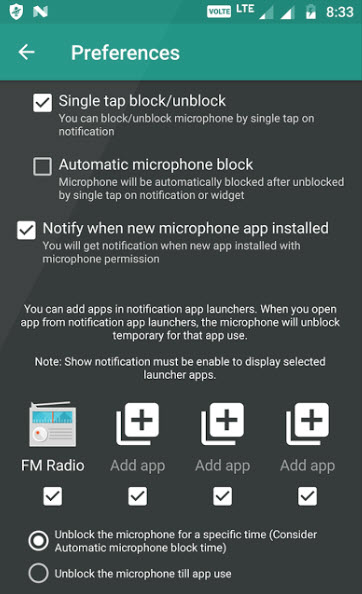
Microphone Blocker – Anti Spyware
Microphone Blocker is an Android app designed especially for paranoid about their privacy. This app comes in both free and paid versions. Microphone Blocker simply blocks all apps Microphone access with a simple click. This app is pretty useful if you want to disable the microphone access to all installed apps on your device.
That’s all for now. Please do share your view in the comment box below.
More in Internet

How to Disable AutoPlay of Videos in Google Chrome by Default
Facebook, YouTube and almost all video file supporting web services enabled autoplay of videos. They may find this feature as user convenience, as the user scrolls down all video content start playing automatically. But for some users, especially for those who don’t have enough data to play all those videos and carefully browsing the internet…

Why Facebook is addictive? Best Ways To Avoid Facebook From Your Life
Facebook is a most popular social networking site in the world. Millions of people are using Facebook to share their photos, videos and even feelings to loved one’s, friends and public.

Ten Amazing & Useful Websites Of The Week Saturday-1
This is our first post of “Ten Amazing & Useful Websites of The Week”, weekly we provide most useful website available on the Internet of different categories. If you are looking for a new interesting website to explore this weekend follow our guide. Every week on Saturday we post the latest and most useful top…
The week in tech, minus the noise.
New reviews, fixes and the stories that matter — once a week, straight to your inbox.
We only use your email to send the newsletter. Unsubscribe any time. See our privacy policy.
Comments