

How to Use Amazon Pay Balance for Recharge and Other Bill Payments
Amazon has introduced Amazon Pay as a wallet for its own shopping portal. If you are trying to pay some utility bill or book a bus ticket in Amazon Pay interface you will find those options missing in the interface. Initially, Amazon Pay supports mobile recharges apart from its own wallet features. Now they are…

How to Use Amazon Pay Balance for Recharge and Other Bill Payments
Amazon has introduced Amazon Pay as a wallet for its own shopping portal. If you are trying to pay some utility bill or book a bus ticket in Amazon Pay interface you will find those options missing in the interface. Initially, Amazon Pay supports mobile recharges apart from its own wallet features. Now they are expanding wallet features by partnering up with merchants for bill payments, recharges, movie ticket booking, and for booking bus.
In this article, we learn how to use Amazon Pay balance for mobile recharge, and other bill payments.

1.Haptik
Amazon is one of the payment partners for Haptik app. Using this personal assistant app you can use your Amazon Pay balance for DTH recharges, flight ticket booking, Ola and Uber cabs payment, and much more.
1. Download Haptik for Android or iOS.
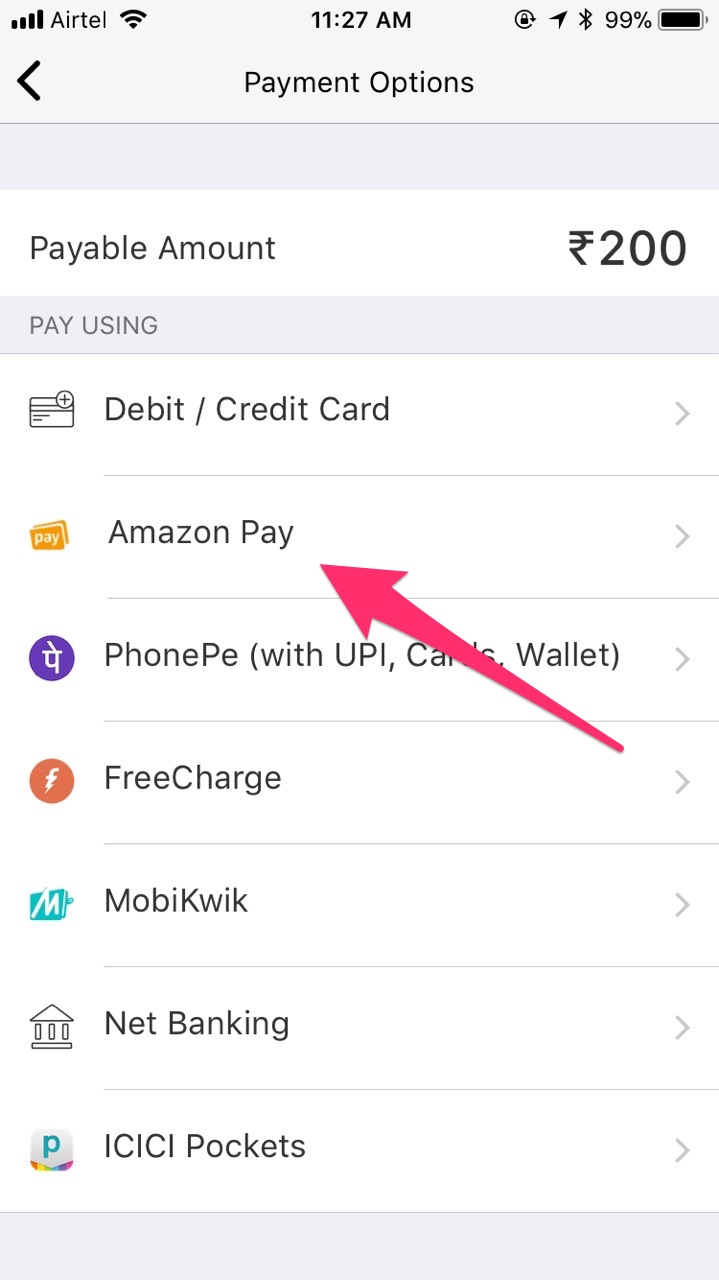
2. In the Haptik user interface go to “Recharge and Bills”.
3. Here you can recharge your mobile, DTH and Electricity Bills.
4. Now select your desired option. For example, I have chosen DTH recharge here.
5. Here enter your DTH details like the service provider, subscriber ID and amount.
6. After entering above details the app will open available payments option.
7. Here you will find Amazon Pay as one of the payment options.
8. Now tap on Amazon Pay, here you will need to login to the Amazon to authenticate the service.
9. After successful login into the Amazon account, you can pay using your Amazon Pay balance for the recharge.
Alternative Apps for using Amazon Pay Balance for DTH other Bill Payments
2.Tapzo
Tapzo is another Amazon Pay enabled e-payments service which does prepaid mobile & DTH, Pay postpaid mobile, Electricity & other utility Bills payments. This app is pretty easy to use. Install from Google Play store and create an account in Tapzo using your mobile phone number.
After the signup, the Tapzo shows the list of e-payments option on its user interface. Select your service you want to recharge and tap on Amazon Pay in the payment options screen. That’s it, now the amount is debits from your Amazon Pay balance.
Now the Amazon expanding its supporters list, apart from Haptik and Tapzo there are two more apps in the list. You can use the 2 apps to use Amazon Pay balance for Prepaid Recharge, Electricity bill payment, Cab booking, flight ticket booking and more.
That’s all for now. Please do share your view and feedback in the comment box below.
You might also like
Top 5 Payment Gateway Solutions for Online Businesses in USA (2026 Guide)
Top 5 Payment Gateway Solutions for Online Businesses in USA (2026 Guide) The payment gateway for your online USA based business essentially serves as the heartbeat of your cash flow. It determines when and how quickly your customers pay you, which types of money you’re able to accept as payment, and how easy it is…
How to Prepare for More Tech Outages: A Phone, Money and Travel Checklist
The run of tech outages this month may not be over. On Sunday, November 22, Microsoft President Brad Smith told CBS’s Face the Nation, “I think we have to be prepared, frankly, for the coming months,” because “the whole information infrastructure of the world is in effect being upgraded right now.” The same day, Director…

Free iPhone 18 Black Friday Deals: The Fine Print at Verizon, AT&T and T-Mobile
Every big carrier is advertising a “free” or nearly free iPhone 18 Pro for Black Friday. Unlike a store discount, these deals don’t take money off the price at checkout. They pay you back in monthly bill credits over two or three years, and only if you meet every condition. Those conditions include the right…
The week in tech, minus the noise.
New reviews, fixes and the stories that matter — once a week, straight to your inbox.
We only use your email to send the newsletter. Unsubscribe any time. See our privacy policy.
Comments