

How to Prepare for More Tech Outages: A Phone, Money and Travel Checklist
The run of tech outages this month may not be over. On Sunday, November 22, Microsoft President Brad Smith told CBS’s Face the Nation, “I think we have to be prepared, frankly, for the coming months,” because “the whole information infrastructure of the world is in effect being upgraded right now.” The same day, Director…
Image: CISA
The run of tech outages this month may not be over. On Sunday, November 22, Microsoft President Brad Smith told CBS’s Face the Nation, “I think we have to be prepared, frankly, for the coming months,” because “the whole information infrastructure of the world is in effect being upgraded right now.” The same day, Director of National Intelligence Jay Clayton told CNN that systems “may be interrupted for a period of time,” as PYMNTS reported. You can’t stop a bank or airline outage, but a few minutes of setup now means you can still pay, travel and get into your accounts when one hits. This checklist uses guidance from Ready.gov, the FDIC, the CFPB and the companies themselves.
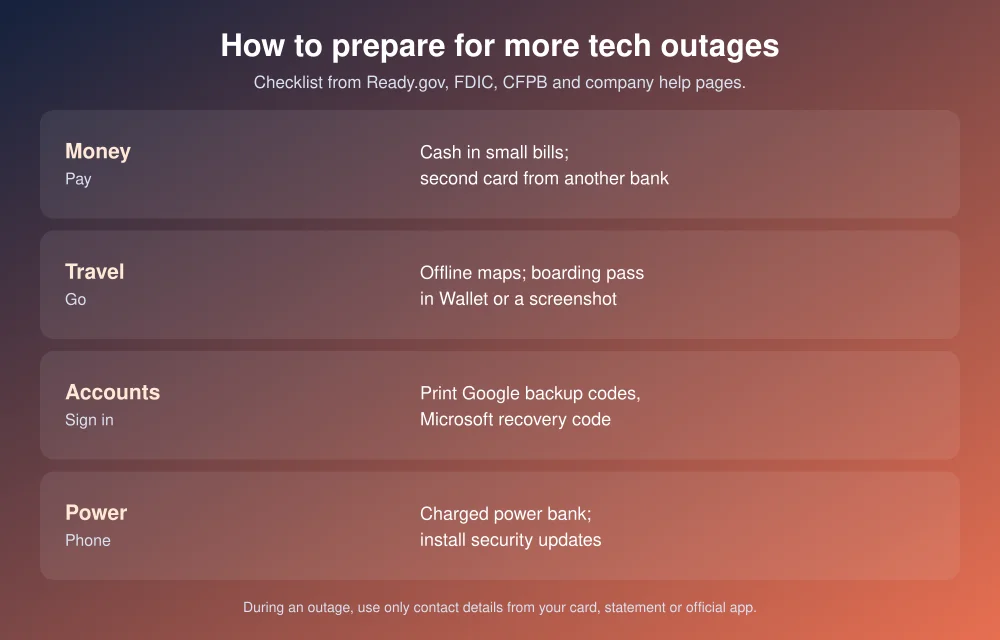
Quick answer: To prepare for tech outages, keep some cash in small bills and a second way to pay from a different bank. Save offline maps in Google Maps or Apple Maps, and add boarding passes to Apple Wallet or Google Wallet or take a screenshot. Print your Google backup codes and Microsoft recovery code, and add an Apple Recovery Contact. Keep a charged power bank, and install security updates when they arrive. During an outage, only use contact details from the company’s own app, card or website, since scammers pose as support.
Why more outages are expected
Smith said Microsoft’s own November 12 outage “wasn’t a cyberattack,” but “a perfect storm of software that was updated four months earlier” combined with a new update and a shift in network traffic. He linked the wave to companies rushing to patch software flaws, and said “this isn’t the type of thing that just gets done in a couple of weeks.” The recent outages, with the causes companies gave:
- Nov 12-14, Microsoft 365: Outlook and Teams went down after a network upgrade. See how to check if Microsoft 365 is down.
- Nov 13, FAA ground stop: a “technical problem” stopped flights nationwide. The FAA says about 12,462 flights were canceled.
- Nov 16, JPMorgan Chase: a software bug delayed payments at other banks too. Read what happened in the Chase outage.
- Nov 16, United Airlines: a technology outage delayed flights, with no sign of a cyberattack.
- Nov 17, Apple: iCloud sign-in, the App Store and Apple Music had problems that Apple blamed on an internal update.
Officials say there’s no evidence the incidents are linked or part of a coordinated attack.
1. Money: keep a way to pay that doesn’t depend on one bank
- Keep some cash in small bills. Ready.gov and the FDIC both recommend it, because cards and ATMs may not work.
- Have a second card from a different bank. In the Chase outage, customers of other banks were also hit when Chase was on the other end of a payment.
- Set up your bank’s app and online banking now, plus its phone number, so you have more than one way in.
- Keep card details and the bank’s number written down somewhere safe.
If your bank goes down, the CFPB says to contact the bank using the number on your card or statement, use another channel such as the app, phone, ATM or a branch, and check whether automatic payments went through. Ask the bank to waive late, overdraft or NSF fees caused by the outage. If a transfer is wrong, report it within 60 days of the statement. Under federal Regulation E, the bank must usually investigate within 10 business days. The FDIC says insured deposits stay protected up to $250,000 per depositor, per bank, per ownership category, even during an outage. For delayed transfers, see our Zelle payment delay guide.
2. Travel: save what you need offline
- Google Maps: tap your profile picture > Offline maps > Select your own map > Download. Offline maps give driving directions but no transit, walking or live traffic.
- Apple Maps (iOS 17 or later): drop a pin on the area, tap Download, adjust the area and tap Download again.
- Boarding passes: tap Add to Apple Wallet or Add to Google Wallet in the airline’s app or email. Saved passes open without internet. TSA has said a screenshot of a mobile pass can be scanned, but a printout of a mobile pass can’t. Print the airline’s own paper boarding pass if you want a paper backup.
- Carry your physical ID, even if you use TSA Touchless ID.
- Know your refund rights. The Department of Transportation requires automatic refunds when a flight is canceled or significantly changed (3+ hours domestic, 6+ hours international) and you don’t accept a rebooking. See the DOT air consumer page and our flight delay alerts guide.
3. Accounts: make sure you can still sign in
Outages often bring sign-in problems. Set these up while things are working:
- Google backup codes: go to your Google Account > Security > 2-Step Verification > Backup codes. You get 10 single-use 8-digit codes. Print them.
- Microsoft recovery code: in your Microsoft account security settings, choose Recovery code > Generate a new code. It’s 25 characters. Keep it off your phone and laptop.
- Apple Recovery Contact: Settings > [your name] > Sign-In & Security > Recovery Contacts. A trusted person can give you a code to get back in, without seeing your data.
- Be careful with Apple’s Recovery Key. Apple warns that turning one on disables its normal account recovery. If you lose the key, you could be locked out for good.
Store important documents like ID, insurance and medical records in the cloud and on an external drive too, as Ready.gov suggests.
4. Phone and power
- Keep a power bank charged, along with a car charger.
- Set up Medical ID in the iPhone Health app and turn on Show When Locked. On iPhone 14 or later, Emergency SOS via satellite works without cell service.
- Install updates. Smith’s advice: “if you get an update on your phone or your laptop with a patch, apply it.” CISA recommends turning on automatic updates.
5. During an outage: avoid the scams
Scammers move fast after outages. After the Microsoft 365 outage, fake emails claimed held messages would be deleted unless you clicked “Restore Messages.” See how to spot the fake Microsoft 365 email.
- Check status on the company’s own status page or verified social account.
- Only call numbers from your card, statement or the official app, never from a search ad or a reply on social media.
- Never read out a verification code, approve a sign-in you didn’t start, or give anyone remote access.
- Anyone asking for payment in gift cards, wire transfers or crypto is a scammer. Report it at ReportFraud.ftc.gov.
FAQs
Are more tech outages coming?
Microsoft President Brad Smith said on November 22, 2026 that people should be prepared “for the coming months” as companies upgrade and patch their systems. The DNI also said systems may be interrupted during upgrades.
How much cash should I keep at home for an outage?
Official guidance doesn’t give an amount. Ready.gov and the FDIC say to keep a small amount of cash in small bills for when cards and ATMs don’t work.
What should I do if my bank’s app is down?
Use another channel such as phone, ATM or a branch, call the number on your card, check that automatic payments went through, and ask the bank to waive fees caused by the outage, as the CFPB recommends.
Can I use my boarding pass without internet?
Yes, if you add it to Apple Wallet or Google Wallet before you lose service. A screenshot of the mobile pass also works at TSA.
Featured image: CISA.
Disclosure: TheTechHacker has no paid relationship with Microsoft, Apple, Google, any bank or airline, or any company mentioned here.
More in Guides

Making Money With a Tech Website — From Traffic Graph to Actual Income
Building a profitable tech website is like opening a shop on a street that’s slowly getting busier every month. For a while, you’re just happy people are walking past and glancing in. Then one day you look at the footfall and think – wait, shouldn’t this be turning into something? That’s the exact moment every…

How to Spot Fake Flight Cancellation Texts Before Thanksgiving Travel
Thanksgiving week is the busiest stretch of the year for travel scams, and fake flight cancellation messages are one of the nastiest. A text arrives saying your flight was canceled, it uses your airline’s name and sometimes a real-looking flight number, and it gives you a number to call or a link to “rebook.” The…

Thanksgiving Tech Checklist: Set Up Your Parents’ Phones in One Visit
Thanksgiving is often the one weekend a year you’re sitting next to your parents with their phone in your hand. Use it well. In about 30 minutes you can make their iPhone or Android phone safer, easier to read, easier to recover if it’s lost, and much harder for scammers to exploit. This checklist puts…
The week in tech, minus the noise.
New reviews, fixes and the stories that matter — once a week, straight to your inbox.
We only use your email to send the newsletter. Unsubscribe any time. See our privacy policy.
Comments