

How to Disable Facebook’s Automatic Face Recognition Setting
Facebook is a lot in the news for its user information collection and making money from the data. The company officially told about the Face Recognition technology was introduced in the year 2017. And our faces are identifiable in the Facebook and this feature is rolled out to make photos tagging easy. In the recent…
How to Disable Facebook’s Automatic Face Recognition Setting
Facebook is a lot in the news for its user information collection and making money from the data. The company officially told about the Face Recognition technology was introduced in the year 2017. And our faces are identifiable in the Facebook and this feature is rolled out to make photos tagging easy.
In the recent news from trustable sources states that the absent of Facial Recognition option to turn it off in some people profiles. This technology is developed in 2017 for machines learning automatically tag you in photos. The AI also has the capabilities to know the person gender, race, and age, and memorizes faces. It is also an open secret that Facebook conducted 10 years of the challenge to collect the users face database.
In my checking, I found the Facial Recognition option present in the Facebook settings. According to a small audit run by Consumer Reports, the options section was missing in nearly 25% of the accounts who participated in the poll. It is unclear why the option is missing whether it is an error or Facebook still rolling out the update across the world.
To check the option is available or not and if the option is available we will show how to turn it off.
How to Disable Facebook’s Automatic Face Recognition Setting
- To disable Facebook’s automatic face recognition settings log into your Facebook account first.
- Now head over to “Settings”.
- Here you will see an option called “Face Recognition” under the Language option.
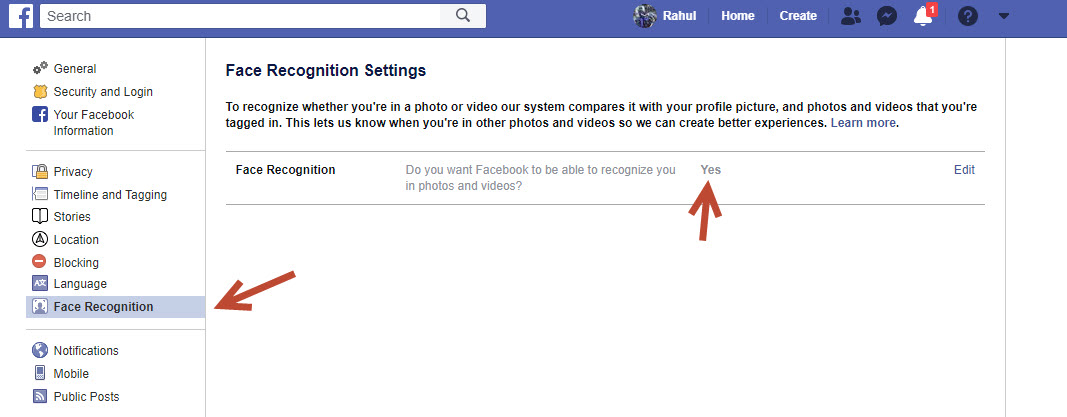
Disable Facebook’s Automatic Face Recognition - On the right side, panel edit the option from Yes to No and close it.
- That’s it. Now you disabled the Face Recognition option on Facebook.
If the option is not available, you have to wait for the Facebook update or error fix which is causing the issue.
Let us know your opinion about Facebook privacy settings in the comment section below.
More in Security

What is Tor? How It Protects Your Online Privacy?
In a world were companies are hungry for your data and many technologies revolve around extracting data from users, privacy is one of the biggest concerns. You might not value for data but companies like Google and Facebook use the data trove obtained from users to train their products and make improvements. If you’re someone…

Hackers Are Targeting Zoom. Here’s How To Stay Safe During Zoom-Meeting And Video Calls
Safety and security during Video Conferencing with Zoom are nowadays thought of concern. We see a lot of Zoom-Bombing victims on a regular basis. With a phase of lockdown, everyone is resorting to working from home. Even schools and colleges are taking their lectures online via Zoom, Google Meets, Microsoft Teams and other such platforms.…

VPN Beginner’s Guide – Why We All Need VPN?
Have you ever considered how anonymous you really are online? Although being able to track internet users is useful when it comes to criminals and the likes, are regular people who are doing no harm right to want to remain anonymous? Or, do you want to stay anonymous for a reason, such as accessing geo-blocked…
The week in tech, minus the noise.
New reviews, fixes and the stories that matter — once a week, straight to your inbox.
We only use your email to send the newsletter. Unsubscribe any time. See our privacy policy.
Comments