

How to send SMS or text from Computer?
Text messaging is an evergreen method of communication. Even after the launch of quick messaging services like WhatsApp, Messenger, and Telegram, SMS is still used by many people. The use of text message is far simpler than the other communication mediums is the advantage of the SMS. If you are planning to send SMS or…


How to send SMS or text from Computer
Text messaging is an evergreen method of communication. Even after the launch of quick messaging services like WhatsApp, Messenger, and Telegram, SMS is still used by many people. The use of text message is far simpler than the other communication mediums is the advantage of the SMS.
If you are planning to send SMS or text from computer, then there are numerous ways to achieve this. In this article, you will know how to send a text from computer in easy methods.
1. Android Messages
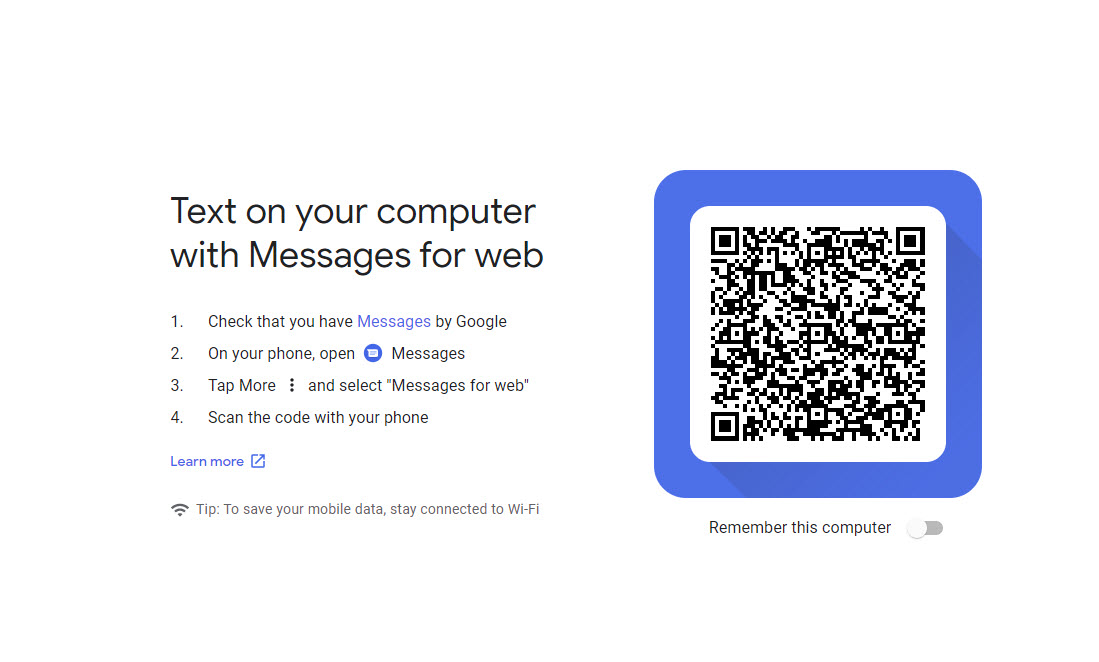
Messages is the simplest way to send Android text messages from a PC. It is an official service from the Android which works from browser integration. To use this service, open your Android default Messages app and tap on 3 dots menu at the top corner of the screen and select “Messages for web“. It will open the camera scanner and now open this link on your desktop browser and scan the code with your phone.
2. mysms – Text from Computer, Messaging
mysms service offers the simplest way to send SMS from a PC. All you need to do is install mysms app from the Windows Store on your PC and correspondent app on Android smartphone. Once you install both apps on Windows and Android now they communicate with each other to send text messages.
In order to use this free service, you need to own Windows PC and Android. Also, you need to signup for mysms to avail of the service.
Features
- Send and receive text messages on your tablet and PC
- Automatic sync between your smartphone, tablet, and computer
- Call notifications on your PC- when you receive a call on your phone
- MMS Group chat and multimedia support
3. Pushbullet
Pushbullet is a very popular name for connecting computers with smartphones. It lets you send SMS from a computer by connecting the smartphone with the PC. The user can type or compose a new text message from a computer keyboard instead of typing on a tedious mobile keyboard.
Features
- Text from your computer using your keyboard instead of grabbing your phone
- See all of your phone’s notifications on your computer, including phone calls
- Dismiss a notification on your computer and it goes away on your phone too
These are the best ways to send a text from computer. Try these ways to simplify the messaging tasks from PC. If you find any new way to communicate text messages from PC please mention in the comment box below.
More in How-to
How To Change Fonts On WhatsApp Messages
WhatsApp is a well know personal messaging platform available for smartphones. It works with the help of a phone number to send and receive a text and multimedia related messages using the Internet. After Facebook take over, WhatsApp rolled out several features to the service which makes the WhatsApp stand out from the alternatives. Recently,…
Gmail POP3/SMTP Settings For Sending Emails
Gmail provides an ability to download emails via POP3/SMTP. To work with this feature, you require access to email client software such as Microsoft Outlook or Thunderbird. The advantage of the functionality is that your emails will be downloaded directly to your computer. Hence, you can read the email when you prefer. It is also…
How To Transfer iPhone Text Messages SMS To Android Device
After choosing Android over iPhone now it is the time to transfer all the existing content to new device. There are several programs available in software market to transfer all the data present in iPhone to Android device.
The week in tech, minus the noise.
New reviews, fixes and the stories that matter — once a week, straight to your inbox.
We only use your email to send the newsletter. Unsubscribe any time. See our privacy policy.
Comments