

How To Fake An Incoming Call On The Phone
There are many unwanted situations comes in our life. Sometimes we can’t show our emotions to escape from the situation. Whether it is an unwanted meeting or boring party, all we need is a small excuse to escape from the situation. Thanks to modern technology which makes our life’s very easy to manage in all…


How To Fake An Incoming Call On The Phone
There are many unwanted situations comes in our life. Sometimes we can’t show our emotions to escape from the situation. Whether it is an unwanted meeting or boring party, all we need is a small excuse to escape from the situation.
Thanks to modern technology which makes our life’s very easy to manage in all kinds of problems. The one advantage of mobile phones we can use is a calling feature. Smartphones are really smart to help you in an escaping scenario. Yes, you can fake an incoming call on a smartphone with the help of an app.
How to Fake an Incoming Call on the iPhone?
There are plenty of ways to fake an incoming call on the iPhone. With the help of third-party apps, we can easily fake a call.
For iPhone users, there is a simple app called “Fake Call” is available on the App store. It is one of the best third-party app available on the Apple App store to create a fake incoming call on your iPhone. It just takes a few simple steps to set the fake call on your device.
- Download and install the “Fake Call” app on your iPhone.
- Open the app and set the calling time. The free version offers a calling feature after a 3 seconds time. The paid version offers start time from 3 seconds to 2 hours period.
- Once you setup the time, just wait to receive a fake call on your device.
Recommended fake call app for iOS users:
How to Fake an Incoming Call on the Android?
For Android devices, there are plenty of fake call apps available on the Google Play store. Here I’m using “Fake call – prank” app in the tutorial.
- Download and install Fake call – prank app on your Android.
- After installing, the home screen of the app shows 6 options to start with.
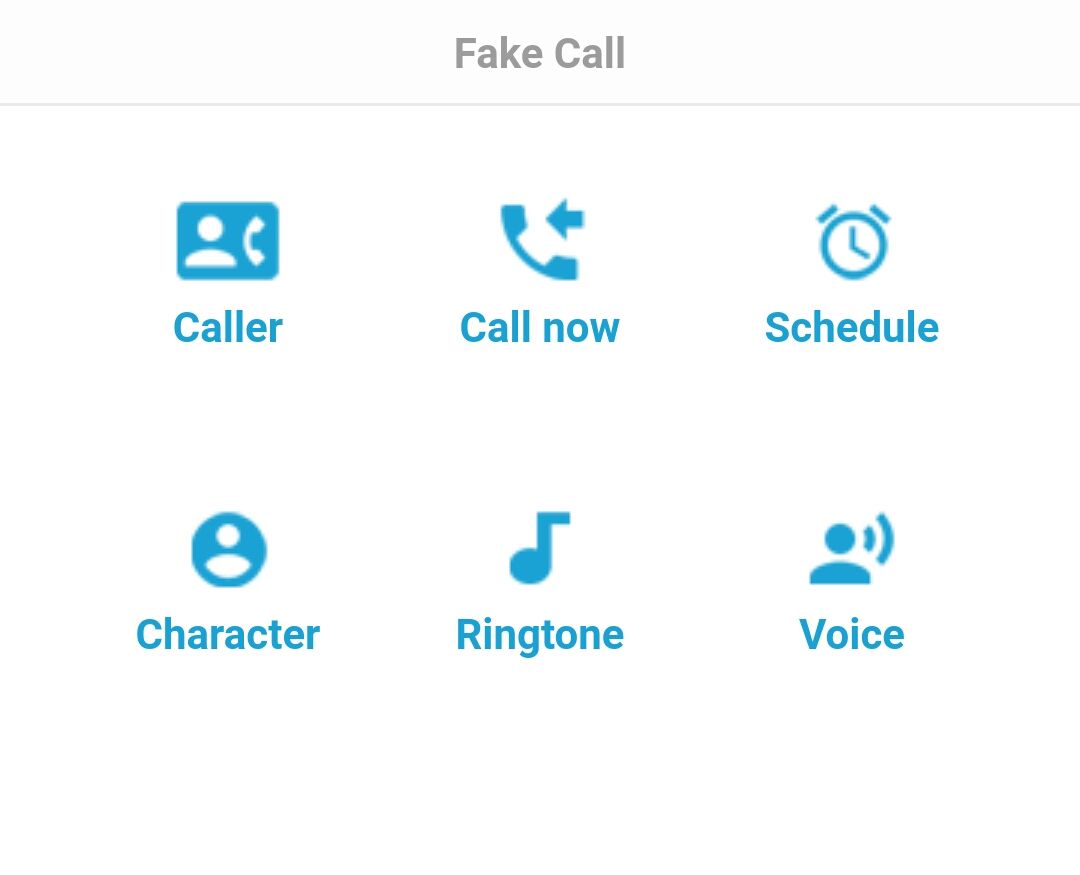
- Caller, Call now, Schedule, Character, Ringtone, and Voice.
- Using each option, you can tweak the incoming fake call settings to make it more real.
That’s it. Creating a fake call on Android or iOS is a pretty easy process with the help of apps. Let us know your valuable feedback in the comment section below.
More in How-to

How To Block A Phone Number To Avoid Unwanted Calls
Reasons are so many to avoid a phone call, it is very frustrating when you receive an unwanted phone call in the middle of a meeting, classroom or any other situation. In recent years there are so many spam calls are disturbing our privacy and time. Choosing a simple method to block a phone number…
How to Fix ‘Your Computer Has Been Locked’ Scam Pop-Ups on Windows and Mac
A fake Microsoft or Apple warning took over your screen and wants you to call a number? Here’s how to close it safely on Windows and Mac, clean up your browser, and recover if you already called or paid.

How to Use Google for a Reverse Phone Lookup
To do a reverse phone lookup with Google, type the full phone number (with the area code) into the Google search box, in quotes, like “888-999-1212”. If the number belongs to a business, a public listing or a known scam, it usually shows up in the first few results. Google does not have a dedicated…
The week in tech, minus the noise.
New reviews, fixes and the stories that matter — once a week, straight to your inbox.
We only use your email to send the newsletter. Unsubscribe any time. See our privacy policy.
Comments