

Best Free Reverse Phone Lookup Sites Like 800notes (2026)
Got a call from a number you don’t recognise? Maybe it called twice and didn’t leave a message. It could be your doctor, a delivery driver, your bank, or a scammer, and you can’t tell just by looking at the number. Before you call back, take thirty seconds to find out who it is. That’s…

Phone showing an unknown incoming call with lookup, report and spam score icons
Got a call from a number you don’t recognise? Maybe it called twice and didn’t leave a message. It could be your doctor, a delivery driver, your bank, or a scammer, and you can’t tell just by looking at the number. Before you call back, take thirty seconds to find out who it is.
That’s exactly what a reverse phone lookup does. You type in the number, and the site tells you what it knows about it, usually from reports left by other people who got the same call. Back in 2019 we wrote about what 800notes is and how it works, and it’s still one of the first places I check. But it isn’t the only free option, and it isn’t always the best one for every number. So here are the free reverse phone lookup sites I actually use, what each one is good at, and where the “free” part ends.
Quick answer: The best free reverse phone lookup sites like 800notes are 800notes itself, WhoCallsMe, tellows and Should I Answer for reading what other people say about a number, NumLookup for a free caller name and carrier on US numbers, and Truecaller for caller ID on your phone. Start by pasting the number into Google with quotes around it, then check 800notes. If a number is flagged as a scam, don’t call back, block it and report it.
What Is 800notes and Why Do People Still Use It?
800notes is a free, community-built directory of phone numbers. When someone gets a strange call, they search the number and leave a short note: “Said it was Amazon, asked for my card details”, “Debt collector looking for someone else”, “Pharmacy reminder, legit”. The next person who searches that number sees all of those notes in one thread.
That’s the real strength of the site. It doesn’t try to sell you a background report. It just shows you what real people experienced when that number rang. The forum is still active too. When I checked it this week, threads had replies from September 2026, so it’s not one of those abandoned sites living on old data.
The catch is that 800notes is only as good as its users. A brand-new scam number may have zero reports. A number that has been “spoofed” (faked by a scammer so it looks like it belongs to someone else) can collect angry comments that the real owner never earned. So treat it like a neighbourhood noticeboard, not a court record.
Best Free Reverse Phone Lookup Sites Like 800notes
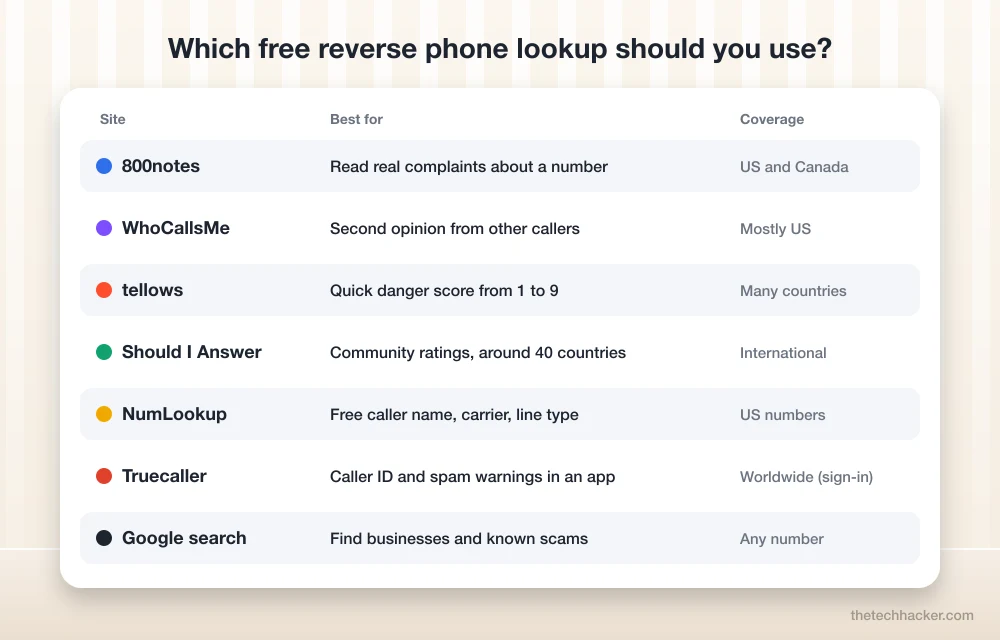
Here’s the list. I’ve grouped them by what they’re best at, because “who is this?” and “is this a scam?” are two different questions, and different sites answer them better.
1. 800notes – Best for Reading Real Complaints
Go to 800notes.com, type the number in the search box and you’ll land on its page if anyone has reported it. Read the newest comments first. If ten people in the last week say “fake bank fraud department”, you’ve got your answer. If the number has no page yet, you can add the first report yourself and help the next person.
It’s completely free to search. It works best for US and Canadian numbers, since that’s where most of its users are.
2. WhoCallsMe – Best Second Opinion
WhoCallsMe works the same way as 800notes: a user-supplied database of telemarketers, charities, survey callers and scammers. I use it as a second opinion. Sometimes a number has nothing on 800notes but three or four comments on WhoCallsMe, or the other way around. If you find nothing, you can leave a comment to start the thread.
3. tellows – Best for a Quick Danger Score
tellows gives every number a score from 1 to 9, based on how other users rated it. 1 means trustworthy, 9 means dubious, and anything from 7 up is treated as a likely nuisance or scam. I like it when I want an answer at a glance instead of reading through a long comment thread. A middle score usually just means there aren’t enough ratings yet, so don’t read too much into a 5.
It also has local versions for different countries, which helps if you’re outside the US.
4. Should I Answer – Best for Users Outside the US
Should I Answer started as a call-blocking app and still is one, but its website lets you look up numbers too, with community ratings of positive, neutral or negative. The big plus is coverage: it runs local sites for around 40 countries, including the UK, Australia and India. If an international number is calling you, this is one of the better free places to check.
5. NumLookup – Best Free Caller Name for US Numbers
The community sites tell you what a caller did. NumLookup tries to tell you who the number belongs to. Its free search, with no sign-up needed, shows a caller name when it has one, the general location, the carrier and whether the number is a mobile, landline or VoIP line. It also flags numbers other users reported as scams or robocalls.
Here’s where “free” ends, though. Address history, relatives and the rest of the background report sit behind a paid subscription. For most unknown calls, the free result is enough. A VoIP result is a small red flag by itself, because many robocalls come from internet phone numbers.
6. Truecaller – Best Caller ID App
Truecaller is the one most people already know, especially in India. Install the app on Android or iPhone and it shows names and spam warnings while the phone is still ringing, which beats looking a number up afterwards. You can also search on its website, but you’ll need to sign in with a Google or Microsoft account first, and the web version limits how many lookups you get before it nudges you towards the app.
The trade-off is privacy. Truecaller’s database is built partly from the contact lists of its users, so think about whether that sits right with you. If you want more options, see our list of caller ID apps for Android.
7. Google – The Free Lookup Everyone Forgets
Honestly, this is my first step every time. Type the number into Google with quote marks around it, like “202-555-0143”, and try it once with dashes and once without. If it belongs to a business, a doctor’s office or a delivery company, it’s usually on their website or Google Business listing. If it’s a known scam, you’ll often see 800notes or tellows pages near the top of the results anyway.
8. TruePeopleSearch – Free, but Use It Carefully
TruePeopleSearch is a free US people-search site that can match a number to a name. It’s handy for an old friend or a missed call from a landline. Just remember it’s a data broker. It shows information about real people who never agreed to be listed, so use it for identifying a caller, not for digging into someone’s life. If your own number shows up there, the site has a free opt-out form, and it’s worth checking it again every few months because listings can come back.
How to Look Up an Unknown Number in Under a Minute
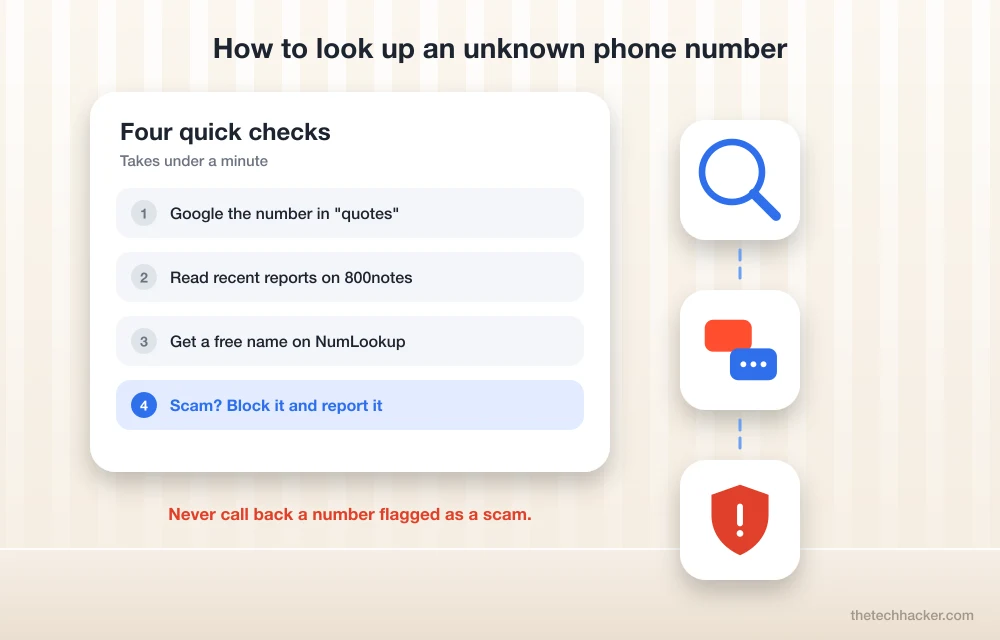
This is the routine I follow, and it settles most numbers fast.
First, copy the number exactly as it appears in your call log and search it on Google in quotes. Then paste it into 800notes and read the latest reports. If you still don’t know who it is, run it through NumLookup for the caller name, carrier and line type, or tellows for a quick score if the number isn’t from the US.
If everything says scam, don’t call back and don’t reply to any text from it. Block it on your phone. In the US you can also report it to the FTC at ReportFraud.ftc.gov, and if you’re getting sales calls even though you’re on the Do Not Call list, report those at DoNotCall.gov.
Let Your Phone Screen Unknown Calls for You
Looking numbers up after the fact works, but your phone can now do a lot of this before you even pick up.
On an iPhone with iOS 26, go to Settings > Apps > Phone > Screen Unknown Callers. Choose Ask Reason for Calling and your iPhone answers numbers that aren’t in your contacts, asks who’s calling and why, and shows you the answer so you can decide. Pick Silence if you’d rather unknown calls go straight to voicemail. The feature isn’t available in every language and region yet, so you may not see it.
On Android phones that use the Phone by Google app, open the Phone app, tap the three dots, go to Settings > Caller ID & spam and turn on both caller and spam ID and the option to filter spam calls. Samsung’s own Phone app has a similar caller ID and spam protection setting.
How Accurate Are Free Reverse Phone Lookups?
Fair question, and the honest answer is “good, not perfect”. Free lookups are great at spotting patterns. If fifty people say the same number is a fake tax office, it is. They’re weaker at naming the person behind a mobile number, because mobile numbers aren’t in public directories the way old landlines were.
There are two more things to keep in mind. Scammers spoof numbers all the time, so the name you find belongs to the number, not always to the person actually calling. And numbers get recycled. The comments on a page may be about someone who had that number years ago. Look at the dates on reports before you trust them.
My rule is simple. If the free sites can’t tell you, it was probably a one-off or a new scam number. If it really matters, a voicemail or a text will come. Real callers leave messages, and scammers mostly don’t.
Frequently Asked Questions
Is 800notes free to use?
Yes. 800notes is free to search and free to post on. You type in the number, read reports left by other people who got calls from it, and add your own report if you want to.
Is there a completely free reverse phone lookup with a name?
NumLookup shows a caller name for many US numbers in its free search, along with the carrier and line type, without sign-up. TruePeopleSearch also matches US numbers to names for free. Fuller background reports on most sites cost money.
How can I find out who called me from an unknown number?
Search the number on Google in quotes, then check 800notes, WhoCallsMe or tellows for reports from other people. For a caller name on a US number, try NumLookup. If the number is flagged as a scam, block it and don’t call back.
Are reverse phone lookup sites safe to use?
The sites in this list are safe to search. Be careful with sites that ask for payment before showing anything, or ask you to download a file to see results. Never give your own personal details to see a lookup result.
Can I stop unknown numbers from ringing my phone?
Yes. On iPhone with iOS 26, use Settings, Apps, Phone, Screen Unknown Callers to have unknown calls screened or silenced. On Android, turn on caller and spam ID and spam call filtering in the Phone app settings.
You might also like

Best Lead Generation Tools To Gain Quality Leads Like A Pro
Lead Generation tool can help you identify and collect data on potential consumers of the service which you offer. It helps you to track, and convert visitors, and other audience in general into a potential and recurring customer. It’s equally important to gain quality leads, and even more important to nurture them. Choosing the best…

Best Chrome Extensions for Bloggers – Tools To Improve Productivity
90% of the Bloggers work on browsers. Except for few like vloggers who work on Mac workstations to tweak their videos. As we know, Google Chrome is one of the best browsers available on the Internet. Its ease of use, the number of extensions support makes Chrome as a user-friendly browser. Also, Chrome extensions work…

Watch Cartoons Online Free: Best Legal Sites and Apps
Looking for a way to watch cartoons online for free? Whether you want classic Looney Tunes, today’s kids’ shows, or something to keep the little ones busy on a long trip, there are plenty of legal options that cost nothing. In this guide, we list the best free and legal websites and apps to watch…
The week in tech, minus the noise.
New reviews, fixes and the stories that matter — once a week, straight to your inbox.
We only use your email to send the newsletter. Unsubscribe any time. See our privacy policy.
Comments